31
(ENG) DVQX2553
3 Touch the scene or the still picture to be played back.
≥ To display the next (previous) page:
j Slide the thumbnail display upward (downward) while touching it.
j Switch the Touch Menu, and then touch (up) / (down) on the thumbnail scroll
lever.
Watching Video/Pictures on your TV
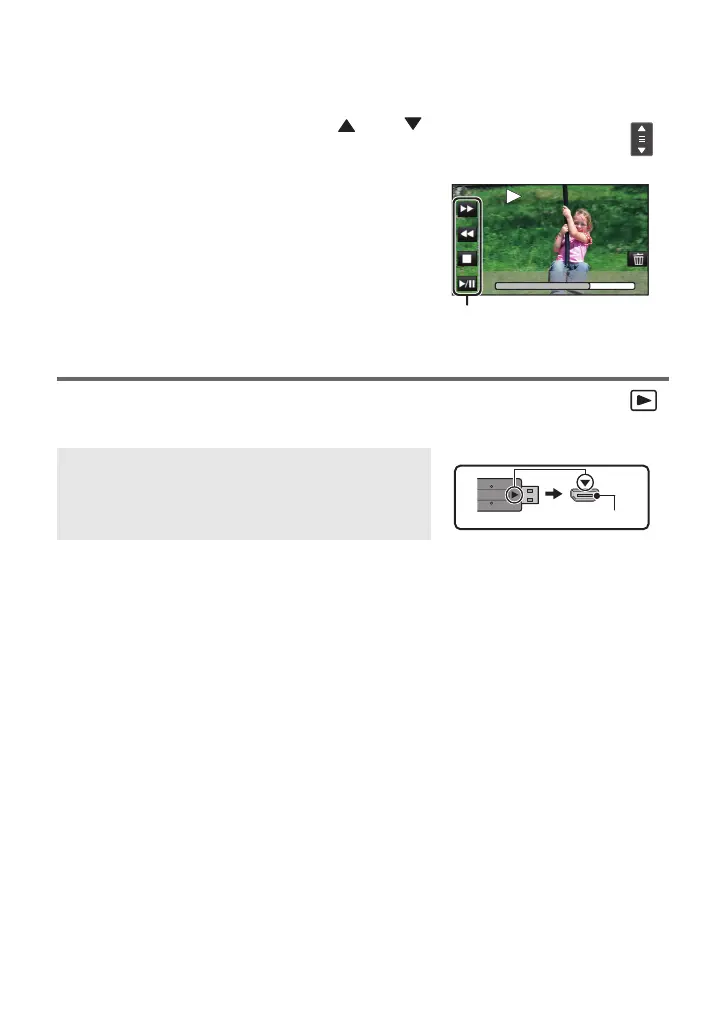
4 Select the playback operation by touching
the operation icon.
≥ Operation icons and screen display will disappear when
no touch operation is performed for a specific period of
time. To display them again, touch the screen.
≥ Touch 1/; to start/pause playback of motion pictures.
Operation icon
Connect this unit to a TV using an HDMI micro cable (supplied).
A HDMI micro connector [HDMI]
≥ Be sure to connect to the HDMI terminal. (Insert the
connector with the arrow side facing up.)
0h01m30s
0h01m30s
HC-VX3_V900PP-DVQX2553_eng.book 31 ページ 2024年9月17日 火曜日 午後8時24分




 To Next Page