27
(ENG) DVQX2553
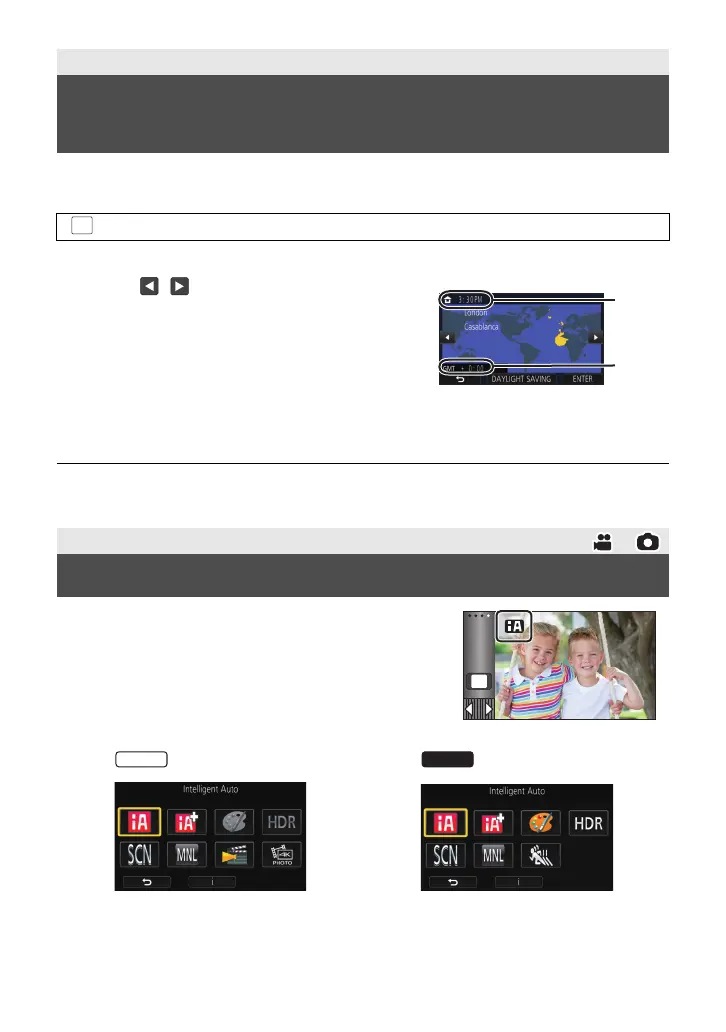
You can set your home region in [SET WORLD TIME].
1 Select the menu. (l 32)
≥ A message will be displayed. Touch [ENTER].
≥ For information on how to change your home region or set the region of your travel destination,
refer to the Owner’s Manual (PDF format).
1 Touch the Recording Mode button icon.
2 Touch the desired Recording Mode button icon.
Preparation
Setting your home region for the first
time
: [SETUP] # [SET WORLD TIME]
2 Touch / to select your home
region and touch [ENTER].
≥ When the clock is not set, the current time is
displayed as “--:----”.
A The current time
B The time difference from GMT
(Greenwich Mean Time)
Basic
Changing the Recording Mode
MENU
HC-VX3_V900PP-DVQX2553_eng.book 27 ページ 2024年9月17日 火曜日 午後8時24分



 To Next Page