EasyManua.ls Logo

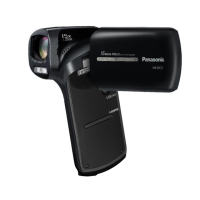
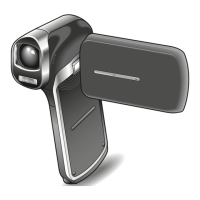
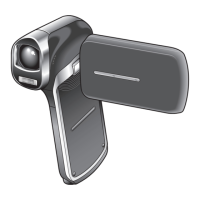
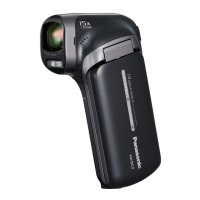
Panasonic HX-DC2 - User Manual

Panasonic HX-DC2
212 pages
Print Icon
To Next Page IconTo Next Page
Loading...
Preparation
Basic
Advanced
(Recording)
Advanced
(Playback)
Copy/
Dubbing
With a PC
Others
Operating Instructions
Dual Camera
Model No. HX-WA20
HX-WA2
HX-DC2
Before use, please read these instructions completely.
until
2012/3/2
Model number suffix “EB” denotes UK model.
VQT4F67
1AG6P1P6510--(S)
HX-WA20EB-VQT4F67_mst.book 1 ージ 2012年2月13日 月曜日 午後3時57

Table of Contents

Other manuals for Panasonic HX-DC2

Questions and Answers

  • J
    Jeffrey PittsSep 8, 2025
    Why is my Panasonic HX-DC2 Camcorder SD card not recognized in other devices?
    • M
      Michael MercadoSep 8, 2025
      If an SD card from your Panasonic Camcorder isn't recognized in another device, ensure that the device is compatible with the capacity or type of SD card (SD Memory Card/SDHC Memory Card/SDXC Memory Card). Refer to the other device's operating instructions for compatibility details.
  • L
    Lisa DunnSep 7, 2025
    Why does Panasonic HX-DC2 show high temperature and won't record?
    • C
      Cheryl DaySep 7, 2025
      If the high temperature warning icon is displayed on your Panasonic Camcorder and recording is not possible, wait for the unit to cool down before using it again.
  • L
    Lisa MendezAug 22, 2025
    How to fix Panasonic Camcorder that won't turn on?
    • M
      mullinsjohnAug 22, 2025
      If your Panasonic Camcorder isn't turning on, staying on, or the battery drains quickly, recharge the battery pack or connect the AC adapter.
  • C
    Christina LandrySep 4, 2025
    What to do if Panasonic HX-DC2 shows high temperature warning?
    • J
      John RojasSep 4, 2025
      If you see a blinking high temperature warning icon and your Panasonic Camcorder won't turn on, wait for the unit to cool down before using it again.
  • R
    Rachel BlanchardSep 3, 2025
    Why does my Panasonic Camcorder turn off automatically?
    • E
      Eric BlakeSep 3, 2025
      Your Panasonic Camcorder might be turning off automatically to save battery. The economy mode function puts the unit into sleep mode if no operation is performed for about 5 minutes (default). Also, if the unit turns off when you turn off the TV with the TV remote, VIERA Link is active. If you're not using VIERA Link, set [VIERA Link] to [OFF].
  • J
    Jordan MooreSep 1, 2025
    What to do if Panasonic HX-DC2 Camcorder doesn't recognize SD card?
    • J
      jackjohnsonSep 1, 2025
      If your Panasonic Camcorder doesn't recognize the SD card, it may be because the card was formatted on a PC. Use the camcorder to format SD cards.
  • M
    Ms. Teresa AllenAug 31, 2025
    How to fix VIERA Link on Panasonic HX-DC2 Camcorder?
    • G
      gibsonryanAug 31, 2025
      If VIERA Link isn't working with your Panasonic Camcorder, connect it with an optional HDMI micro or mini cable, depending on your model (HX-WA20/HX-WA2 or HX-DC2). Ensure that [VIERA Link] is set to [ON] in the settings. Try turning the unit off and then on again. If the TV input doesn't switch automatically, use the TV remote to switch it manually. Check the VIERA Link setting on the connected device.
  • B
    Benjamin GarciaAug 30, 2025
    Why does my Panasonic Camcorder keep stopping recording?
    • J
      Julie MorrisAug 30, 2025
      If your Panasonic Camcorder stops recording unexpectedly, ensure you are using an SD card suitable for motion picture recording. The recordable time might be reduced because of data writing speed deterioration or repeated recording and deletion. Try formatting the SD card or the built-in memory using the unit.
  • J
    Jose DuncanAug 29, 2025
    What to do if Panasonic Camcorder displays error message?
    • D
      Doris RamirezAug 29, 2025
      If you see the message “ERROR OCCURRED. PLEASE TURN UNIT OFF, THEN TURN ON AGAIN.” on your Panasonic Camcorder, try these steps: First, remove and reinsert the SD card. Then, remove and reinsert the battery. Finally, try a different SD card. If the message still appears, disconnect the power and consult the dealer where you bought the camcorder.
  • C
    Clarence HahnAug 27, 2025
    Why is my Panasonic HX-DC2 Camcorder not detected by PC?
    • D
      David WhitakerAug 27, 2025
      If your Panasonic Camcorder is not detected by the PC when connected via USB, re-insert the SD card into the unit and reconnect the supplied USB cable. Try a different USB terminal on your PC. Also, check the operating environment. After restarting the PC and turning on the unit again, reconnect the supplied USB cable.

Summary

Preparation

Waterproof and Dustproof Performance

Details the unit's IP ratings and underwater usage limits.

Power Supply and Battery Management

Covers battery types, insertion, removal, and charging procedures.

SD Card Recording and Management

Explains compatible SD cards and their usage for recording.

Basic Unit Operations: On;Off and Settings

Covers powering on/off, standby mode, and date/time settings.

Basic Operations

Before Recording Procedures

Provides guidance on camera positioning and basic recording setup.

Recording Motion Pictures and Still Pictures

Step-by-step instructions for capturing video and still images.

Intelligent Auto Mode and Playback

Explains automatic mode and basic playback functions.

Advanced Recording Features

Zoom and Image Stabilisation

How to use zoom controls and the image stabiliser feature.

Special Recording Modes: Slow Motion and Burst

Instructions for recording in slow motion and burst shooting modes.

Underwater Recording Procedures

Specific instructions and precautions for underwater video recording.

Manual Recording Adjustments

Covers manual settings for White Balance, Shutter Speed, and Focus.

Advanced Playback Features

Playback Controls and Functions

Explains playback operations, including fast forward, rewind, and slow motion.

Editing and Manipulating Media

Guide on creating stills from video, cutting panorama sections, and zooming.

Viewing Media on TV

Explains how to connect the camera to a TV for playback.

Copying and Dubbing Files

Copying Files to SD Card

Step-by-step guide to transfer recorded files from internal memory to an SD card.

Dubbing Footage to Other Devices

Instructions for transferring footage to external video devices using an AV cable.

PC Connection and Software Usage

Connecting Camera to PC

How to establish a connection between the camera and a computer via USB.

Using the Unit as a Web Camera

Guide on setting up the camera for video conferencing.

HD Writer VE 2.0 Software Usage

Instructions for installing and using the PC software for media management.

Wireless File Transfer with Eye-Fi

Explains how to use an Eye-Fi card for wireless file transfer.

Troubleshooting and Specifications

Troubleshooting Common Issues

Addresses common problems like card errors, full memory, and power failures.

Safety Cautions and Unit Care

Important safety guidelines regarding electromagnetic interference, chemicals, and handling.

Recording Mode Capacity Information

Details on different recording modes and their approximate recordable times.

Optional Accessories and Specifications

Lists optional accessories and provides detailed technical specifications of the camera.

Panasonic HX-DC2 Specifications

General IconGeneral
Sensor typeMOS
Total megapixels14.4 MP
Optical sensor size1/2.33 \
Effective megapixels (image)11.9 MP
Digital zoom120 x
Optical zoom5 x
Image stabilizerYes
Focal length range6.8 - 34 mm
Interchangeable lensNo
Maximum aperture number3.7
Minimum aperture number3.5
Focal length (35mm film equivalent)40 - 240 mm
Maximum focal length (35mm film equiv)199.5 mm
Minimum focal length (35mm film equiv)39.9 mm
Camera file systemDCF 2.0, Exif 2.2
Camcorder media typeMemory card
Compatible memory cardsSD, SDHC, SDXC
Internal storage capacity- GB
Focus adjustmentAuto
Built-in light-
Shutter speed (photo)1/2 - 1/1500 s
Shutter speed (video)1/30 - 1/10000 s
Display diagonal3 \
Display resolution (numeric)230400 pixels
Camcorder typeHandheld camcorder
Minimum illumination4 lx
On Screen Display (OSD) languagesCZE, DEU, DUT, ENG, ESP, FRE, ITA, POL, SWE, TUR
Product colorGray
Video resolutions640 x 480, 960 x 540, 1280 x 720, 1920 x 1080 pixels
Supported video modes1080i, 480p, 720p
Video formats supportedH.264, MPEG4
Maximum video resolution1920 x 1080 pixels
Image formats supportedJPG
Maximum image resolution4352 x 3264 pixels
Still image resolution(s)640 x 480, 1920 x 1080, 2048 x 1536, 2560 x 1440, 2560 x 1920, 4352 x 2448, 4352 x 3264
Audio formats supportedAAC
USB 2.0 ports quantity1
Component video (YPbPr/YCbCr) out0
Battery voltage3.7 V
Battery capacity- mAh
Battery life (max)- h
Cables includedUSB
Bundled softwareHD Writer VE2.0
Power consumption (typical)4 W
Weight and Dimensions IconWeight and Dimensions
Depth38.1 mm
Width86.2 mm
Height120.8 mm
Weight180 g

Related product manuals