KW8M Eco-POWER METER
18
Mode1 Setting flow chart
Monitor
MODE1 display
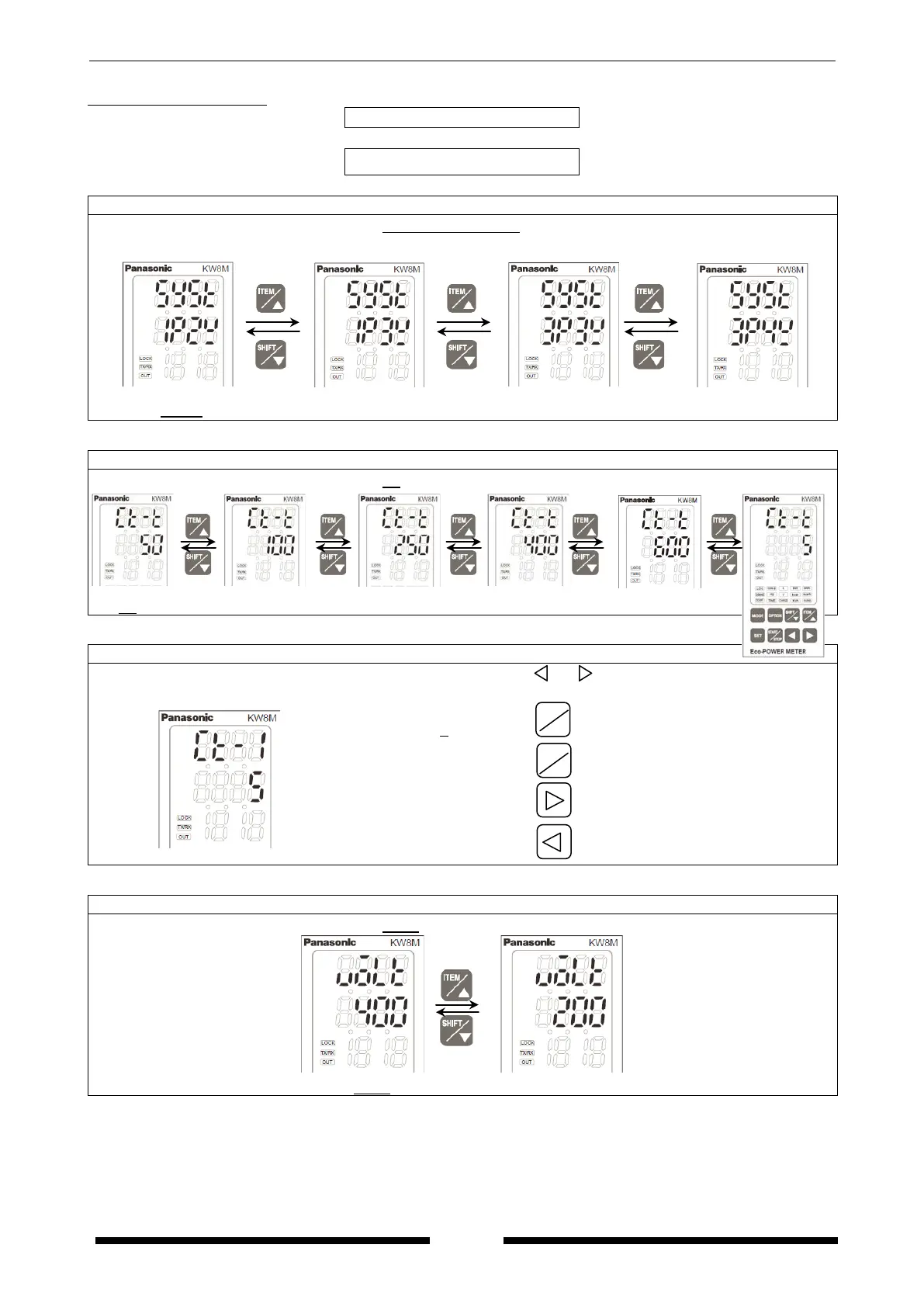
Phase/Wire system setting mode
Press <ITEM/△>, <SHIFT/▽> to change Single-phase 2-wire ⇔ Single-phase 3-wire ⇔
Three-phase 3-wire ⇔ Three-phase 4-wire.
1P2W 1P3W 3P3W 3P4W
Press <ITEM/△>, <SHIFT/▽> to change 50 ⇔ 100 ⇔ 250 ⇔ 400 ⇔ 600⇔ 5.
Primary side current of CT setting mode
*It is only when “5A” is selected on CT type setting mode.
Set primary side current of CT using <ITEM/△>, <SHIFT/▽>, < >, < >.
If measured CT is 100A/5A, set to 100. If 5A is measured, set to 5.
(1 to 4000, Initial 5)
Increase value
Decrease value
Shift place to set
Shift place to set
Voltage range setting mode
△
▽
⇔
ITEM
△









 To Next Page