49
KX-FT982LS-B / KX-FT984LS-B / KX-FT988LS-B
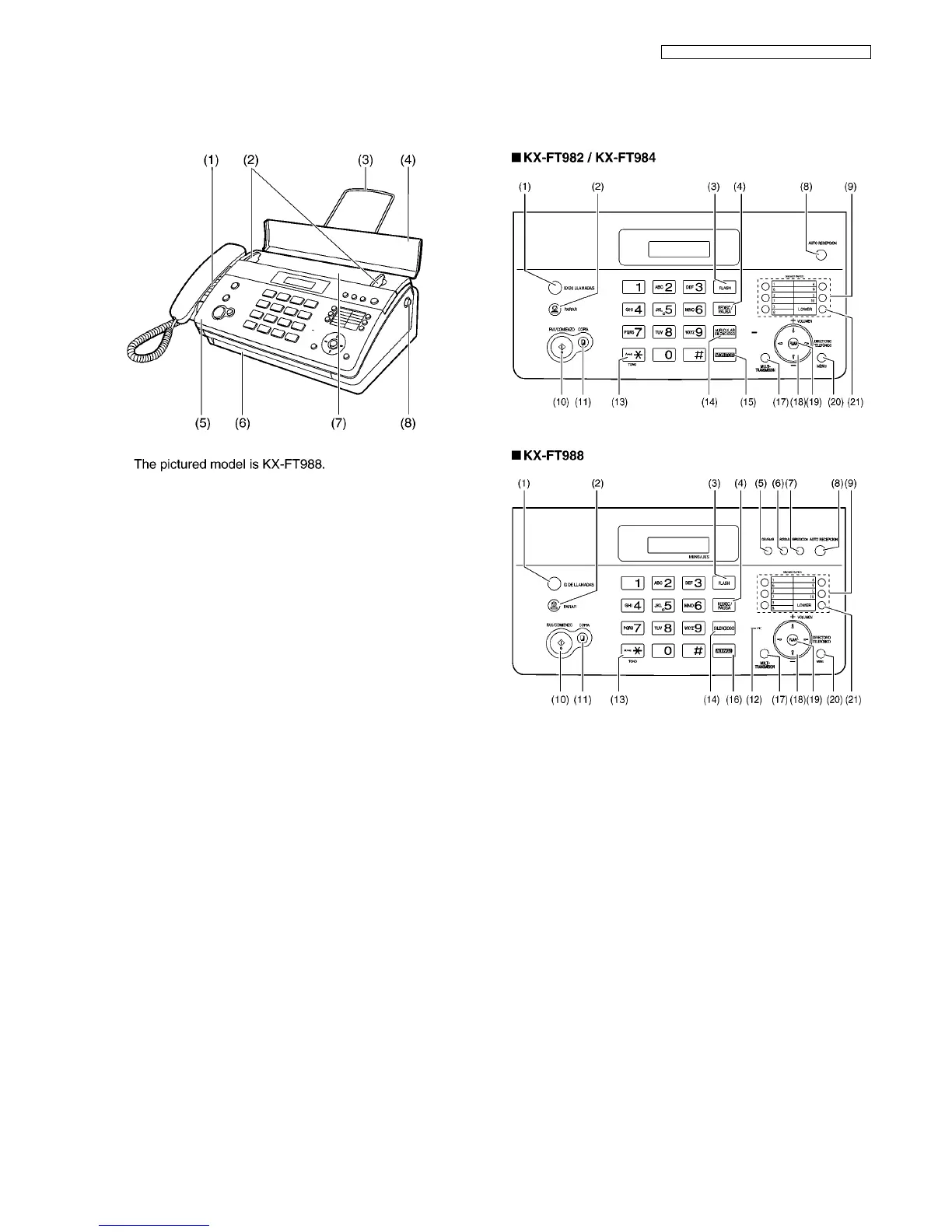
7 Location of Controls and Components
7.1. Overview
(1) Speaker
(2) Document guides
(3) Paper stacker (KX-FT984/KX-FT988 only)
(4) Document feeder tray
(5) Top cover
(6) Document exit
(7) Document entrance
(8) Top cover release button
7.2. Control Panel
(1) [CALLER ID]
• To use Caller ID features.
(2) [STOP]
• To stop an operation or programming session.
• To erase a character/number. Press and hold to erase all
characters/numbers.
(3) [FLASH]
• To access special telephone services or for transferring
extension calls.
(4) [REDIAL/PAUSE]
• To redial the last number dialled. If the line is busy when
you send a fax, the unit will automatically redial the num-
ber up to 2 times.
• To insert a pause during dialing.
(5) [RECORD] (KX-FT988 only)
• To record your greeting message.
• To record your voice memo.
(6) [ERASE] (KX-FT988 only)
• To erase messages.
• To erase a stored item.
(7) [PLAYBACK] (KX-FT988 only)
• To play messages.
(8) [AUTO ANSWER]
• To turn the auto answer setting ON/OFF.












 To Next Page