96
KX-FT982LS-B / KX-FT984LS-B / KX-FT988LS-B
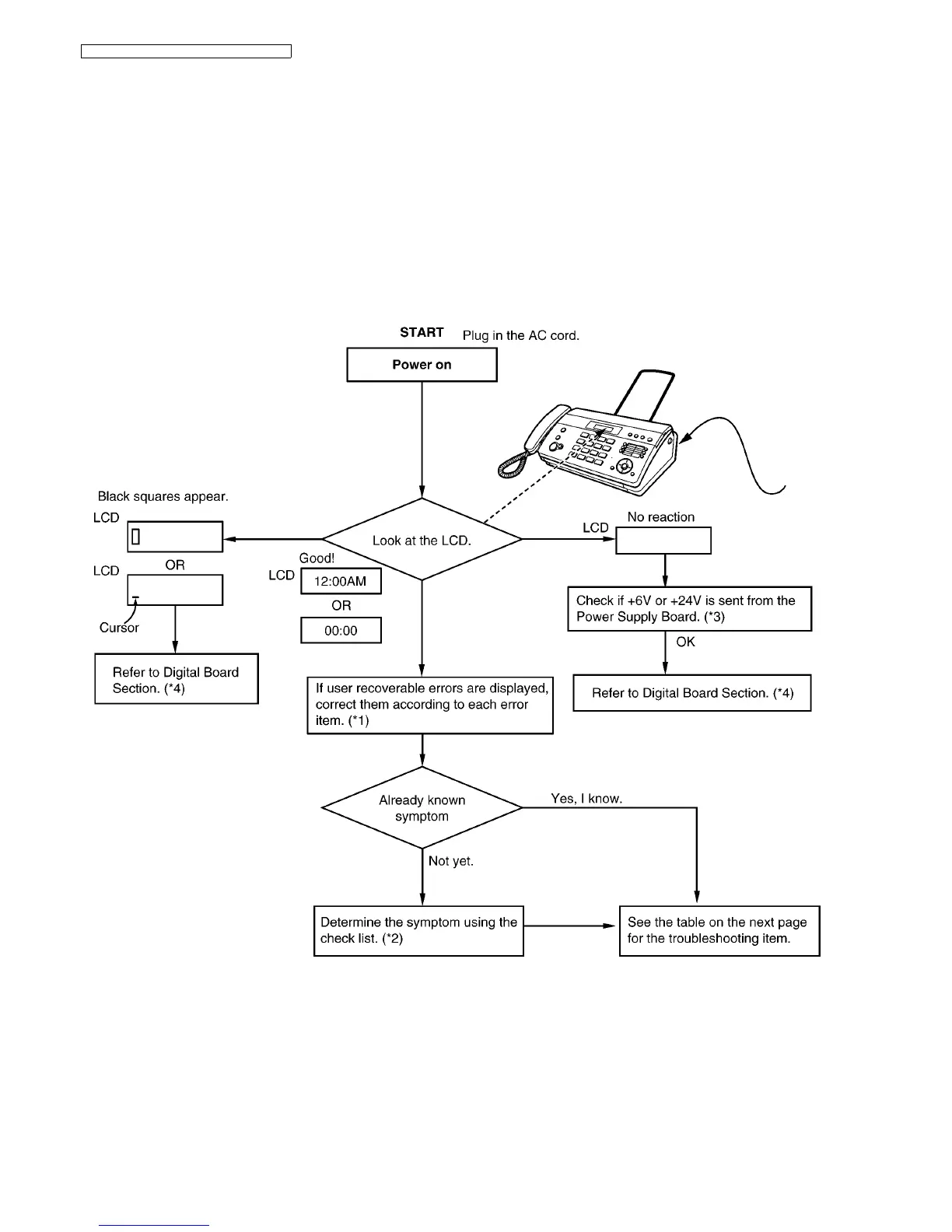
12.5. Troubleshooting Details
12.5.1. Outline
Troubleshooting is for recovering quality and reliability by determining the broken component and replacing, adjusting or clean-
ing it as required. First, determine the problem then decide the troubleshooting method. If you have difficulty finding the broken
part, determine which board is broken. (For example: the Digital PCB, Analog PCB, etc.) The claim tag from a customer or
dealer may use different expressions for the same problem, as they are not a technician or engineer. Using your experience,
test the problem area corresponding to the claim. Also, returns from a customer or dealer often have a claim tag. For these
cases as well, you need to determine the problem. Test the unit using the simple check list on Simple Check List (P.97). Diffi-
cult problems may be hard to determine, so repeated testing is necessary.
12.5.2. Starting Troubleshooting
Determine the symptom and the troubleshooting method.
REFERENCE:
(*1): Error Messages-Display (P.69)
(*2): Simple Check List (P.97)
(*3): Power Supply Board Section (P.120)
(*4): Digital Board Section (P.107)












 To Next Page