97
KX-FT982LS-B / KX-FT984LS-B / KX-FT988LS-B
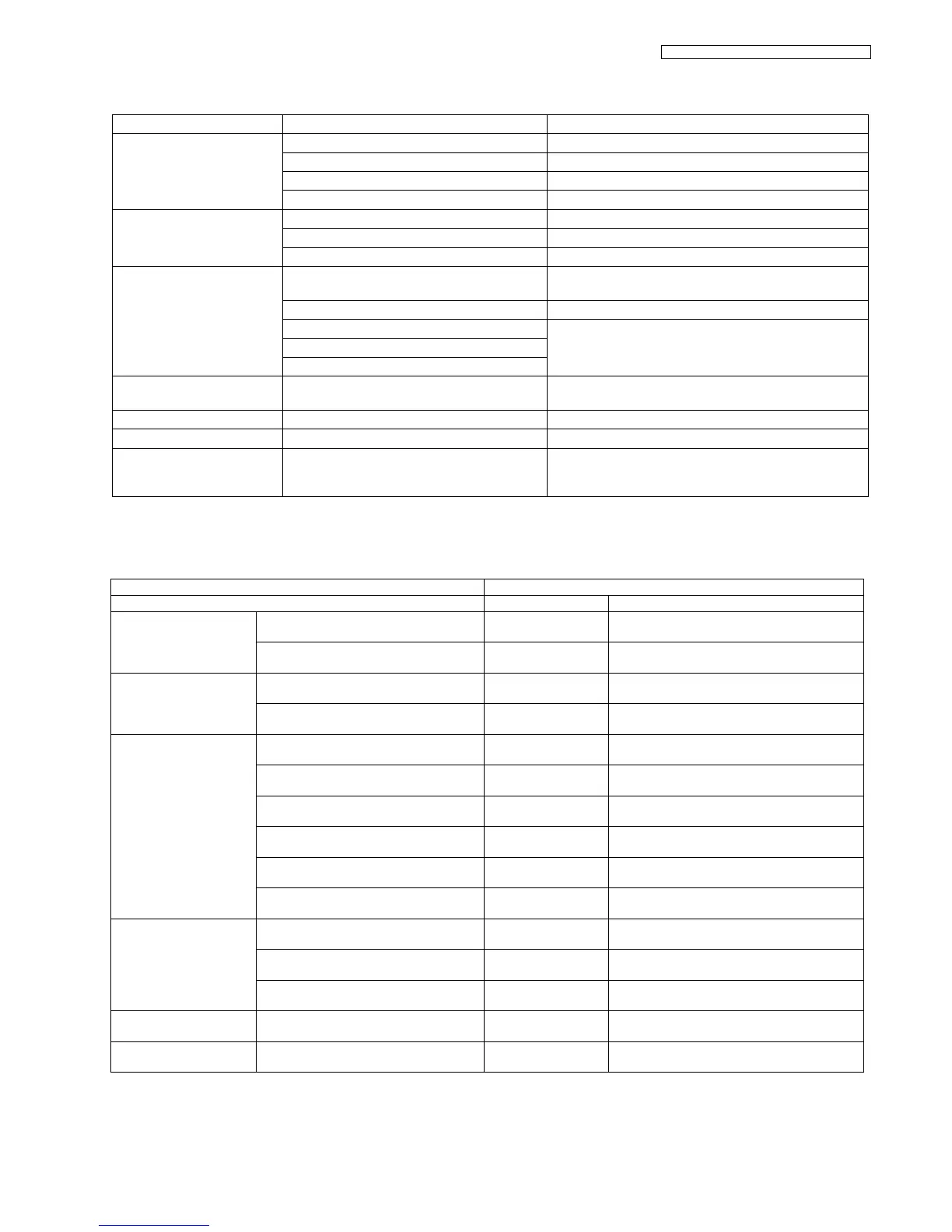
12.5.3. Troubleshooting Items
12.5.3.1. Simple Check List
ITEM SYMPTOM REFERENCE
ADF
(Auto Document Feeder)
No feed See No Document Feed (P.99)
Paper jam See Document Jam (P.100)
Multiple feed See Multiple Feed (P.101)
Skew See Skew (P.102)
Printing Skewed receiving image. See Skewed Receiving Image (P.104)
Image is distorted. See Image is Distorted (When printing) (P.103)
Black or white vertical lines appear See Black or White Vertical Lines Appear (P.104)
Communication
FAX, TEL
Cannot communicate by fax. See Defective ITS (Integrated Telephone System) Section
(P.117) and Error Messages-Report (P.71).
(Analog board) Error code is displayed. See Error Messages-Display (P.69)
Cannot talk. See Analog Board Section (P.115)
DTMF tone doesn’t work.
Handset/Monitor sound, volume.
Abnormal mechanical sound Abnormal sound from the product See When Coping or Printing, an Abnormal Sound is
Heard from the Unit (P.105)
Power supply Voltage output is abnormal. See Power Supply Board Section (P.120)
Operation panel Keys are not accepted. See Operation Panel Section (P.123)
Sensor If the electric circuit is the cause, the error mes-
sage corresponding to the sensor will be dis-
played.
See Sensor Section (P.124)
SERIAL NO. DATE
FUNCTION JUDGEMENT REFERENCE
FAX operation Transmission OK / NG
Receiving OK / NG
Copy operation FINE mode OK / NG
PHOTO mode OK / NG
Telephone operation Handset MIC/receiver OK / NG
Monitor or SP-Phone sound OK / NG
Ringer sound OK / NG
Dial operation OK / NG
Volume operation OK / NG
Vox detection (KX-FT988 only) OK / NG Service code #815
(Refer to Test Mode (P.55).)
Operation Panel Key check OK / NG Service code #561
(Refer to Test Mode (P.55).)
LED check OK / NG Service code #557
(Refer to Test Mode (P.55).)
LCD check OK / NG Service code #558
(Refer to Test Mode (P.55).)
Sensor Sensor check OK / NG Service code #815
(Refer to Test Mode (P.55).)
Clock Time goes by OK / NG Is the time kept correctly?
Check with another clock.












 To Next Page