53
KX-FT982LS-B / KX-FT984LS-B / KX-FT988LS-B
9 Operating Instructions
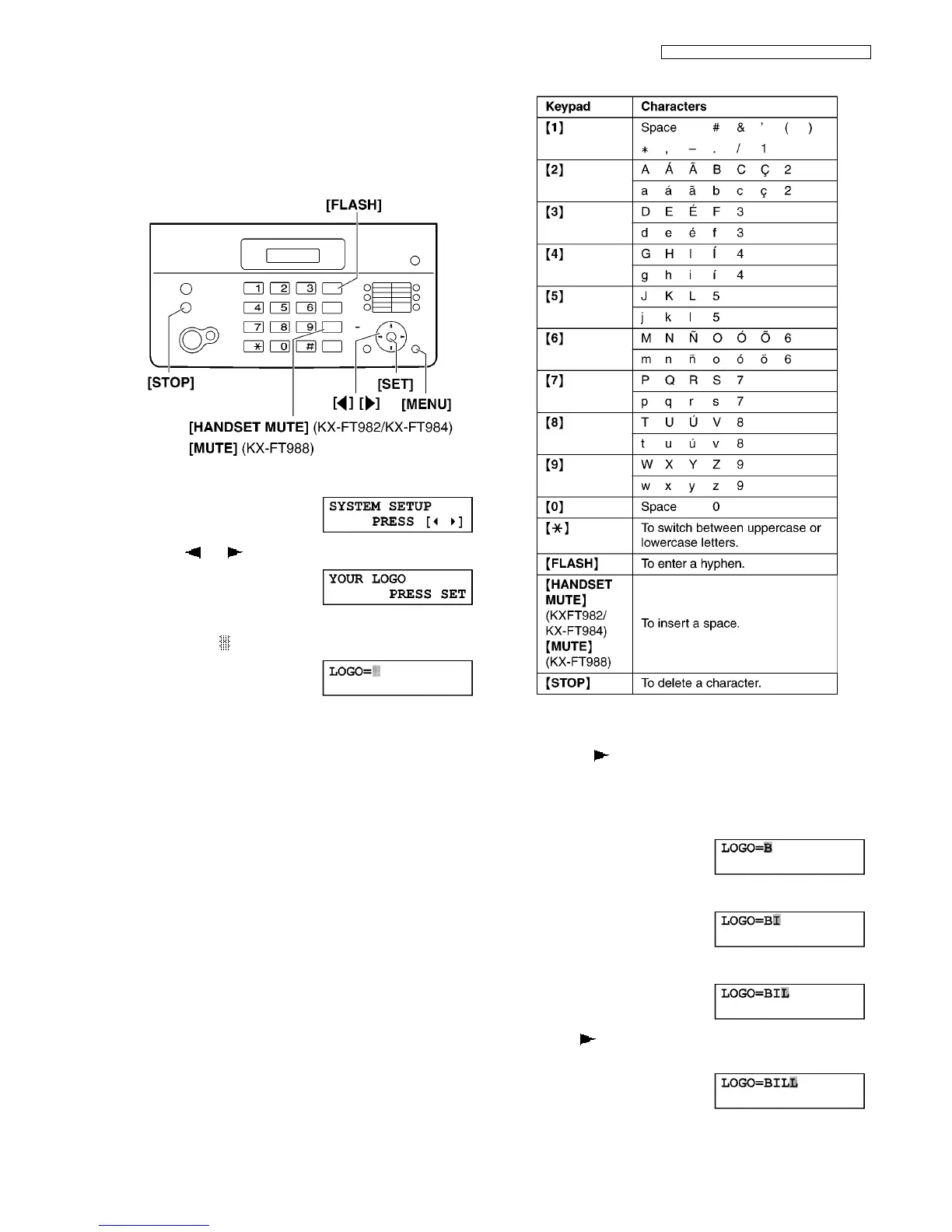
9.1. Setting Logo
Your logo will be printed on the top of each page sent from your
unit. The logo can be your name or the name of your company.
Refer to Translation Lists (P.10) for display.
1. Press [MENU].
2. Press [] or [] repeatedly to display the following.
3. Press [SET].
• The cursor ( ) will appear on the display.
4. Enter your logo, up to 30 characters. See the following
character table for details.
5. Press [SET].
• The next feature will be displayed.
6. Press [MENU].
To select characters with dial keypad
Note:
To enter another character that is located on the same dial
key, press [] to move the cursor to the next space.
To enter your logo
Example: “BILL“
1. Press [2] 4 times.
2. Press [4] 3 times.
3. Press [5] 3 times.
4. Press [] to move the cursor to the next space and
press [5] 3 times.












 To Next Page