60
KX-FT982LS-B / KX-FT984LS-B / KX-FT988LS-B
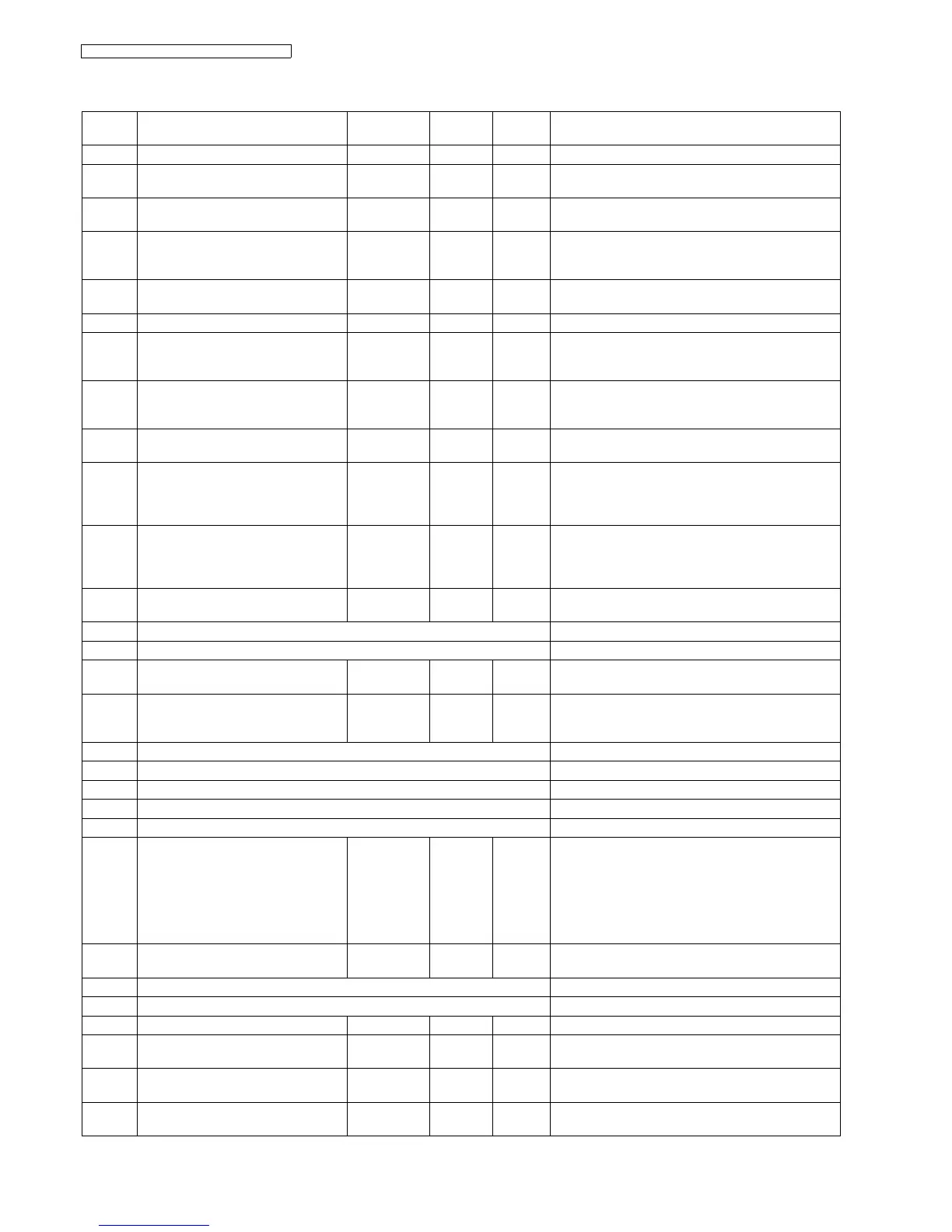
11.1.3. Service Function Table
Code Function Set Value Effective
Range
Default Remarks
501 Pause time × 100 msec 001~600 030 ----------
503 Dial speed select 1: 10 pps
2: 20 pps
1, 2 1 ----------
510 VOX time (KX-FT988 only) 1:6 sec
2:4 sec
1, 2 1 Setting of the end of call confirmation VOX.
511 VOX sensitivity (KX-FT988 only)
1: High
2: Low
1, 2 1 When the TAM (or EXT TAM) does not stop recording
the ICM because noise is detected on the telephone
line, change this setting to “LOW”.
512 VOX mode Detection (KX-FT988 only) 1: A
2: B
1, 2 1 ----------
514 Bell detection time × 100 msec 1~9 6 ----------
520 CED frequency select 1: 2100 Hz
2: 1100 Hz
1, 2 1 See Symptom/Countermeasure Table for long distance
and international calls in The unit can copy, but can-
not transmit/receive (P.88).
521 International mode select 1: ON
2: OFF
1, 2 1 See Symptom/Countermeasure Table for long distance
and international calls in The unit can copy, but can-
not transmit/receive (P.88).
522 Auto standby select 1: ON
2: OFF
1, 2 1 The resolution reverts to the default when transmission
is complete.
523 Receive equalizer select 1: 0 km
2: 1.8 km
3: 3.6 km
4: 7.2 km
1~4 1 When the telephone station is far from the unit or recep-
tion cannot be performed correctly, adjust accordingly.
524 Transmission equalizer select 1: 0 km
2: 1.8 km
3: 3.6 km
4: 7.2 km
1~4 1 When the telephone station is far from the unit or trans-
mission cannot be performed correctly, adjust accord-
ingly.
544 Document feed position × mm 1~9 5 When the ADF function is in correct, adjust the feed
position.
550 Memory Clear See Memory Clear Specification (P.62).
551 Flash memory check See Test Mode (P.55).
552 DTMF single tone test 1: ON
2: OFF
1, 2 2 See Test Mode (P.55).
553 Monitor on FAX communication select 1: OFF
2: PHASE B
3: ALL
1~3 1 Sets whether to monitor the line signal with the unit's
speaker during FAX communication or not.
554 Modem test See Test Mode (P.55).
555 Scan test See Test Mode (P.55).
556 Motor test See Test Mode (P.55).
557 LED test See Test Mode (P.55).
558 LCD test See Test Mode (P.55).
559 Document jam detection select 1: ON
2: OFF
1, 2 1 Sets whether or not to detect a paper jam. If a docu-
ment with a length longer than 600 mm is copied or
transmitted, the unit stops copying or transmitting as a
paper jamming because a document over 600 mm is
not normal. In the factory, transmitting or copying a doc-
ument longer than 600 mm is done as an aging test. In
this case, OFF is selected.
560 Cutter selection
(KX-FT984/KX-FT988 only)
1: ON
2: OFF
1, 2 1 Turns off the cutter function.
561 KEY test See Test Mode (P.55).
562 Cutter test (KX-FT984/KX-FT988 only) See Test Mode (P.55).
567 T0 timer × second 001~255 046 ----------
570 BREAK % select 1: 61%
2: 67%
1, 2 2 Sets the % break of pulse dialing according PBX.
571 ITS auto redial time set × number of
times
00~99 00 Selects the number of times that ITS is redialed (not
including the first dial).
572 ITS auto redial line disconnection time
set
× second 001~999 065 Sets the interval of ITS redialing.











 To Next Page