Preparation
18
For assistance, please visit http://www.panasonic.com/phonehelp
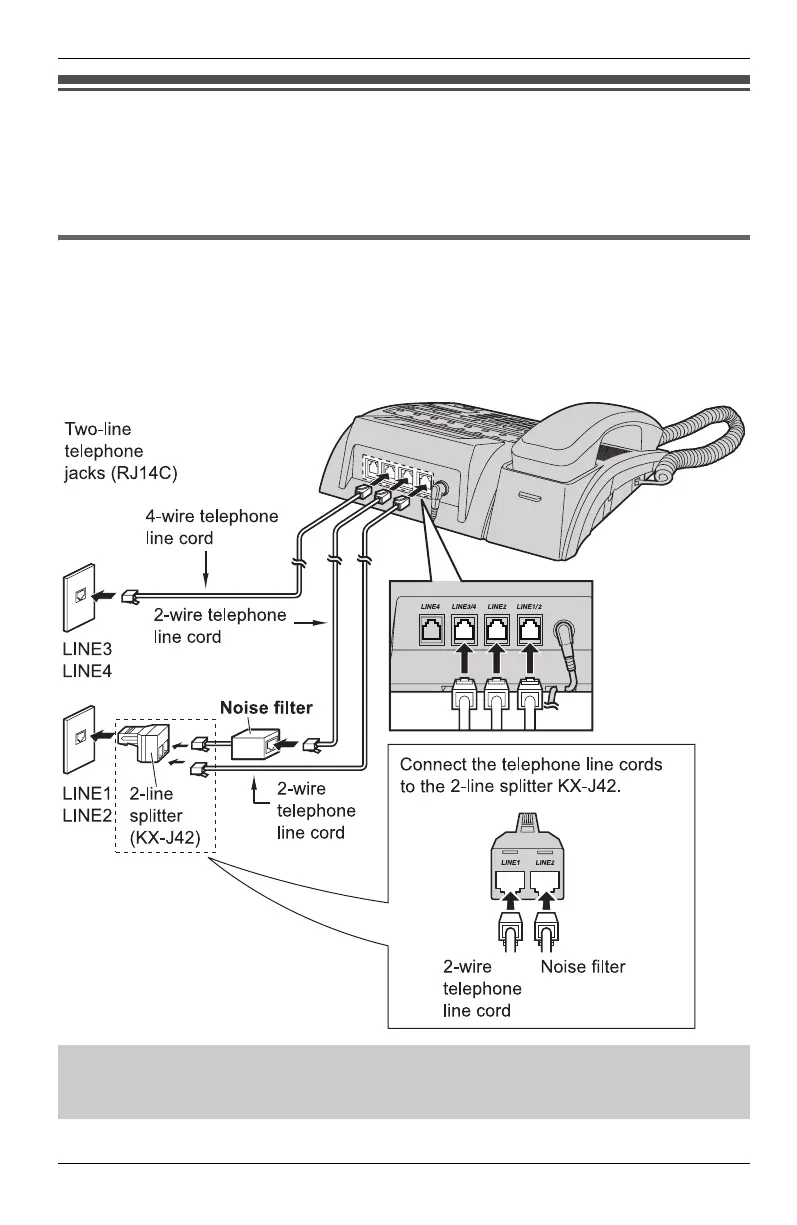
If you subscribe to a DSL service
Please attach a noise filter (contact your DSL provider) to the telephone line between
the unit and the telephone line jack in the event of the following:
– Noise is heard during conversations.
Connecting 2 two-line telephone jacks
For this connection, please purchase a Panasonic 2-line splitter KX-J42 and two 2-wire
telephone line cords (Order No. PQJA10075Z) (see “Additional/replacement
accessories” on page 5).
Example: DSL line is LINE2.
DSL Internet connection and KX-TS4100/KX-TS4200/KX-TS4300 Intercom work
at similar frequencies. Please contact Panasonic at 1-800-211-PANA (1-800-211-
7262) for special wiring configurations.
KXT4100OI.bookPage18Friday,September1,20068:54AM









 To Next Page