Preparation
22
For assistance, please visit http://www.panasonic.com/phonehelp
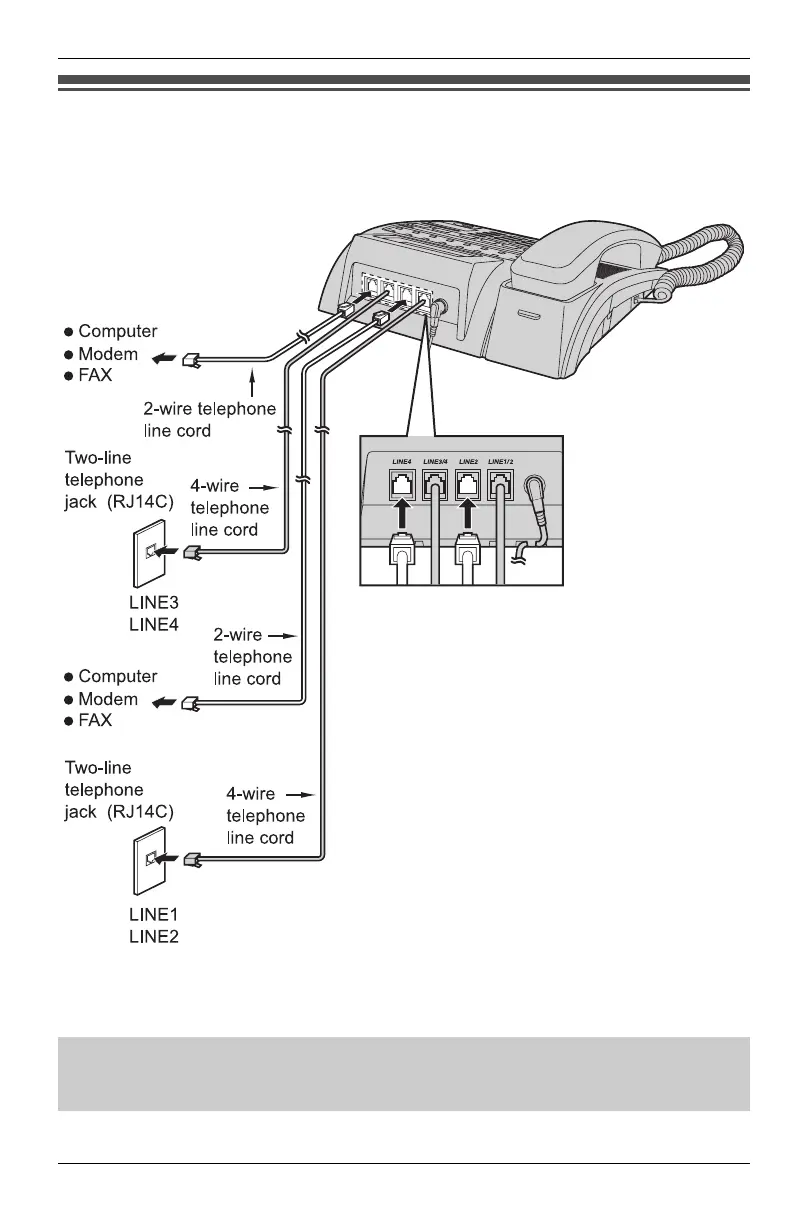
Connecting a communication device
After connecting the telephone line cords to two-line telephone jacks, you can connect a
communication device (computer, modem, fax, etc.) through this unit using the LINE2
or LINE4 jacks.
o
e:
L If the communication device is in use, use LINE1 or LINE3 to make or answer other
calls. Otherwise the communication device may not operate properly.
DSL Internet connection and KX-TS4100/KX-TS4200/KX-TS4300 Intercom work
at similar frequencies. Please contact Panasonic at 1-800-211-PANA (1-800-211-
7262) for special wiring configurations.
KXT4100OI.bookPage22Friday,September1,20068:54AM








 To Next Page