Useful Information
44
For assistance, please visit http://www.panasonic.com/phonehelp
Useful I nformation
Headset (optional)
Sales and support
information
L To order replacement accessories, call
1-800-332-5368.
L TTY users (hearing or speech
impaired users) can call 1-866-605-
1277.
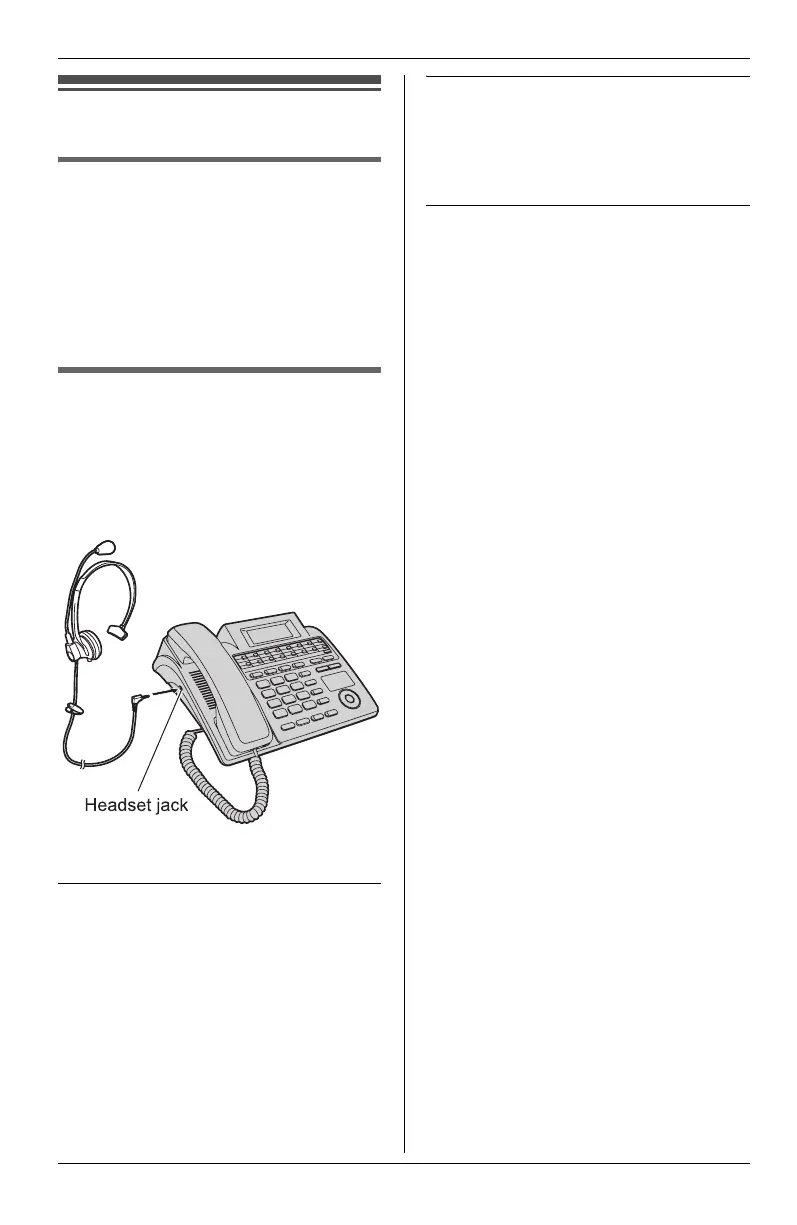
Connecting the optional
headset to the unit
Connecting a headset to the unit allows
hands-free phone conversations. We
recommend using the Panasonic
headset noted on page 5.
L Headset shown is KX-TCA88HA.
Making/Answering calls
1 Press {HEADSET} to make or
answer a call.
L If you misdial when making a call,
press {HEADSET} and start again
from step 1.
2 To hang up, press {HEADSET}.
To adjust the headset receiver volume
(5 levels)
While using the headset, press {-} or
{+}.
Switching between headset, handset,
and speakerphone
Switching from handset to headset
Press {HEADSET}, then place the
handset on the cradle.
Switching from headset to handset
When the handset is on the cradle, lift
the handset.
When the handset is off-hook, press
{HEADSET} again.
Switching from headset to
speakerphone
Press {SP-PHONE}.
Switching from speakerphone to
headset
Press {HEADSET}.
o
e:
L If you unplug the headset while the
phone is in use, the phone will not
automatically switch to speakerphone.
You must press {SP-PHONE} to
switch.
KXT4100OI.bookPage44Friday,September1,20068:54AM









 To Next Page