Preparation
20
For assistance, please visit http://www.panasonic.com/phonehelp
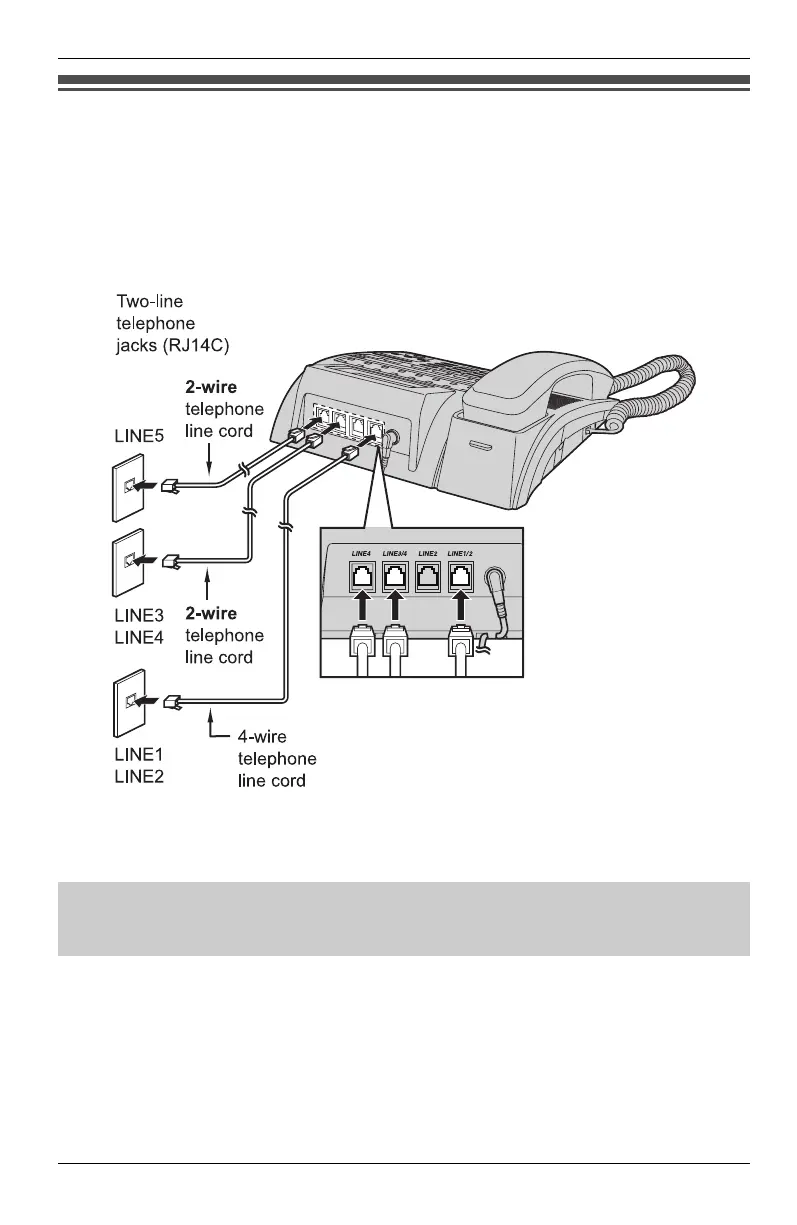
Setting up the line group
If you have more than 2 system phones (KX-TS4100/KX-TS4200/KX-TS4300) and use
more than 4 lines in your system phones, you can set up the line group to work correctly
with the units. To program the line group, see “Line group” on page 43.
mpor
an
:
L You can set up the line group only for LINE4.
o
e:
L You can set up the line group unconnected from other extensions (private line). To
program the private line, see “Line group” on page 43.
DSL Internet connection and KX-TS4100/KX-TS4200/KX-TS4300 Intercom work
at similar frequencies. Please contact Panasonic at 1-800-211-PANA (1-800-211-
7262) for special wiring configurations.
KXT4100OI.bookPage20Friday,September1,20068:54AM














 To Next Page