Speed Dialer
32
For assistance, please visit http://www.panasonic.com/phonehelp
8 Enter (or edit) the name (max. 16
characters; see “Character table” on
page 32).
L To erase the character, select
“Delete Char”, then press
{MENU/SET}.
9 Select “Done”, then press
{MENU/SET}.
L To cancel, select “Cancel”, then
press {MENU/SET}.
10Enter (or edit) the phone number
(max. 24 digits).
L To erase the number, select
“Delete Char”, then press
{MENU/SET}.
L If required, you can insert
{FLASH}, {REDIAL/PAUSE} or
{*} (TONE) in a phone number.
L To add the last number dialed, you
can press {REDIAL/PAUSE}
instead of entering the phone
number.
11 Select “Done”, then press
{MENU/SET}.
L To cancel, select “Cancel”, then
press {MENU/SET}.
12Press and hold {MENU/SET} to
return to standby mode.
o
e:
L To return to the previous menu, press
{<}.
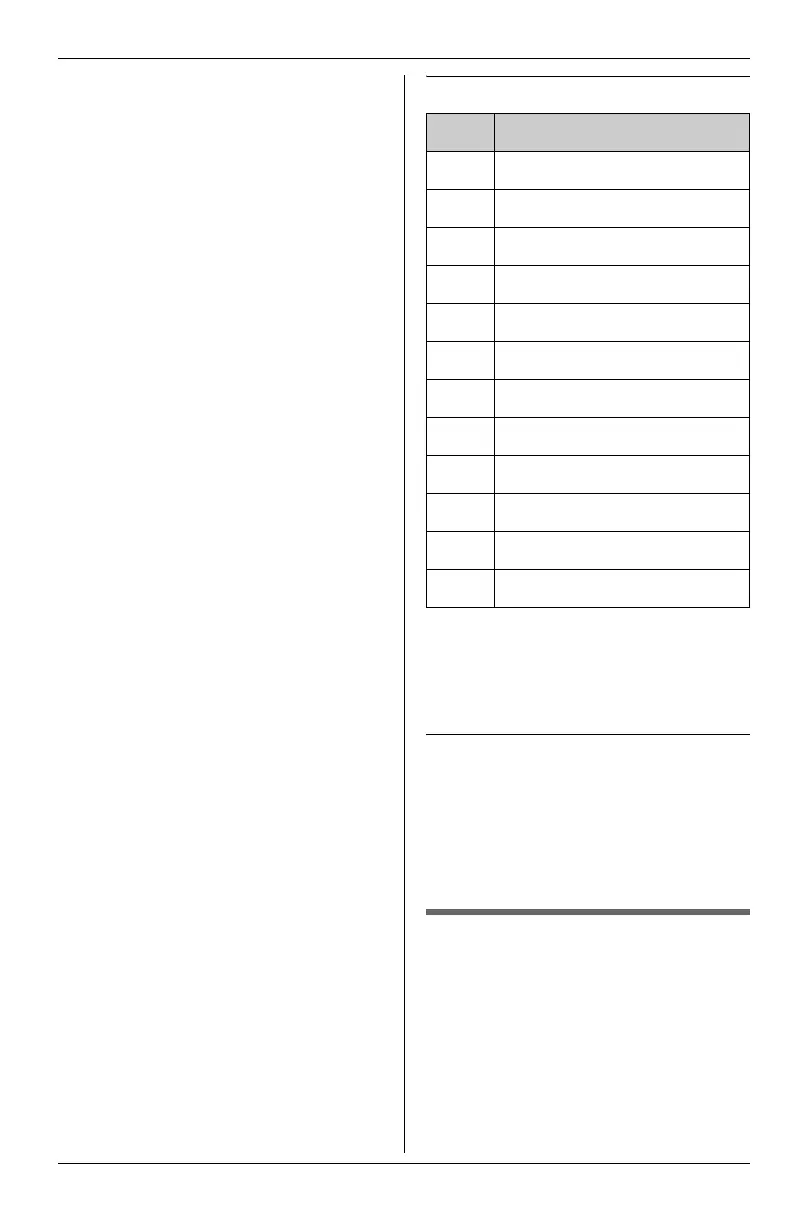
Character table
L To enter another character that is
located on the same dial key, first
press {>} to move the cursor to the
next space.
Editing/correcting a mistake
Press {<} or {>} to move the cursor
to the character or number you want to
erase, select “Delete Char”, then
press {MENU/SET}. Enter the
appropriate character or number.
Storing items from the
redial list into the speed
dialer
mpor
an
:
L Make sure that the unit is in standby
mode.
1 Press {REDIAL/PAUSE}.
Key Character
{1} , - ’ & . ( ) @ ! 1
{2} ABCabc2
{3} DEFdef 3
{4} GHI ghi 4
{5} JKLj kl 5
{6} MNOmno6
{7} PQRSpqr s7
{8} TUVt uv 8
{9} WXYZwxyz9
{0} Space 0
{*} ;
{#} #
KXT4100OI.bookPage32Friday,September1,20068:54AM








 To Next Page