Programming
40
For assistance, please visit http://www.panasonic.com/phonehelp
Programming
Programmable settings
You can customize the unit by programming the following features.
Make sure that the unit is in standby mode.
o
e:
L In the following table, * shows the default setting.
L To return to the previous menu, press {<}.
L You can exit feature setup and return to the idle status any time by pressing and
holding {MENU/SET}.
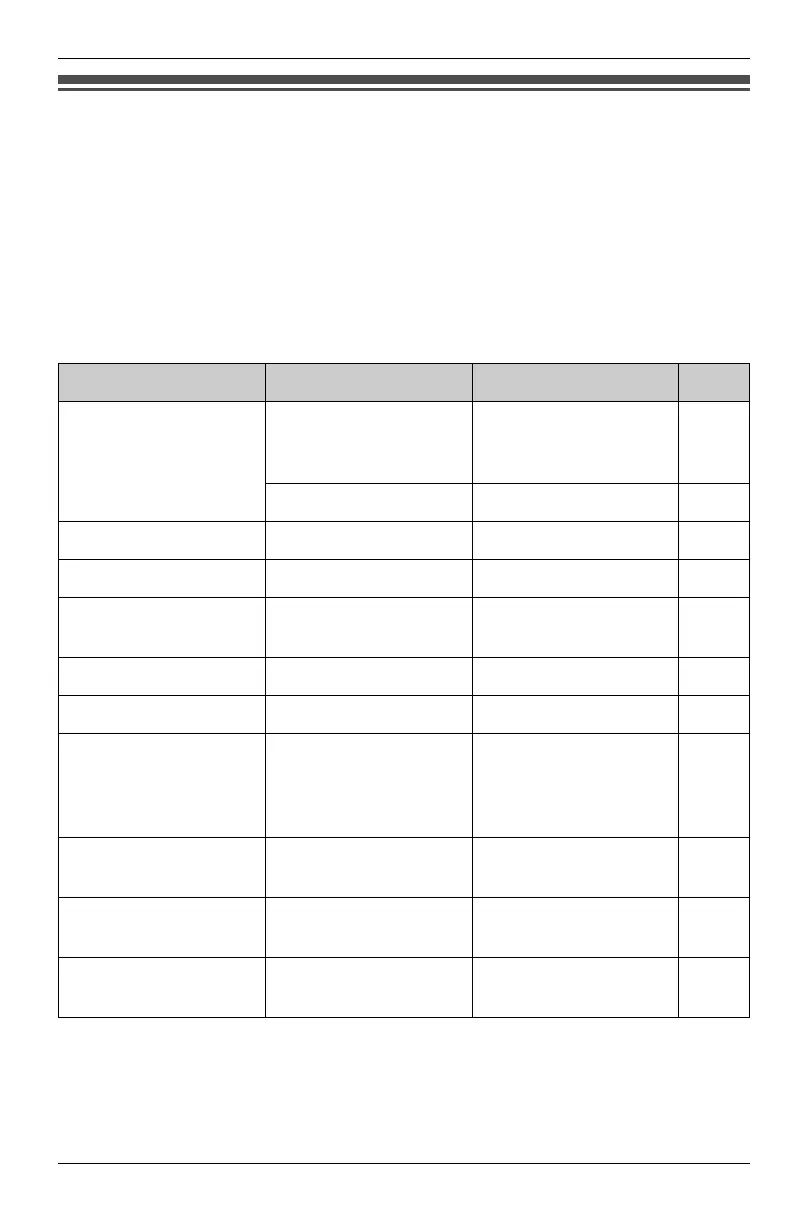
Phone Setup
Sub-menu 1 Sub-menu 2 Setting Page
Speed Dial SPD Preference CO Call*,
Intercom DSS,
Preview Memory
31
Edit/View SPD –31
Language – English*, Español 23
Extension No. – 11* – 26 23
Date & Time
–
2006 12/31
12:00A*
24
Auto Mute – On*, Off 36
Tone/Pulse – Tone*, Pulse 24
Flash Time
–
80 ms, 100 ms, 200
ms, 300 ms, 400 ms,
500 ms, 600 ms*,
700 ms
30
Hold Reminder
–
60 Seconds*, 120
Seconds, Off
29
Handsfree Mode
–
Headset*,
Speakerphone
42
Prime Line
–
Line1*, Line2,
Line3, Line4
42
KXT4100OI.bookPage40Friday,September1,20068:54AM








 To Next Page