1.3.47 Paging
– Group Paging
– Paging and then Transferring a Call
–
Paging Deny
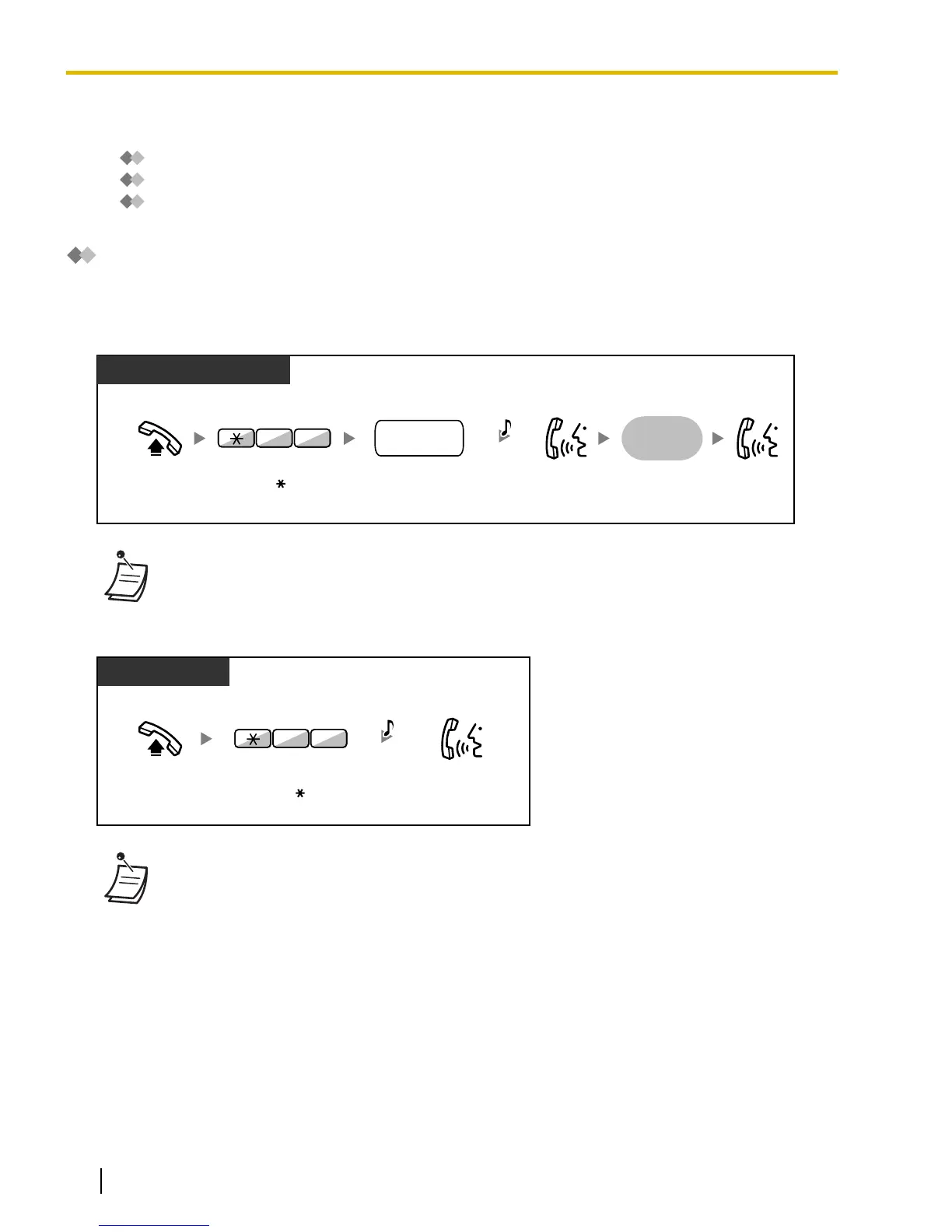
Group Paging
You can make a voice announcement to proprietary telephones or external speakers or both in the preset
group simultaneously. A person who has been paged can answer the page at any extension.
To page
Off-hook. Talk.Announce.
Dial paging group
number (2 digits).
Enter 33.
Wait for an
answer
paging group
no.
3 3
C.Tone
PT/SLT/PS
• If the group which you paged is already being used for paging, you hear a busy tone.
To answer
PT
Enter 43.
Talk.
Off-hook.
34
C.Tone
• The following are extensions that cannot receive a paging announcement:
– Portable station
– Single line telephone
– Proprietary telephone that is ringing or busy
– Proprietary telephone in Paging Deny mode
– Proprietary telephone in DND mode
• System programming may be required for some IP-PT users to receive paging
announcements.
• Even
if the announcement is not paging your extension, you can answer it, if it is paging your
group.
102 Operating Manual Document Version 2009-11
1.3.47 Paging





 To Next Page