Einstellungen (Fortsetzung)
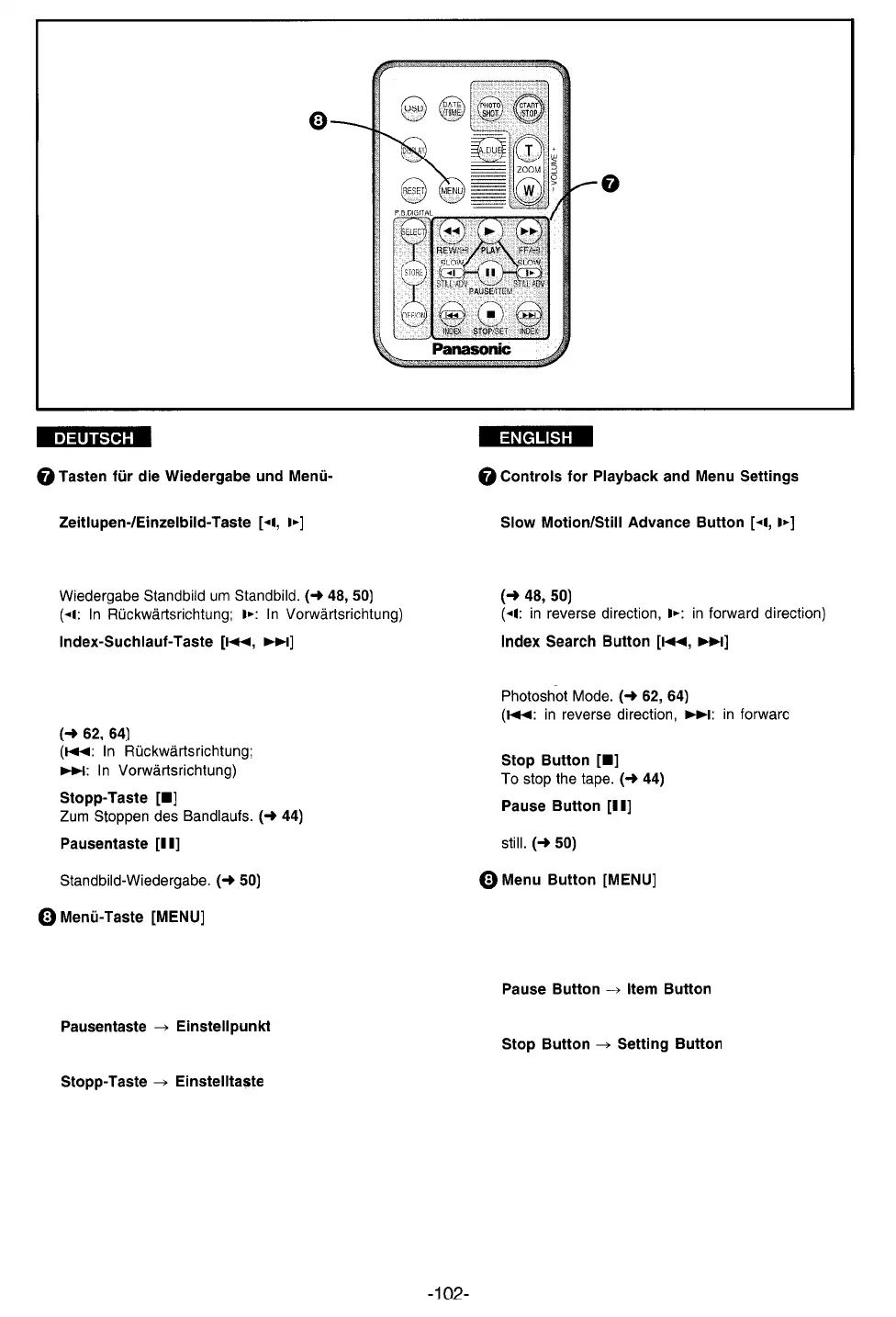
Beim Drücken während normaler Wiedergabe: Zum
(Continued)
To perform Slow Motion Playback if pressed in the
Auslösen der Zeitlupen-Wiedergabe; und beim
Drücken im Standbild-Wiedergabe-Modus: Zur
Zum schnellen Auffinden des Anfangs
aufgezeichneter Szenen, die mit Index-Signal
markiert sind, und von Standbildern, die im
Photoshot-Modus aufgezeichnet worden sind.
Zum Anhalten der Wiedergabe und Umschalten auf
Beim Drücken der Menü-Taste [MENU] wird das
Menü eingeblendet.
In diesem Falle haben die folgenden Tasten
geänderte Funktionen:
Normal Playback Mode; and to perform Still Advance
Playback if pressed in the Still Playback Mode.
To search for recorded Scenes marked with an
index Signal and for still images recorded in the
direction)
To pause playback. The playback picture Stands
Pressing the Menu Button [MENU] displays the
Menu.
In this case, the functions of the following buttons
are changed:
To select items on the Menu.
Zum Wählen von Einstellpunkten im Menü.
To set the mode for the selected item.
Zum Einstellen des gewünschten Modus für den
gewählten Einstellpunkt.



 To Next Page