RQTX0151
11
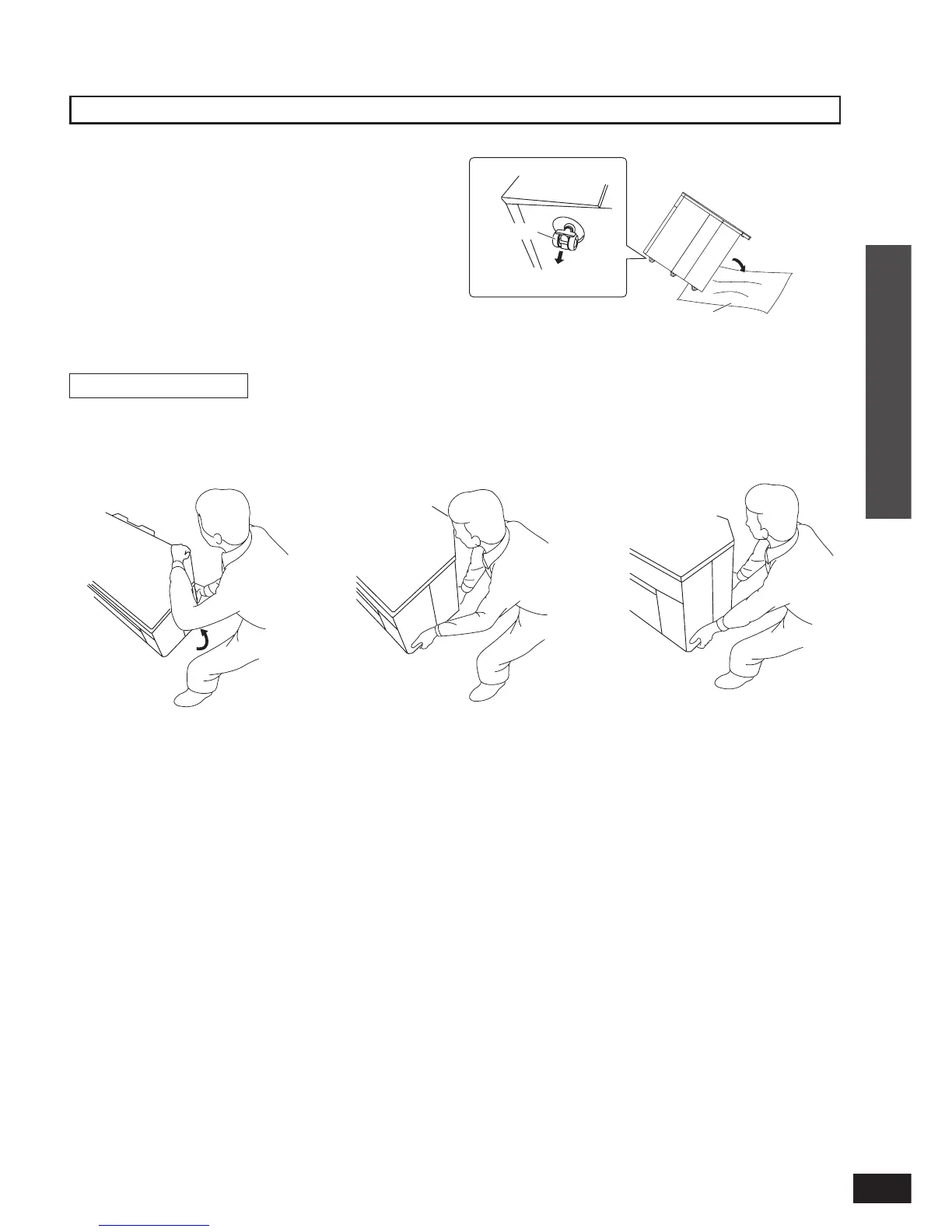
Removing casters
How to lift the rack
1
Lift the back side of the
top board and insert your
hand to the bottom of the
back side.
2
Insert your hand to the
bottom of the front side.
3
Lift the rack horizontally
using your both hands.
Remove casters at unstable places. (thick-piled carpet,
etc.)
Spread soft cloth on the fl oor and tip the rack back to
remove the casters.
Hold and pull to remove.
At least 2 people are necessary for removing casters.
Make sure that at least 2 people hold the bottom plate
when moving the rack after removing the casters. See the
following instructions about how to lift the rack.
Do not put anything on and in the rack when removing
casters. Do not put the included glass top panel either.
•
•
•
•
•
•
Connection
Installing and assembling the rack
(Bottom plate)
Hold and pull.
Caster
Front side
Back side
Soft cloth, etc.
Front side
Back side












 To Next Page