RQTX0151
13
Installing the television
(Please also refer to the television’s operating instructions.)
Installing a DVD player/Blu-ray Disc player/DVD recorder or other equipment on
the shelf
(Please also refer to the other equipment’s operating instructions.)
1
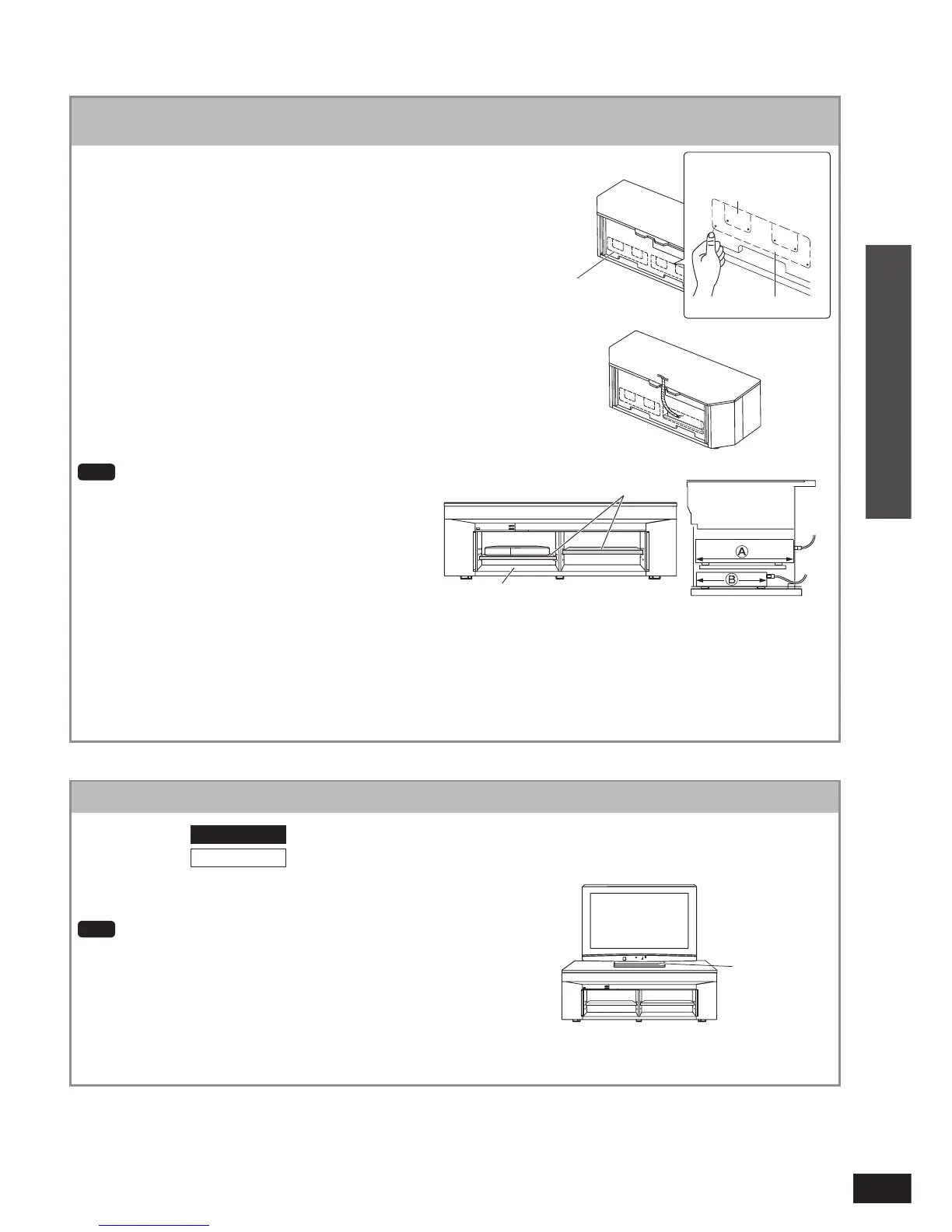
Press the cut-out on the back panel using
your thumb etc. with force to remove it for
wiring after installing the equipment.
Refer to pages 16 to 21 for connections with other
equipment.
If the operating instructions of the equipment require heat
release or ventilation, remove the cut-out on the back
panel to secure ventilation.
When setting equipment with the exhaust hole on the side,
follow the operating instruction of the equipment before
setting.
Pull out the bundled cords of stored
equipment from the cut-outs for
connection.
•
•
•
2
Shelf top (dimension
A
): 348 mm (Maximum depth of equipment when
the big cut-outs part on the back panel is
opened)
Shelf top (dimension
A
): 255 mm (Maximum depth of equipment when
the small cut-outs part on the back panel is
opened)
The lowest level (on the fl oor panel) (dimension
B
):
255 mm (Maximum depth of equipment)
Note
Do not put equipment weighing more than 12 k
g
on
the upper shelf or more than 20 k
g
on the lower shelf.
Image interference may occur if you put a DVD
recorder, etc. on the upper shelf. Put it on the lower
shelf if this occurs.
Depending on the equipment to install, the cables
may not be connected.
To install the equipment, adjust the height of the shelf
to the position where the cables come out.
If you set on the lowest level (on the fl oor panel), the
equipment with long depth may not be set properly or
the equipment cord may not be taken out.
When installing equipment, refer to the table for “Shelf
assembly” on page 12.
•
•
•
•
•
(Rear view)
Cut-outs
Push the black-circled
point.
Shelf top
(Side view in cross section)
Place the television (with stand attached)
in the center of the rack.
Recommended:
SC-HTR310
: 50 inches or less
SC-HTR210
: 42 inches or less
Television
stand
Note
Lift the television when placing it on the rack. Dragging it may
damage the top panel.
(For details, refer to the television’s operating instructions.)
If the television stand adheres to the glass top panel too tight to
remove, lift the stand inserting a fl at and thin object. This may help
removing the stand.
Install the rotary television stand not to run over the rack even if it
rotates.
•
•
•
(Front view)
The lowest level (on the fl oor panel)
Small cut-outs
Big cut-outs
Connection
Installing and assembling the rack












 To Next Page