1
SINGLE CHANGE
MULTI CHANG
E
OPEN/CLOSE
2
3
4
5
MIC VO
L
MIC
1
MIC
2
OPEN
SUBWOOFER
SOUND EQ
SUPPER SOUND EQ
SUPER SURROUND
SURROUND
ENHANCER
PHONES
MUSIC PORT
OPEN
AC
IN
AUTO REVERSE PLAYBACK / RECORDRECORDAUTO REVERSE PLAYBACK
V
O
L
U
M
E
TAPE DVD/CDTUNERMUSIC PORT
DEMO
RECORDDECK 1/2DISPLAY STOPREW/ /FF
Press and hold.
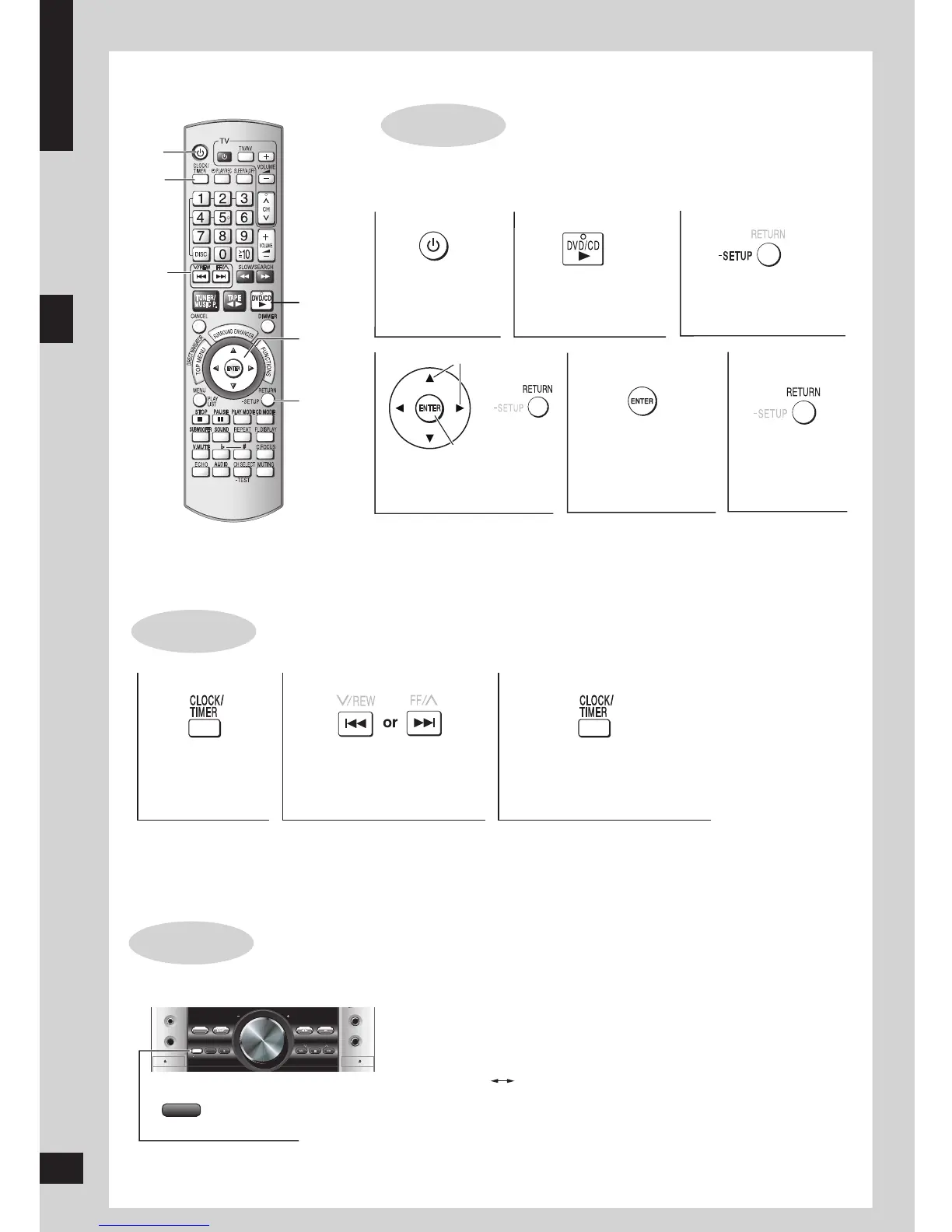
QUICK SETUP
STEP 3
Turn on the television and select the appropriate video input on the television
to suit the connection for the unit.
Setting the time
STEP 4
Power ON. Select “DVD/CD”.
Press and hold to
show the QUICK
SETUP screen.
Select the option
from the screen.
Press to finish
QUICK SETUP.
Press to exit.
Press to select
“CLOCK”.
Press [CLOCK/TIMER] to
finish setting the time.
Set the time
(press within 6 seconds or so).
This is a 24-hour clock.
Press [CLOCK/TIMER] when the unit is on to display the time.
Reset the clock regularly to maintain accuracy.
•
•
When the unit is first plugged in, a demonstration of its functions may be
shown on the display.
If the demo setting is off, you can see a demonstration by turning on the
demo.
The display changes each time the button is held down.
DEMO ON DEMO OFF
You can reduce the power consumed in standby mode by turning the
demonstration off.








 To Next Page