4
RQTV0148
ENGLISH
Remote control
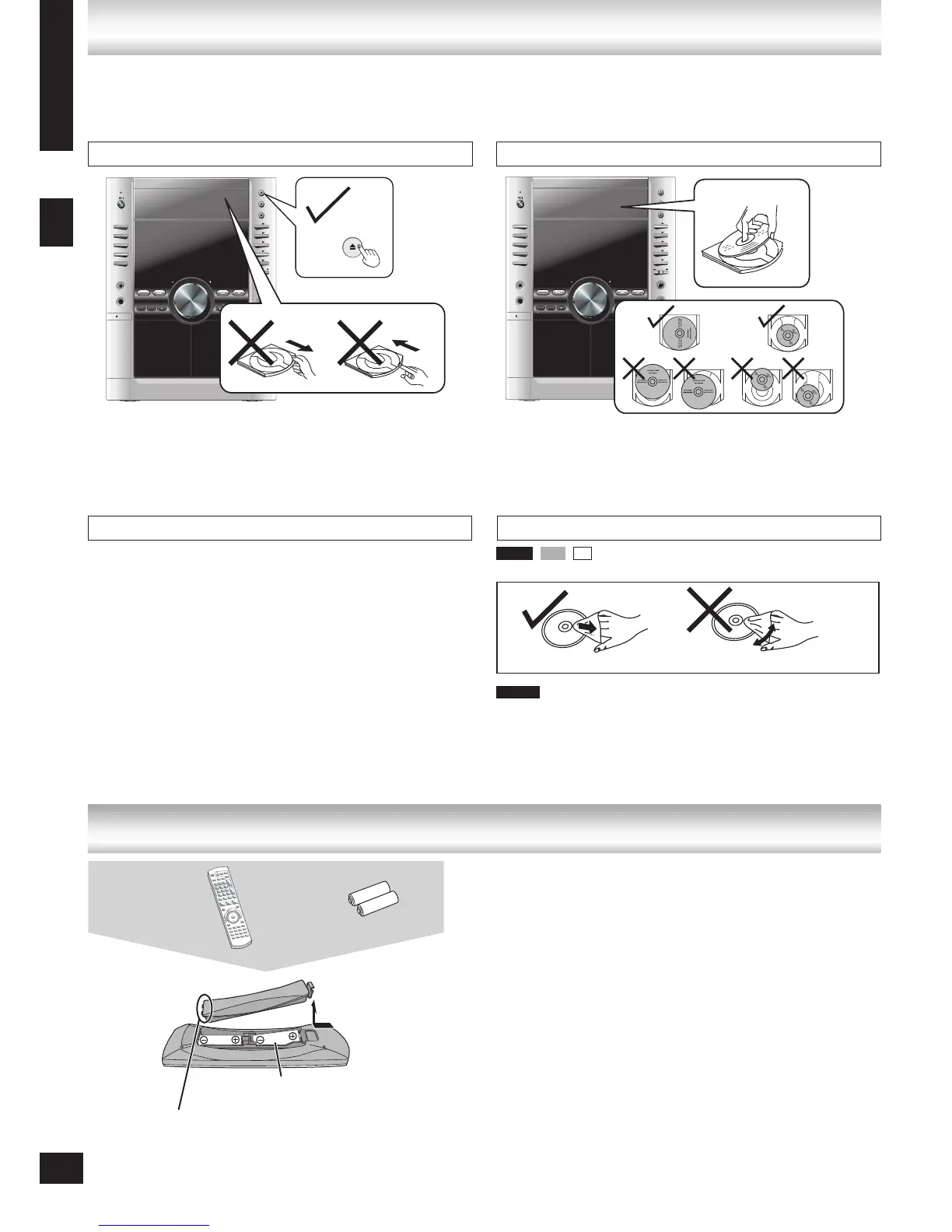
Tray/disc handling procedure / The remote control
Cleaning discs
Wipe with a damp cloth and then wipe dry.
and other recordable formats
Clean with an optional DVD-RAM/PD disc cleaner (LF-
K200DCA1, where available).
Never use cloths or cleaners for CDs, etc.
•
•
Adhere to the following to avoid problems.
Removing the power plug
Press [^] to turn off the unit and remove the power plug only after all the displays have disappeared.•
Place the disc label up in the center of the tray.
Insert only one disc into each tray.
•
•
Tray/disc handling procedure
DVD-V VCD CD
■ Do not:
mix old and new batteries.
use different types at the same time.
heat or expose to flame.
take apart or short circuit.
attempt to recharge alkaline or manganese batteries.
use batteries if the covering has been peeled off.
Mishandling of batteries can cause electrolyte leakage which
can damage items the fluid contacts and may cause a fire.
Remove if the remote control is not going to be used for a long
period of time. Store batteries in a cool, dark place.
■ Use
Aim at the sensor, avoiding obstacles, at a maximum range of
7 m directly in front of the unit.
•
•
•
•
•
•
Insert so the poles (+ and – )
match those in the remote control.
Do not use rechargeable type
batteries.
•
•
The remote control
DVD-VR
Tray caution
Inserting a disc
Disc handling precautions
Do not attach labels or stickers to discs (This may cause disc
warping, rendering it unusable).
Do not write on the label side with a ball-point pen or other
hard writing instrument.
Do not use record cleaning sprays, benzine, thinner, static
electricity prevention liquids or any other solvent.
Do not use scratch-proof protectors or covers.
Do not use the following discs:
Discs with exposed adhesive from removed stickers or
labels (rented discs, etc).
Discs that are badly warped or cracked.
Irregularly shaped discs, such as heart shapes.
•
•
•
•
•
–
–
–
R6/LR6, AA
Press on the tab to
open
Insert this side first
when closing
Batteries
4
Always press [;, OPEN/CLOSE] to insert or remove a disc.
Do not push or pull out the tray by hand as this will cause an
accident.
•
•








 To Next Page