15
RQTV0148
ENGLISH
Discs — Using navigation menus
Discs — Using navigation menus
1 Press [FUNCTIONS] while the navigation menu
is displayed
Actual items depend on the disc.
Example:
2 Press [e,r] to select the item and press
[ENTER].
To return to the menu
Press [RETURN].
•
Playing from the selected items
(Navigation Menu)
1 Press [MENU, PLAYLIST].
2 Press [e, r, w, q] to select the group or audio/
picture/video content and press [ENTER].
3 To play content in the group in order
Press [ENTER].
To start play from the selected content
Press [
e, r] and then [ENTER].
To play WMA/MP3 while showing JPEG image
First select the JPEG file you want to show, then select the
WMA/MP3 file(s).
To exit the screen
Press [MENU, PLAYLIST] or [RETURN].
•
•
Navigation Menu 2 5 MP3 1:54
FUNCTIONS to display the sub menu
RETURN to exit
Group 002/003 Content 0005/0012
G
G
C
C
Breaking The Habit
D ont_Stay
Faint
Hit_The_Floor_ _Abyss
Lirkin Park [Hyorid Theor
Lirkin Park_Cure For The
Lirkin_Park_ Metora_
Lirkin_Park_ Metora_
Lying_From_You
Somewhere_I_Belong
Lady Starfish
Life on Jupiter
Sep 15 2003
Lirkin Park Meteor
a
Penguins
Group and content number
currently playing
JPEG files
WMA/MP3 files
ContentGroup
Example:
Using the submenu
To find a group: highlight one of the group names
To find content: highlight an item in the content column
1 Select “Find” in the submenu.
2 Press [e,r] to select a character and press
[ENTER].
Repeat to enter other characters.
Lower case is also searched.
Press [t, y] to skip between A, E, I, O, and U.
Press [w] to erase a character.
Leave the asterisk (★) to search for the titles including
the character you enter.
Erase the asterisk (★) to search only for the titles starting
with the character you enter. To add the asterisk (★)
again, display the submenu again and select “Find”.
3 Press [q] to select “Find” and press [ENTER].
The search results screen appears.
4 Press [e,r] to select the content or group and
press [ENTER].
•
•
•
•
•
•
Playing data discs
Multi
List
Tree
Thumbnail
Next group
Previous group
Al
l
Audi
o
Picture
Video
Help displa
y
Find
Show groups and content
Content only
Groups only
Thumbnails
Go to next group
Go to previous group
WMA/MP3, JPEG, MPEG4 and DivX video
WMA/MP3 files only
JPEG files only
MPEG4 and DivX video only
Show help bar or the elapsed play time
indicator
Enter a title to find content and group
(➡ below)
You can play JPEG, MPEG4 and DivX video content on
DVD-RAM or play HighMAT discs without using the HighMAT
function (➡ Other Menu, page 20).
CD
Only a content list appears when playing CDs, but
information for CD-Text discs is correctly displayed.
•
•
Searching by content or group title
WMA MP3 JPEG MPEG4 DivX
WMA MP3 JPEG
JPEG
WMA MP3 MPEG4 DivX
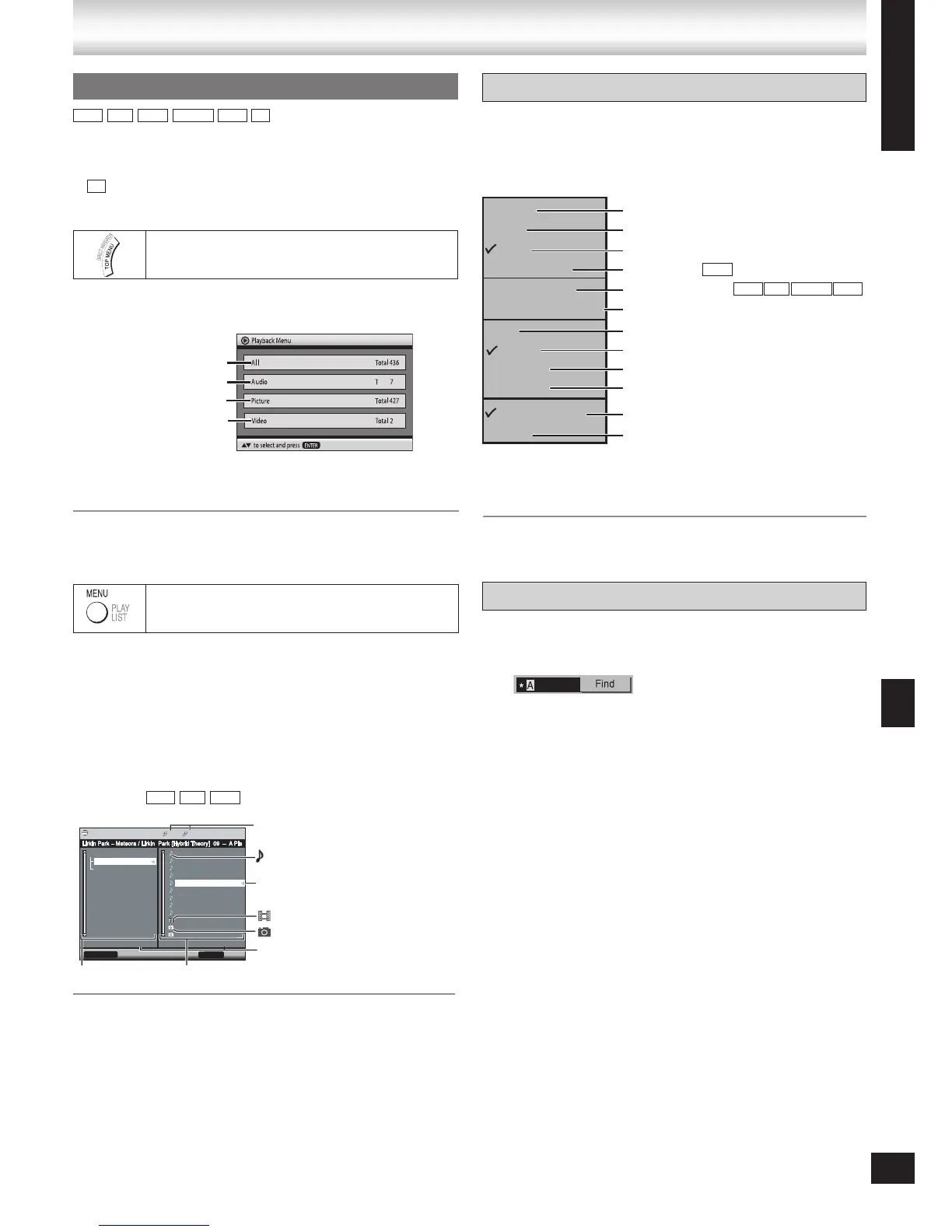
Playing items in order (Playback Menu)
1 Press [TOP MENU].
2 Press [e, r] to select “All”, “Audio”, “Picture”
or “Video” and press [ENTER].
To exit the screen
Press [TOP MENU] or [RETURN]
•
CD
➡ Page 40 for the position of the remote control buttons.
MPEG4 and DivX video
Indicates the group/content
currently playing.
Number currently selected
All content
WMA/MP3
JPEG
MPEG4 and DivX video
15








 To Next Page