13
RQTV0148
ENGLISH
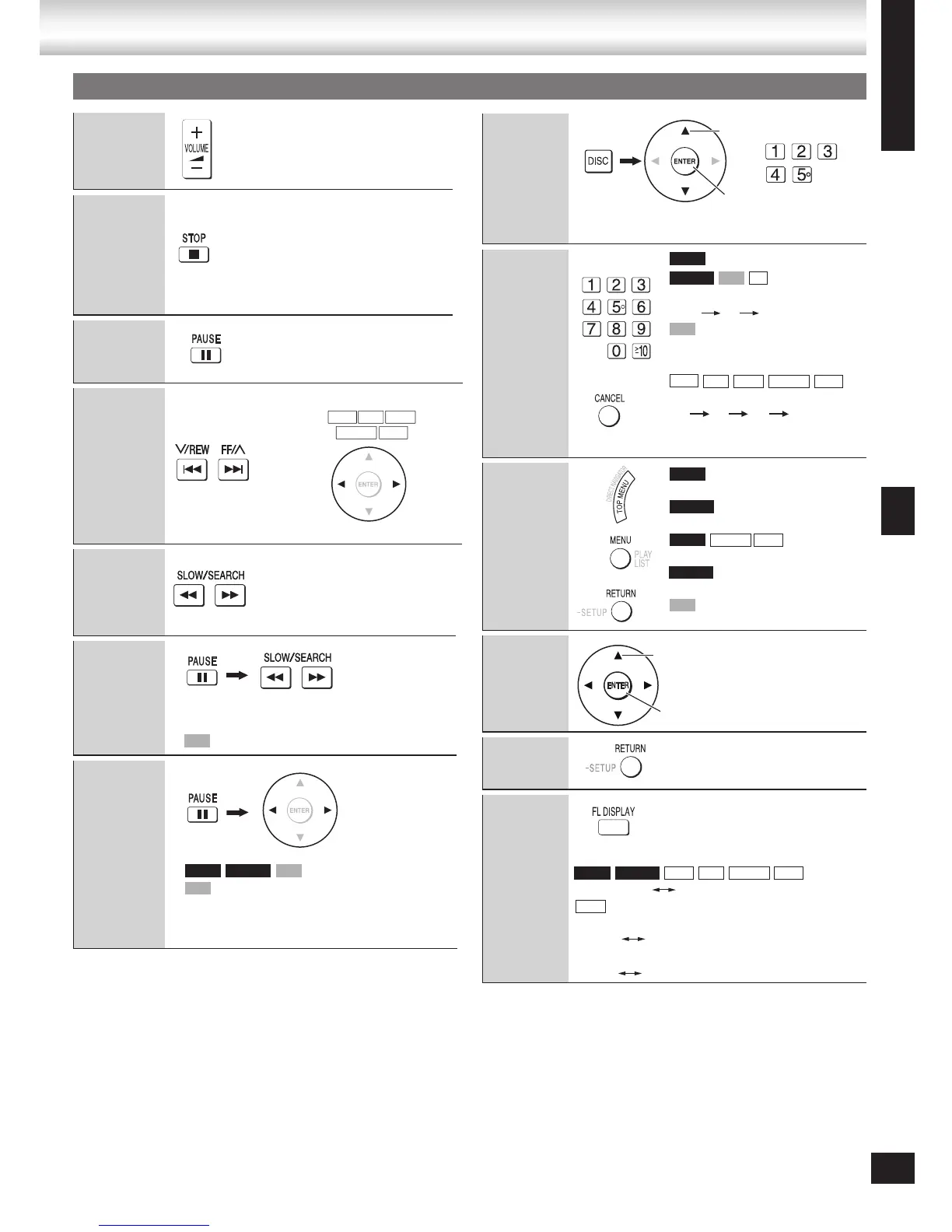
Volume
adjustment
Stop
The stopped play position is
memorized when “RESUME” is
displayed.
Press [DVD/CD q] to resume
play.
Press [g, STOP] to clear the
position.
•
•
Pause
Press [DVD/CD q] to continue
normal play.
•
Skip
Search
(during play)
Play speed increases up to 5
steps.
Press [DVD/CD q] to
continue normal play.
•
•
Slow-motion
Up to 5 steps.
Press [DVD/CD q] to continue normal play.
Forward direction only.
•
•
•
Frame-by-
frame
Forward direction only.
Pressing [h, PAUSE] also activates forward
direction.
Press [DVD/CD q] to continue normal play.
•
•
•
Discs — Basic play
Discs — Basic play
Selecting a
disc
Disc information screen is displayed.•
Enter
number
(while stopped)
Example: To select 12:
[
>
=
10] [1] [2]
with playback control
Press [g, STOP] then press
the numbered buttons.
Example: To select 123:
[1] [2] [3] [ENTER]
Press [CANCEL] to cancel
the number(s).
•
•
Disc menu
Shows a disc top menu.
Shows the programs.
Shows a disc menu.
Shows a playlist.
with playback control (PBC)
Shows a disc menu.
On-screen
item select
Return to
previous
screen
Main unit
display
Press to change display.
Time display Information display
When Slideshow is on (➡ page 18)
SLIDE Information display
When Slideshow is off (➡ page 18)
PLAY Information display
Select
Confirm
DVD-VR VCD CD
DVD-V
VCD
WMA
MP3
JPEG MPEG4 DivX
DVD-V
DVD-VR
DVD-V
MPEG4 DivX
DVD-VR
VCD
Select
Confirm
or
DVD-V WMA MP3 MPEG4 DivXDVD-VR
JPEG
or
WMA MP3 JPEG
MPEG4 DivX
VCD
VCD
DVD-V DVD-VR VCD
Using the remote control
13








 To Next Page