3
4
5
MIC VOL
MIC 1
MIC
2
OPEN
SUBWOOFER
SOUND EQ
SUPPER SOUND EQ
PHONES
MUSIC POR
T
OPEN
V
O
L
U
M
E
TAPE DVD/CDTUNERMUSIC PORT
DEMO
RECORDDECK 1/2DISPLAY STOPREW/ /FF
1
SINGLE CHANGE
MULTI CHANGE
OPEN/CLOSE
2
3
4
5
MIC VO
L
MIC
1
MIC
2
OPEN
SUBWOOFER
SOUND EQ
SUPER SOUND EQ
SUPER SURROUND
SURROUND
ENHANCER
PHONES
MUSIC POR
T
OPEN
AC
IN
V
O
L
U
M
E
TAPE DVD/CDTUNERMUSIC PORT
DEMO
RECORDDECK 1/2DISPLAY STOPREW/ /FF
PHONES
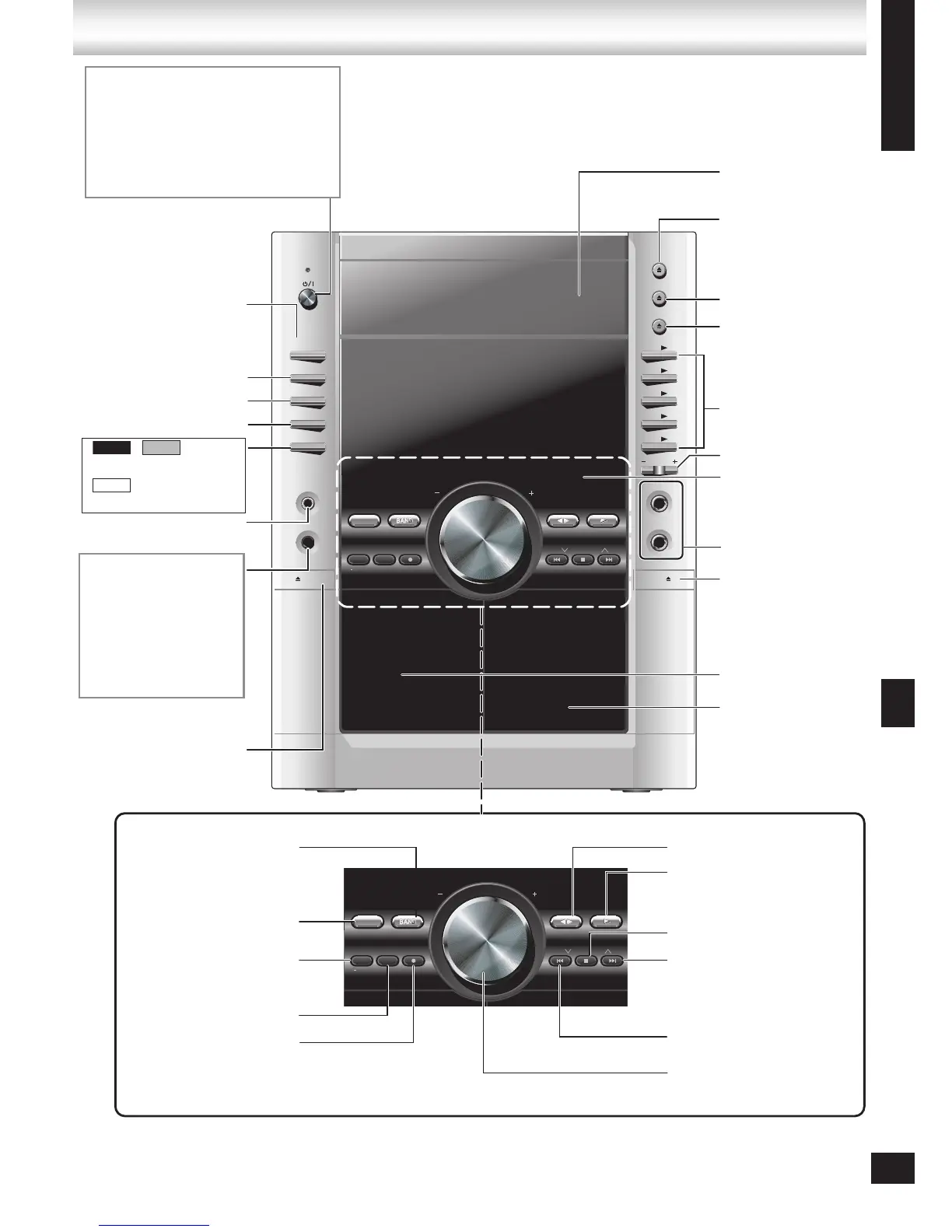
Headphone jack
Reduce the volume level and
connect the headphones.
Headphones plug type:
3.5 mm stereo.
Avoid listening for prolonged
periods of time to prevent
hearing damage.
AC IN (AC supply indicator)
This indicator lights when the unit is
connected to the AC mains supply.
8 (Standby/on switch)
Press to switch the unit from on to standby
mode or vice versa.
In standby mode, the unit is still consuming
a small amount of power.
BAND, TUNER
(➡ 23)
SURROUND ENHANCER
(➡ 28)
*, RECORD (➡ 25, 31)
1 q to 5 q (disc
direct play buttons)
(➡
12)
;, MULTI CHANGE
(➡
12)
;, OPEN/CLOSE
(➡
4, 12)
– VOLUME + (➡ 13, 26)
Disc trays (➡
4, 12)
w q, TAPE (➡ 24)
q, DVD/CD (➡ 10, 12, 26)
g, STOP (➡
13)
DISPLAY, -DEMO
(➡ 10, 31)
SUPER SURROUND (➡ 29)
– MIC VOL + (➡ 27)
SUPER SOUND EQ (➡ 29)
DECK 1/2 selection
button (➡ 24)
u, REW/2, i, 1 /FF,
(Disc skip/search/slow-
motion play, tape fast-
forward/rewind, tune, time
adjust buttons)
(➡ 10, 13, 24, 30)
Deck 1 cassette
holder (➡ 24)
Deck 2 cassette
holder (➡ 24)
MUSIC PORT jack (➡ 31)
;, SINGLE CHANGE
(➡
12)
MIC 1, MIC 2 (➡ 26)
MUSIC PORT (➡ 31)
SOUND EQ (➡ 28)
SUBWOOFER (➡ 29)








 To Next Page