17
Surround Sound Operation (TX-76PW10A only)
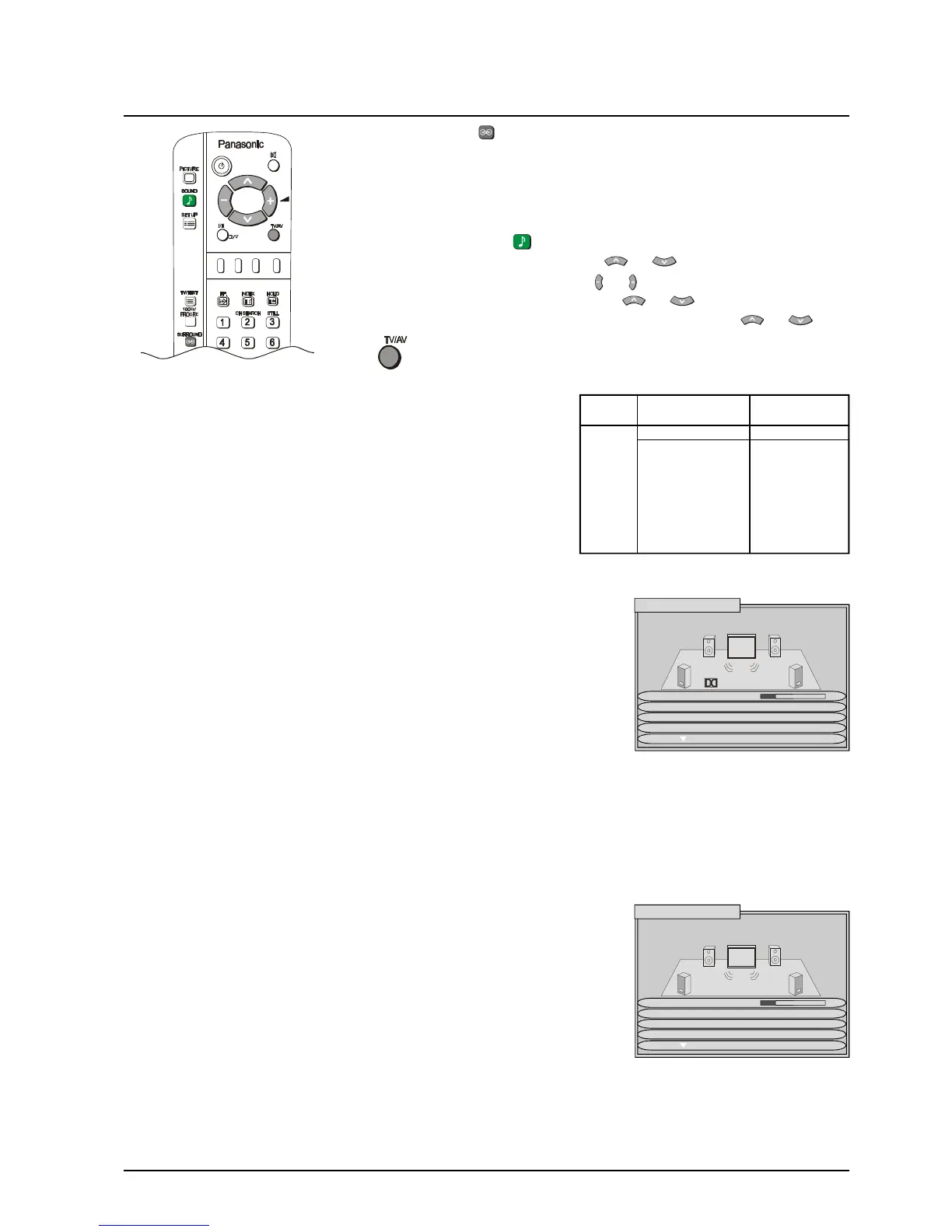
Push the Surround ( ) to confirm that the Surround feature is On. If the on
screen message that appears indicates Surround is Off, Push again to turn the
feature On.
Note: If Surround is Off, the sound output is two channel (ie: left and right)
stereo or mono.
1 Push the SOUND ( ) button.
2 Select to Surround menu by using or .
3 Access Surround menu by using or
4 Move to chose menu option by using or .
5 Adjust chosen option or access chosen menu by using or .
Push to go back to watching TV.
If a DTS / Dolby Digital input is detected the Surround menu
options instantly change - Surround mode is not available. (The
DVD output must be labelled “DTS” or “Dolby Digital”). Ensure that
the Digital Audio option in the SOUND menu is set to the correct
AV input (see page 42). A message displayed in the centre of the
screen shows whether the signal is DTS or Dolby Digital, and
gives a code indicating which channels are detected (see table to
the right). Subwoofer output is not listed; if a subwoofer channels
is detected then its contents are output.
VOLUME
SURROUND
MODE
SPEAKER
SETTING/
SIMULATED
SPEAKER
FRONT
DISTANCE
REAR
DISTANCE
INTERNAL
SPEAKER
The volume adjustment sets the overall Surround output
volume.
When a DTS/ Dolby Digital input is not detected this option
is shown. Choose between PRO LOGIC and SIMULATED.
The mode chosen here dictates the next menu option.
If a DTS / Dolby Digital input is detected, or if Pro Logic is
selected in Surround mode, this menu option is Speaker
setting, allowing selection of NORMAL, PHANTOM or 3
STEREO modes, as described on page 19.
If Simulated is selected in Surround mode, this menu
option is Simulated setting, allowing selection of DISCO,
MOVIE or STADIUM modes, as described on page 19.
Allows adjustment of the volume for each speaker, as
LEVEL described on page 19.
Allows setting of the distance from the listening position to
the front speakers.
Distances or 1, 2, 3, 4, 5, 6, 7 or 8M can be selected.
Allows setting of the distance from the listening position to
the rear speakers. If the rear surround speakers are closer
to you than the centre speaker, you may hear “dialogue
leakage” from the rear surround speakers. It may be
necessary to reduce the volume of the rear speakers.
Distances or 1, 2, 3, 4, 5, 6, 7 or 8M can be selected.
If you do not have an external centre speaker connected,
set to On. If you wish to connect an external centre
speaker then switch Off, see page 43 for connection
details.
If a DTS / Dolby Digital Input is
detected, the Surround menu is
as shown above. This does not
occur if the DVD output is PCM.
If no DTS / Dolby Digital input is
detected, Surround mode
appears as a menu option.
Code Front Rear
outputs surround outputs
Left Right Centre Left Right
1+1 Dual mono output
1/0 Mono output
2/0 ü ü
3/0 ü ü ü
2/1 ü ü Mono output
3/1 ü ü ü Mono output
2/2 ü ü ü ü
3/2 ü ü ü ü ü
SURROUND MENU
VOLUME
SURROUND MODE PRO LOGIC
SIMULATED SET PHANTOM
SPEAKER LEVEL
SURROUND MENU
VOLUME
SPEAKER SET PHANTOM
SPEAKER LEVEL
FRONT DISTANCE 3M
Digital 3/2




 To Next Page