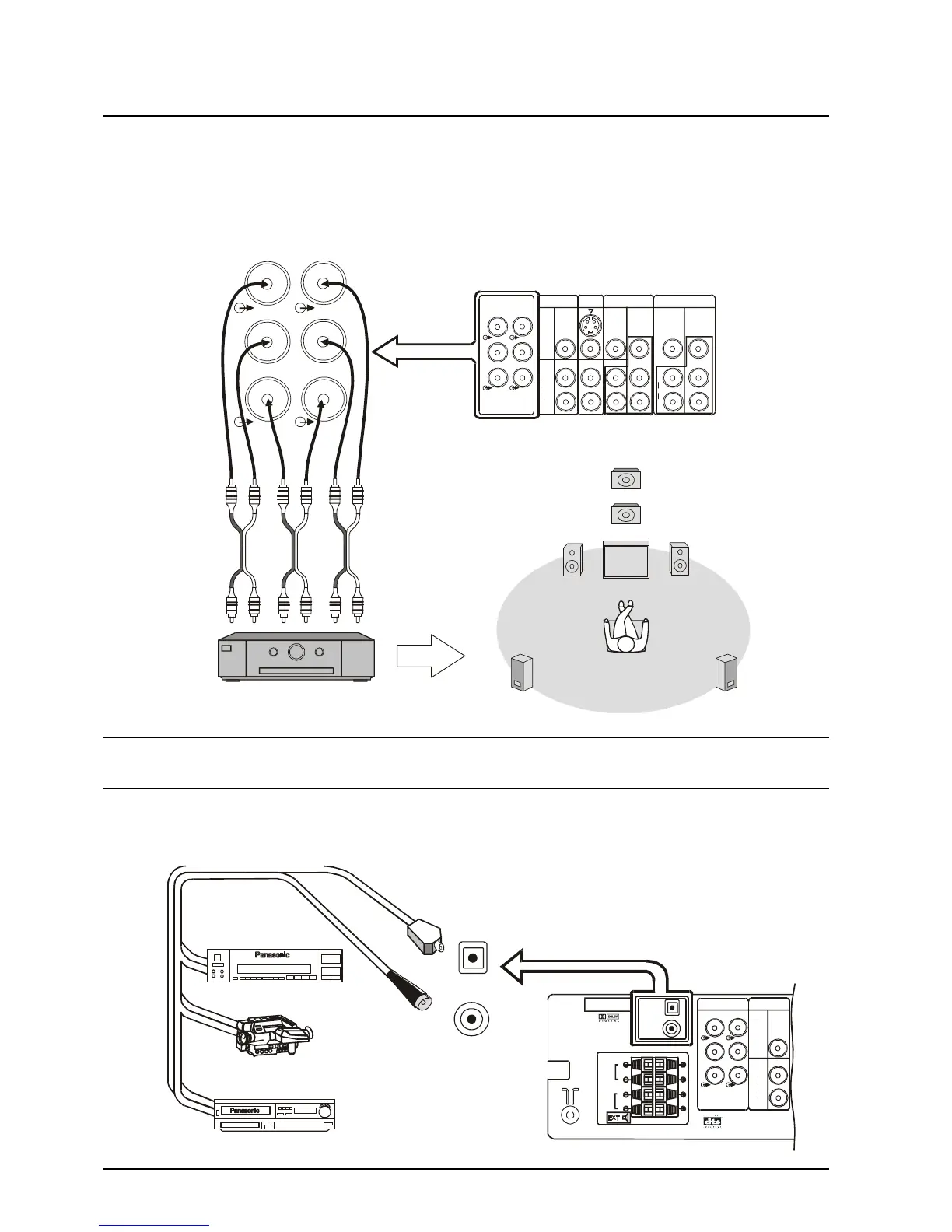
Optical Input
Camcorder
DVD Player
Connecting Equipment to the TV
Connecting the Audio Out Terminals (TX-76PW10A only)
The Audio Out sockets on the rear of the TV allow you to create a custom sound system using an external
amplifier and external speakers.
You may decide, for example to use an external DTS/Dolby Digital amplifier to connect external left and right
front speakers, left and right rear surround speakers and a subwoofer (LFE speaker) as shown below.
Connecting the Digital Audio Input (TX-76PW10A only)
Additional equipment can be connected to the rear of the AV1/AV2/AV3/AV4 and via the two digital audio
input sockets (coaxial or optical)
MONITOR
OUT
AV1
IN
S-VIDEO
VIDEO
AV2
IN
AV4
IN
AUDIO
L
R
AUDIO
L
R
MONOMONO
MONO
VIDEO
Y
Y
P
B
P
B
P
R
P
R
DVD
Y-P-P
B R
DVD
Y-P-P
B R
L
L
R
R
C
W
FRONT
REAR
CENTRE
SUB WOOFER
Centre
Speaker
Subwoofer
Speaker
Left
Speaker
Front
Right
Speaker







 To Next Page