22
Aspect Controls
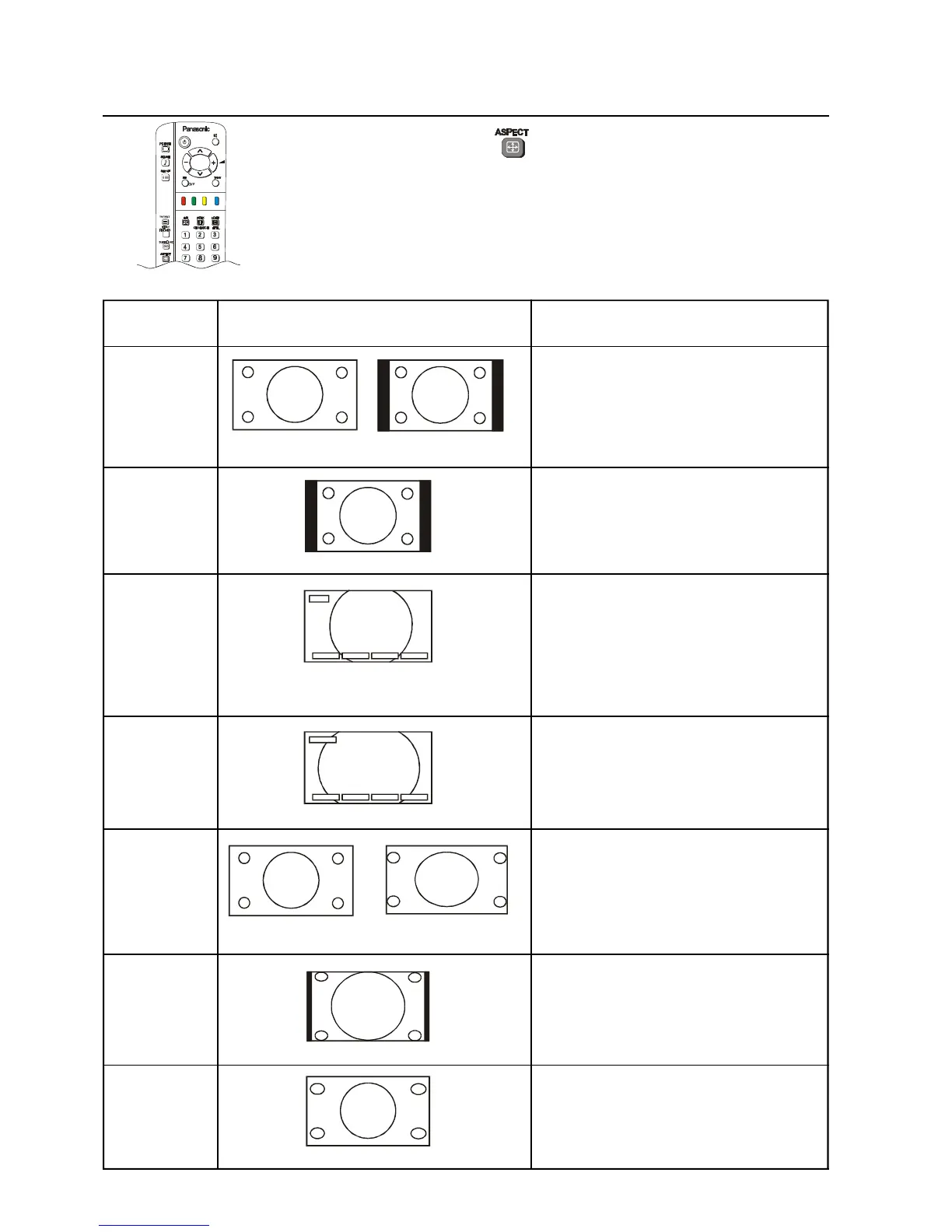
Press the ASPECT button to select the different Aspect options. The
options available are AUTO, 4:3, ZOOM, S-ZOOM, 16:9, 14:9 and JUST.
Mode Picture Description
AUTO The AUTO position can be set to 4:3 or to
JUST. When a wide screen signal is
detected at the Video terminal the TV will
select the16:9 aspect ratio.
16:9 Signal 4:3 Signal
4 : 3 This option will display a standard 4:3
picture without any stretching or
compression. There will be vertical black
lines down either side of the picture
ZOOM This option allows you to magnify part of
the picture. The coloured buttons let you
change the position of the magnified area.
Red H POS - Move picture Left
Green H POS + Move picture Right
Yellow V POS - Move picture Down
Blue V POS + Move picture Up
S - ZOOM S-ZOOM displays part of the picture at
greater magnification that the ZOOM
mode does. The coloured buttons let you
change the position of the magnified area
as shown for ZOOM..
16 : 9 The 16:9 option will display the picture at
its maximum size. Signals in the 4:3
format will be stretched to fit the picture.
16:9 Signal 4:3 Signal
14 : 9 The 14:9 option will display a 4:3 signal in
simulated wide screen. The picture is
slightly stretched. It is also slightly
cropped top and bottom.
JUST JUST gives you a “best fit” option when
showing 4:3 on wide screen. The centre
of the picture is not affected but there is
some stretching at the edges.
H - POS - H - POS + V - POS - V - POS +
S - ZOOM
H - POS - H - POS + V - POS - V - POS +
ZOOM







 To Next Page