26
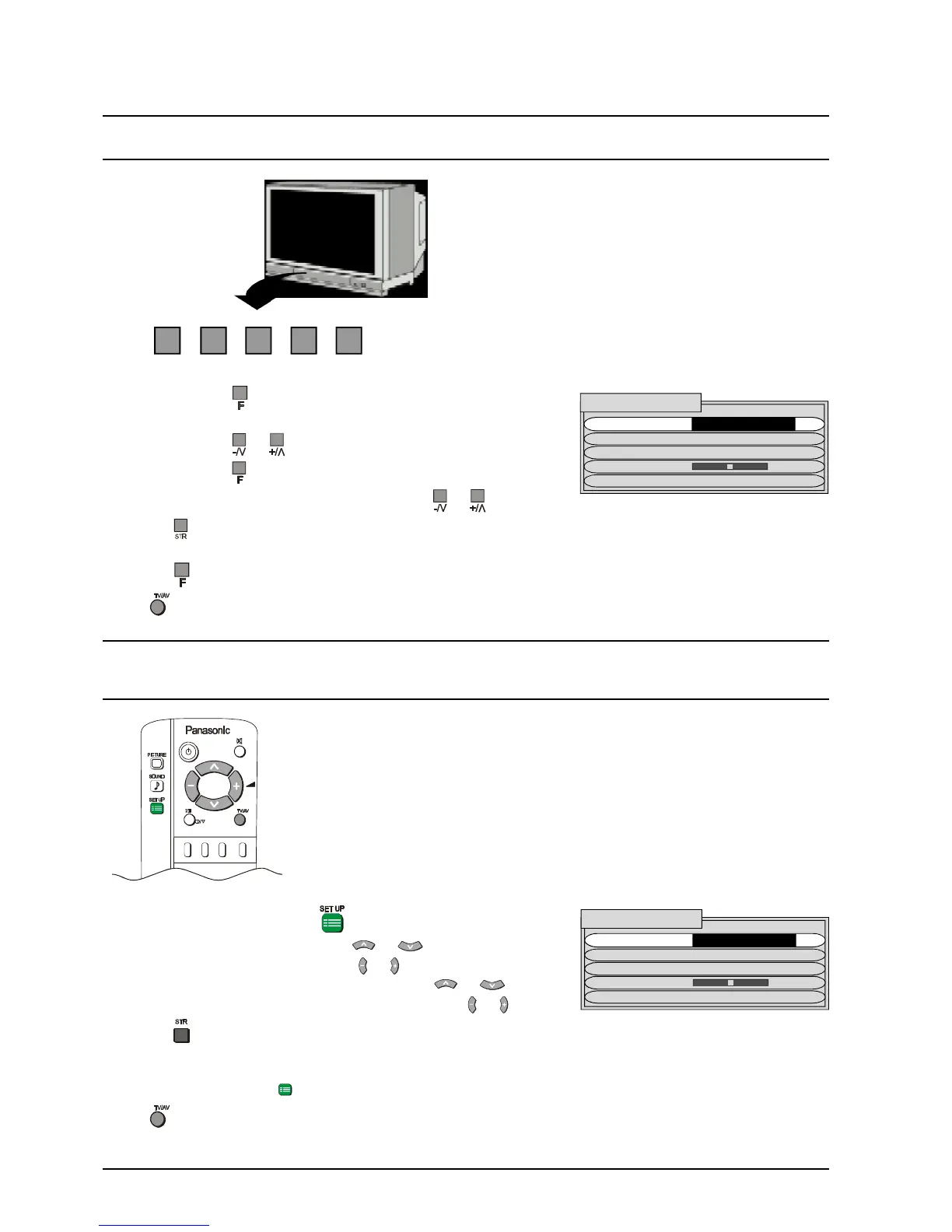
STR F -/\/ +//\ TV/AV
Tuning Menu
1. Push the SET UP button .
2. Select the Tuning Menu using
or .
3. Access the Tuning Menu using
or .
4. Move to the required option or menu using
or .
5. Select, adjust or switch the chosen option using
or .
Pressing
after making an adjustment will store the setting as the default (and will replace the factory
setting).
Push the SET UP button
to return to the Tuning Menu.
Push
at any time to return to watching TV.
1. Push the
button repeatedly until the Tuning Menu
is reached.
2. Push the
or Button to select the Tuning Menu.
3. Push the
button to access the Tuning Menu.
4. Adjust the chosen option or menu using
or .
Pressing
after making an adjustment will store the setting as the default (and will replace the factory
setting).
Push the
button to return to the Tuning Menu.
Push
at any time to return to watching TV.
FRONT PANEL CONTROLS
REMOTE CONTROL
TUNING MENU
SYS SELECT AUSTRALIA
AUTO TUNE
MANUAL TUNE
FINE TUNE
SKIP OFF
TUNING MENU
SYS SELECT AUSTRALIA
AUTO TUNE
MANUAL TUNE
FINE TUNE
SKIP OFF







 To Next Page