Right
Speaker
Front
Left
Surround
Speaker
Rear
Right
Surround
Speaker
Rear
Connecting Equipment to the TV
Connecting the External Speakers (TX-76PW10A only)
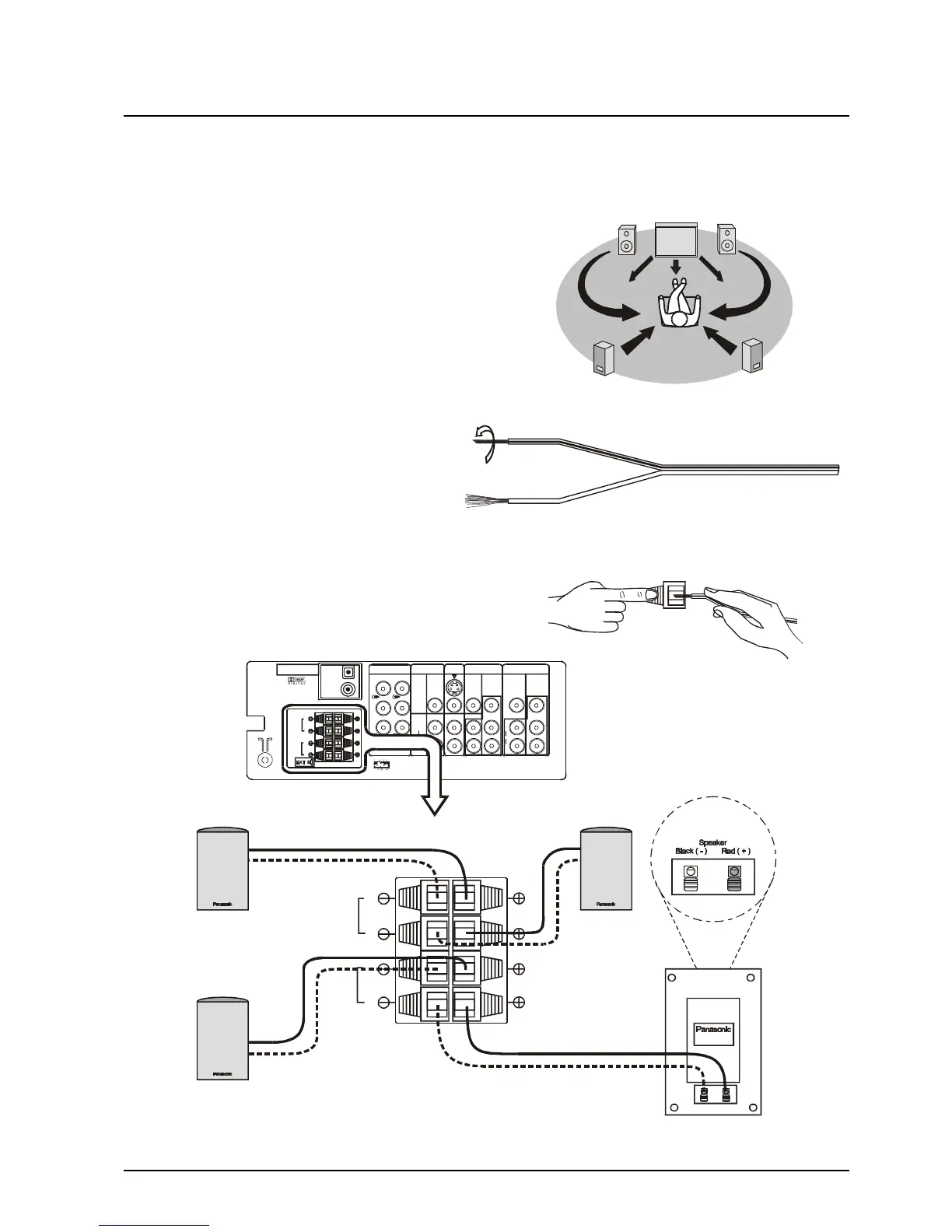
The external speaker connections (EXT) on the rear of the TV allow you to create your own system using
external speakers.
You may decide, for example, to connect external left and
right front speakers and left and right rear surround
speakers as shown here.
The TV must be turned OFF before connecting external
equipment.
1. Twist the bare wire ends of the speaker
wires before inserting into the speaker
terminals.
Push lever Insert Wire
2. Insert into terminals.
Ensure that bare speaker wires are not touching and
are fully inserted into the terminals.
Left
Speaker
Front
Left
Surround
Speaker
Rear
Right
Surround Speaker
Rear
PCM/AC-3
DIGITAL AUDIO INPUT
OPTICAL
AUDIO - OUT
MONITOR
OUT
AV1
IN
S-VIDEO
VIDEO
L
L
R
R
C
W
FRONT
REAR
CENTRE SUB WOOFER
AV2
IN
AV4
IN
COAXIAL
AUDIO
L
R
AUDIO
L
R
MONOMONO
MONO
VIDEO
Y
Y
P
B
P
B
P
R
P
R
DVD
Y-P-P
B R
DVD
Y-P-P
B R
EXT
FRONT
REAR
L
L
R
R
FRONT
REAR
L
L
R
R
Right
Speaker
Front







 To Next Page