6
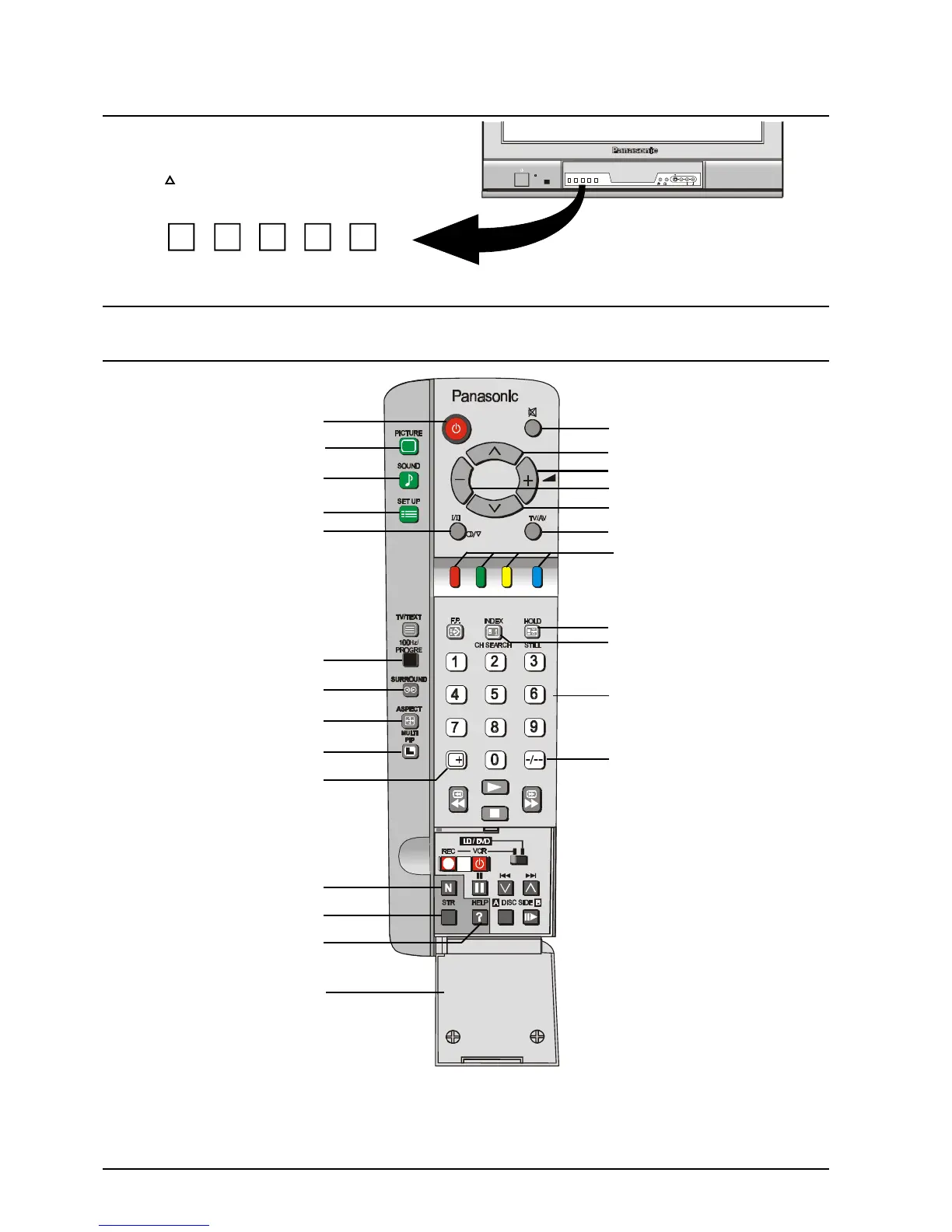
Control Panel Buttons
Open the control panel door to gain access to the
Television Controls Push the door at the point
marked to open.
Push again to close.
STR F -/\/ +//\ TV/AV
For details of TELETEXT Operation remote control operation, please refer to page 23.
For details of VCR, LD player and DVD player remote control operation, please refer to page 32.
* Bilingual broadcasting is not currently available in Australia or New Zealand.
# Multi Picture In Picture button and “CH SEARCH” are not on the remote control used for the TX-76PW05A.
Remote Control Buttons
Stereo / Mono / *Bilingual
100Hz / Progressive Scan
Recall
Aspect
Surround
Set Up
Sound
Picture
Stand By
Normalisation
Mute
Programme Number Up
Volume Up
Volume Down
Programme Number Down
TV / AV / RGB
Two Digit Programme
Numbers
Help
Direct Programme Numbers
Coloured Buttons. Used for
Aspect Functions, AV Selection
Teletext Functions
Store
Multi Picture in Picture #
Still
Channel Search #
L/MONO R
S-VIDEO VIDEOSTR F -/\/ +//\ TV/AV
AV3
IN
AUDIOMain Sub.
Door







 To Next Page