3
Getting Started
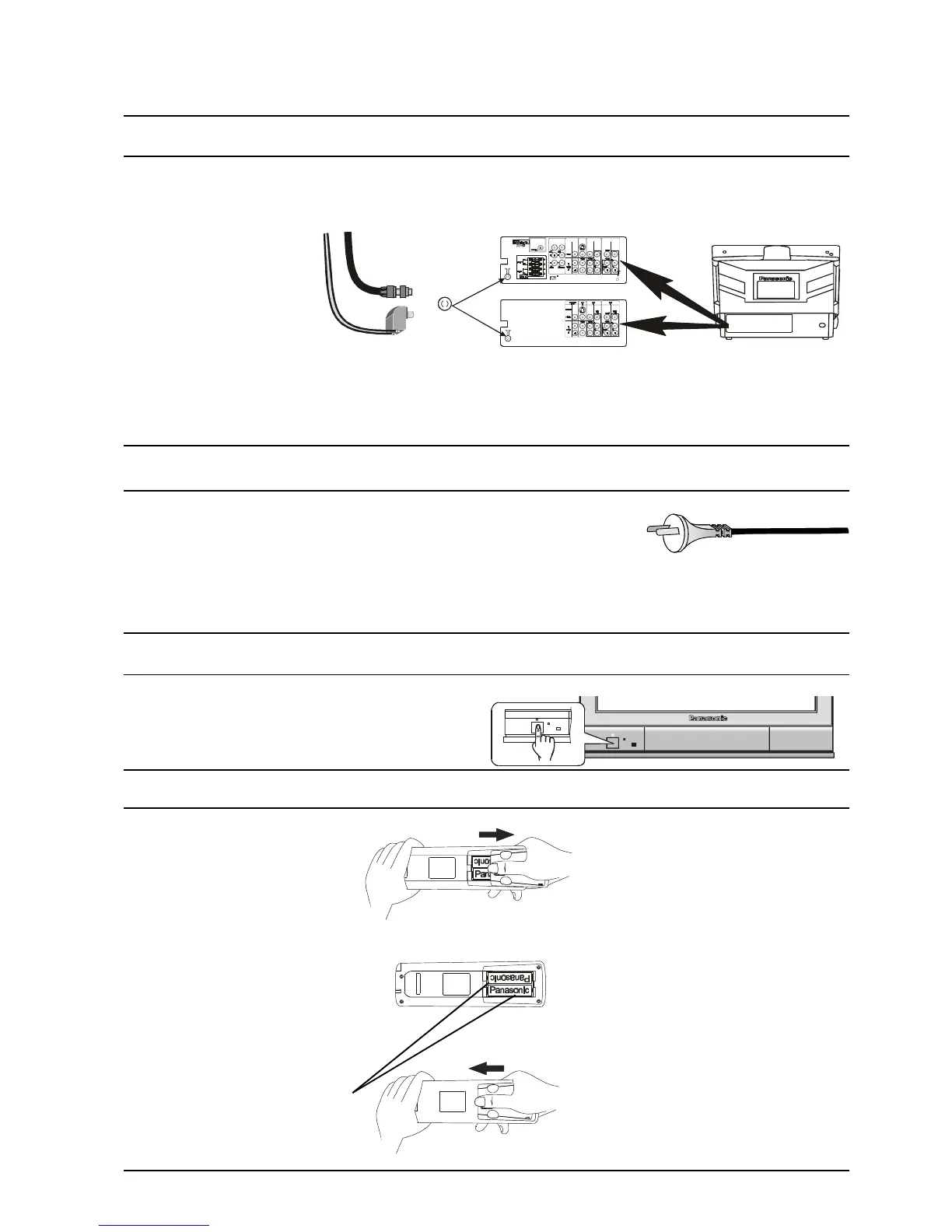
Connect the Aerial
The RF (Aerial) Input impedance of this television is 75Ω. If your aerial lead is 300Ω ribbon (two wires
separated by a flat plastic sheet) you will require a 300Ω/75Ω Balun (not supplied) in order to connect your
aerial to the television.
Note:
For your safety any external aerial should be installed by a reputable qualified installer and should comply
with Australian Standard AS1417.1.
In New Zealand the installation should comply with International Standard IEC597-1.1.
Connect the Power Plug
The televisions are designed for the Australian Standard Mains Voltage of
240V 50Hz and the New Zealand Standard Mains Voltage of 230V 50Hz.
NOTE:
If the television is not going to be used for an extended period, remove the power plug from the wall outlet.
Turn on the Television
Push the Power Switch to turn the television ON.
Sit back and enjoy your new Panasonic television.
Battery Installation and Replacement
Place your thumb on the battery
cover triangle. Apply a slight
downward pressure with the
thumb and slide the cover back.
This allows the cover to be
removed.
Insert the batteries ensuring the
correct polarity. The polarity is
identified by the “ + “ symbol on
the battery and the “ + “ and “ - “
symbols on the battery
compartment. The springs inside
the battery compartment connect
to the negative terminal of the
battery.
Two “AA” size batteries
Fit the battery cover and slide it
forward until it “clicks” into place.
Battery Precautions
• Do Not use rechargeable batteries.
Differences in size and performance
may cause incorrect operation.
• Do Not mix battery types (Alkaline
with zinc-carbon etc.)
• Do Not mix old and new batteries.
Replace both batteries at the same
time.
• Do Not attempt to recharge
batteries.
• Do Not short circuit batteries.
• Do Not disassemble batteries.
• Do Not heat or burn batteries.







 To Next Page