33
Remote Control VCR/LD/DVD Operation
Remote Control VCR/LD/DVD Buttons
Function
Button / Switch
VCR LD/DVD
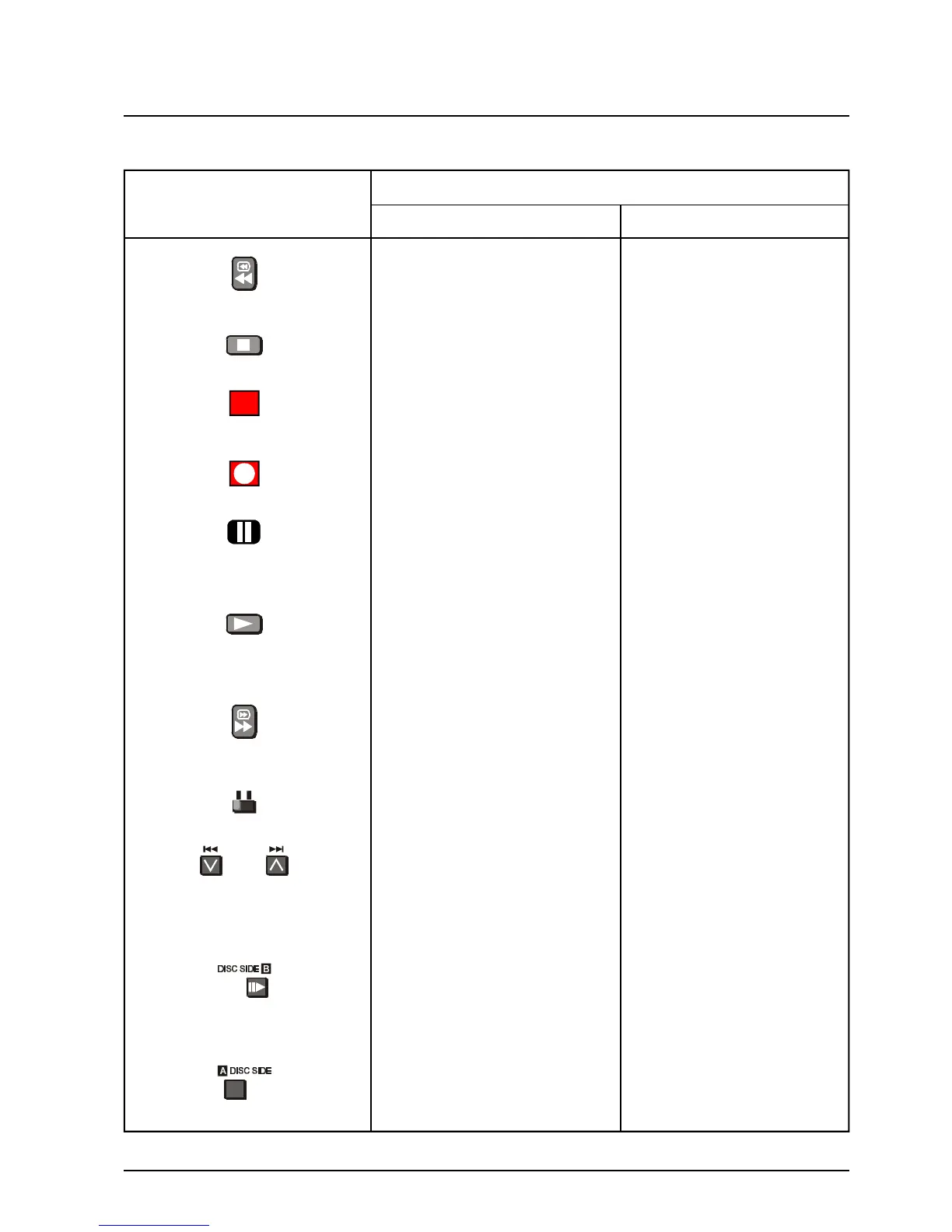
REWIND / REVIEW REWIND / REVIEW
Used to rewind the tape Used to play the disc in
quickly or watch the tape reverse while watching the
in reverse. picture.
STOP STOP
Used to stop the VCR. Used to stop the LD/DVD.
POWER BUTTON POWER BUTTON
Used to switch the VCR Used to switch the LD/DVD
ON or OFF (Standby). ON or OFF (Standby).
RECORD
Push both buttons to
Start recording.
PAUSE PAUSE
Pauses the tape during play. Pauses the disc during play.
PLAY PLAY
Used to start the VCR Used to start the LD/DVD
playing. playing.
FAST FORWARD / CUE FAST FORWARD / CUE
Used to wind the tape Used to watch the disc at
forward quickly or to watch fast speed.
the tape at fast speed
VCR Switch Setting LD/DVD Switch Setting
Selects VCR Selects LD/DVD.
PROGRAMME NUMBER PROGRAMME SKIP
DOWN AND UP
Used to select the next Used to skip tracks on the
Higher or lower programme. disc.
Number.
STILL ADVANCE DISC SIDE B SELECTION
Used to advance the tape Used to select the B side
One frame at a time. Used of the disc.
With the Pause button.
DISC SIDE A SELECTION
Used to select the A side
of the disc.
Please refer to drawing on Page 32 for location of VCR/LD/DVD Control Buttons.







 To Next Page