www.parweld.com
16
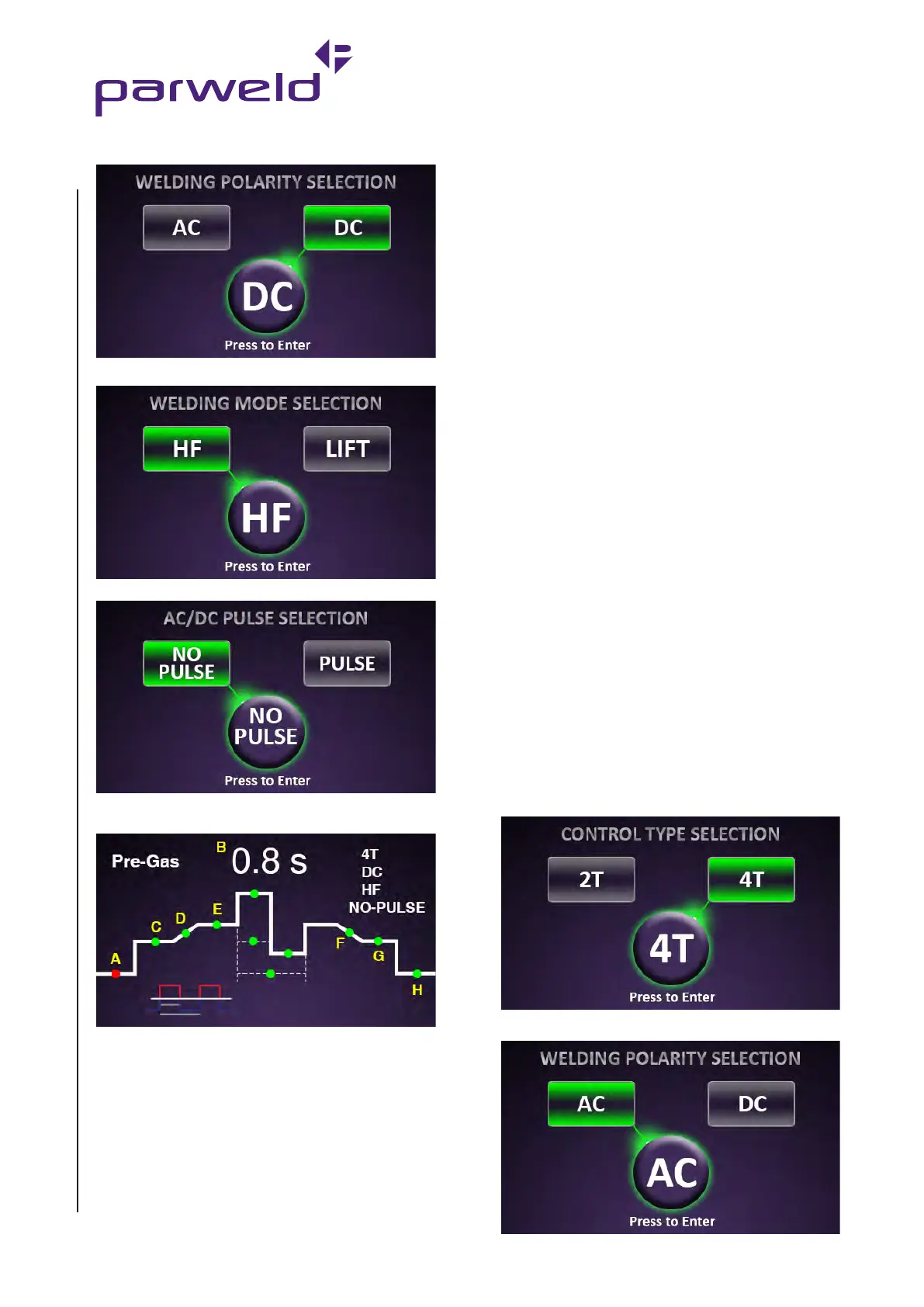
5) Select DC output.
6) Select HF start
7) Select No Pulse.
8) Rotate the control knob to move the illuminated LED to the gas
pre-flow position (A).
9) Press the control knob to select the parameter. The red LED will
now flash. Adjust the value by rotating the control knob. This can
be adjusted from 0.1 to 0.3 seconds. The value is displayed on the
digital display (B) Press the control knob again to accept the setting.
10) Rotate the control knob to move the LED to the initial current (C)
This can be adjusted from 5 to 100% of the main welding current.
The value is displayed on the digital display (B). 50% is a good initial
setting. Note this function only operates in 4T switch mode.
11) Rotate the control knob to move the LED to the slope up time (D)
This can be adjusted from 0 to 10s. The value is displayed on the
digital display (B). 2s is a good initial setting.
12) Rotate the control knob to move the LED to the main welding
current (E) This can be adjusted from 5 to 200A. The value is
displayed on the digital (B). Refer to the TIG welding guide for a
recommended welding current.
13) Rotate the control knob to move the LED to the slope down time
(F) This can be adjusted from 0 to 10s. The value is displayed on the
digital display (B). 2s is a good initial setting.
14) Rotate the control knob to move the LED to the final current (G)
This can be adjusted from 5 to 100% of the main welding current.
The value is displayed on the digital display (B). 10% is a good initial
setting. Note this function only operates in 4T switch mode
15) Rotate the control knob to move the LED to the Post Gas time
(H). This can be adjusted from 0.1 to 10s. The value is displayed on
the digital display (B). 3s is a good initial setting.
You are now ready to weld. These settings are a guide and you
should adjust to suit the job you are welding. If you are unfamiliar
with the machine try to adjust only one parameter at a time so you
become familiar with its effect.
7.7.6 AC TIG welding (No Pulse)
Note:- shorting or dipping the electrode into the weld pool
for more than 1 second will cause the machine to reduce the
welding power to zero in order to protect the tungsten and
minimise contamination.
1) Connect the torch to the TIG torch socket and the gas hose to the
gas outlet.
2) Connect the trigger control plug on the torch to the trigger socket.
3) Connect the Earth lead to the Earth socket.
4) Set the process mode to 2T or 4T if you prefer a latching trigger
action. (Note in 4T position you must press and release to start the
process and press and release again to stop the process).
5) Select AC output.


 To Next Page