P550c Operation Manual
3 System overview
www.pearpoint.com | 29
Handle-mounted status indicators
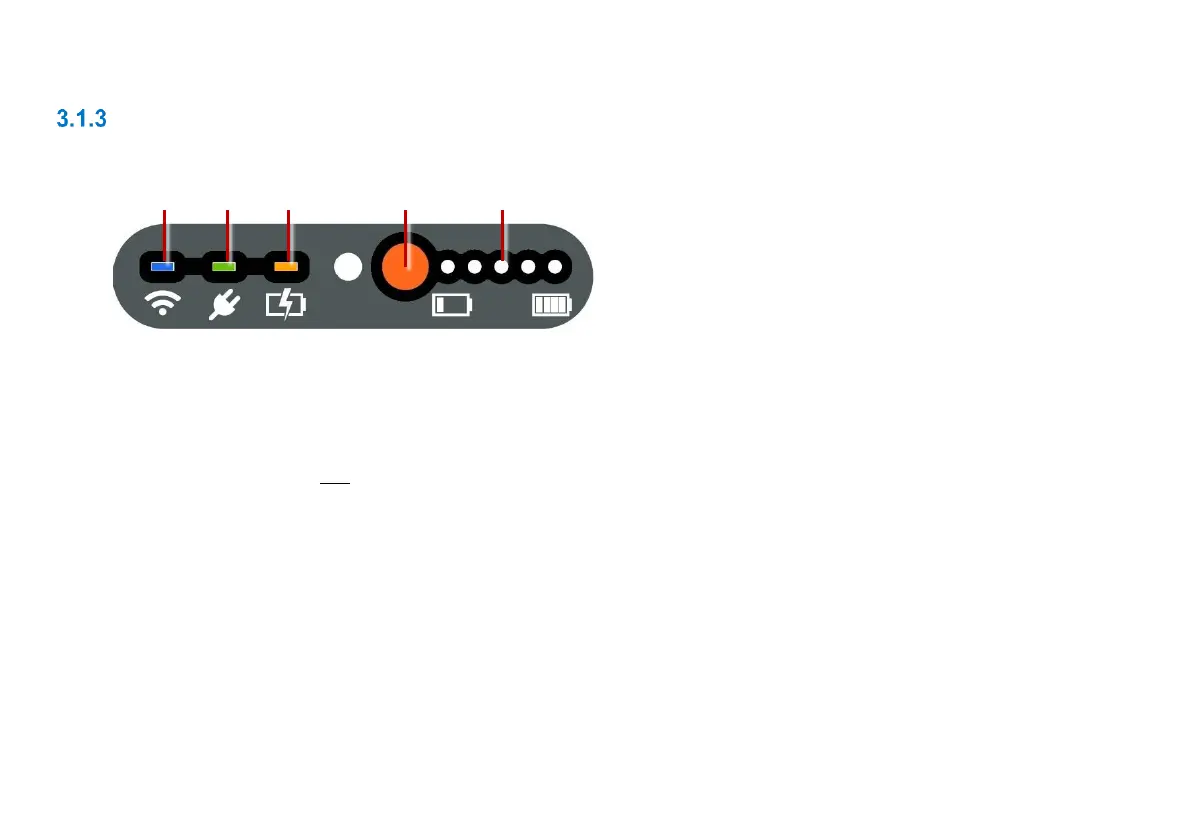
On the back and front of the handle, LEDs show the WiFi, Power and Battery Charge status.
Fig. 3.3: Status indicators on controller handle (front view)
1 WiFi: Lights up when WiFi is enabled on the controller.
Note: This LED indicates only that WiFi is enabled and the controller can detect available WiFi
networks. It does not indicate that the controller is connected to the internet!
2 Power: Lights up when the controller is powered on (green).
3 Battery charge: Lights up while battery charging is underway (amber). When the battery is fully
charged, the LED changes to green.
Note: Also indicates the controller is connected to an external power supply (mains or vehicle).
4 Battery check button: Press to check the battery level.
5 Charge status lights: When the battery check button is pressed, these lights show the battery level.



 To Next Page