12 of 42
ISSUED: 03-08-07 SHEET #: 095-9264-1
Attaching Adapter Plate to Screen with VESA
®
Mounting Pattern
4
Mounting Patterns
VESA
®
200 x 100
VESA
®
200 x 200
VESA
®
100 x 100
VESA
®
200 x 100 VESA
®
200 x 200
VESA
®
100 x 100
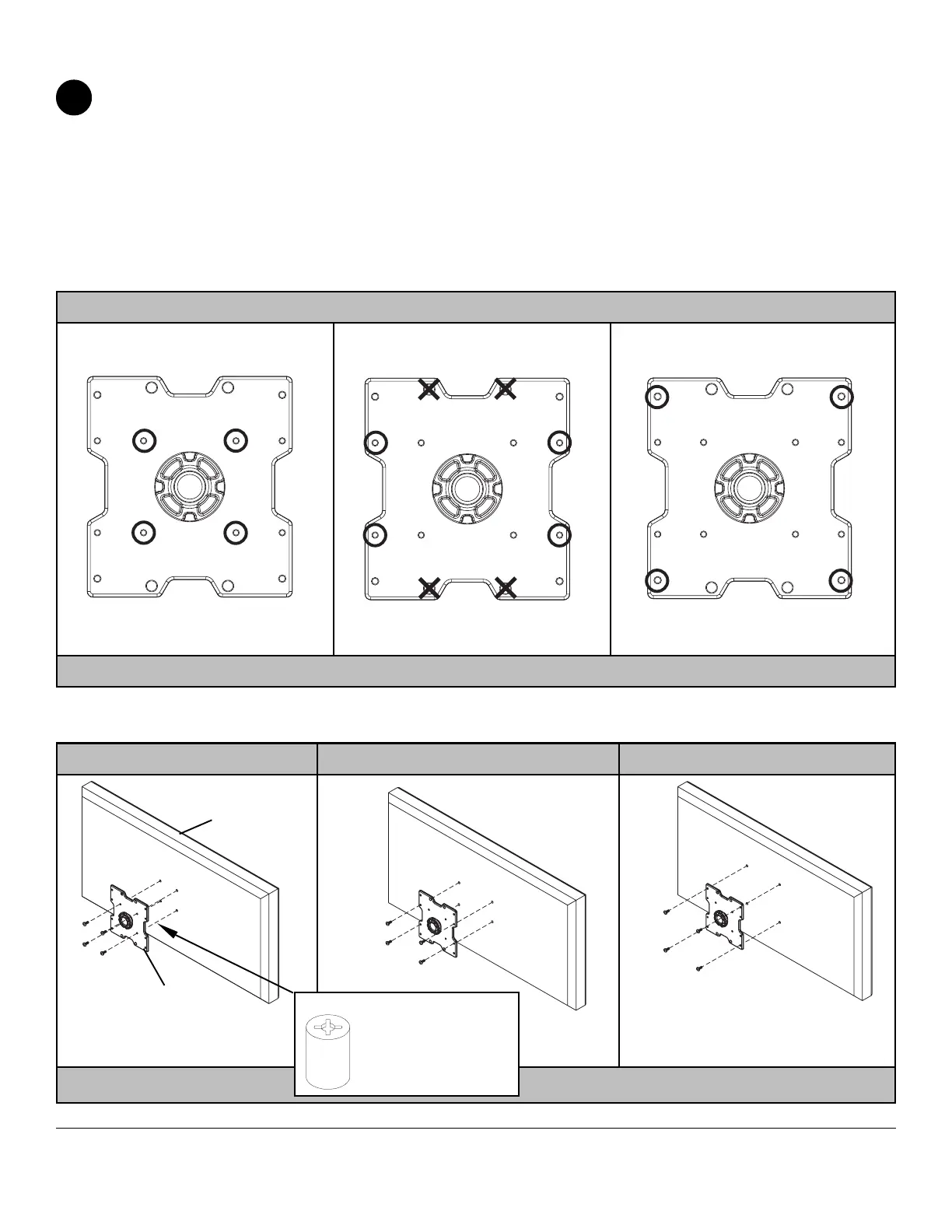
Choose hole pattern as shown in detail 4 for VESA mounting pattern. Begin with the shortest length screw, hand thread
through adapter plate into screen as shown in detail 5. Screw must make at least three full turns into the mounting hole
and fit snug into place. Do not over tighten. If screw cannot make three full turns into the screen, select a longer length
screw from the fastener pack. Repeat for remaining mounting holes. Securely tighten screws.
NOTE: Spacers may not be used, depending upon the type of screen.
If you have any questions, please call Peerless customer care at 1-800-865-2112. Visit our website at
www.peerlessmounts.com/unl to determine the correct fasteners to use for your particular screen.
NOTE: For screens with a hole
pattern in a pocket,
spacers go between
adapter plate and
screen.
ADAPTER
PLATE
SCREEN
DETAIL 4
DETAIL 5


 To Next Page