98
4
Menu Reference
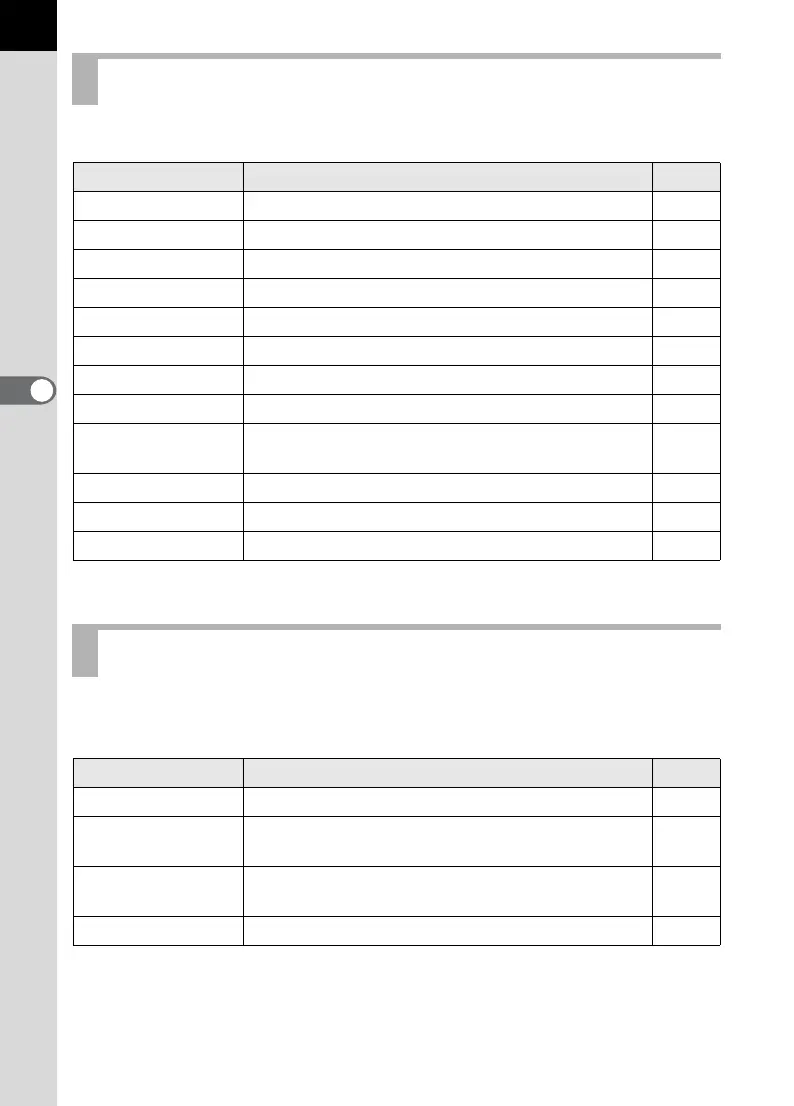
Perform settings related to capturing in the [A Rec. Mode] menu.
Perform settings related to playback and editing images in the
[Q Playback] menu.
[A Rec. Mode] Menu Setting Items
Item Function Page
Image Tone Set the color tone of pictures. p.108
Recorded Pixels Set the recording size of images. p.109
Quality Level Set the image quality. p.110
Saturation Set the color saturation. p.111
Sharpness Make the image outlines sharp or soft. p.111
Contrast Set the image contrast. p.111
Instant Review Set the Instant Review time. p.170
Auto Bracket Set Auto Bracket shooting. p.145
AE Metering
Choose the part of the screen to use for measuring
brightness and determining exposure.
p.130
Focusing Area Change the area on which the autofocus focuses. p.121
AF Mode Choose the autofocus mode. p.122
Flash Exp. Comp. Adjust the amount of flash discharged. p.146
[Q Playback] Menu Setting Items
Item Function Page
Plybk dsply mthd Set capturing information to show during playback. p.160
Bright Portion
Set to display bright portion warning during Instant
Review or Playback.
p.160
Digital Filter
Edit captured images to black and white or sepia
tint, or add softening and slimming effects.
p.71
Slideshow Play back recorded images one after another. p.68


 To Next Page
 Loading...