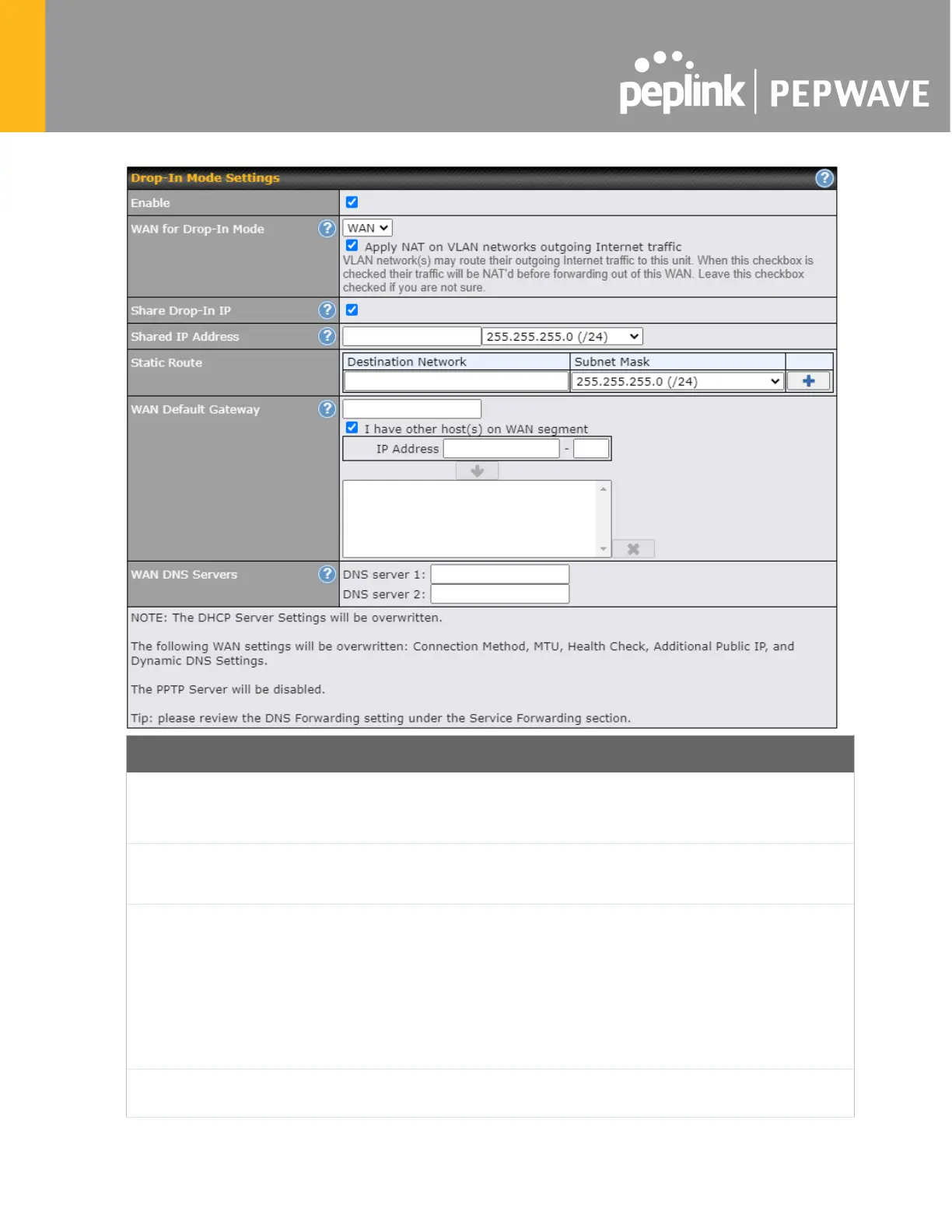
Enable
Drop-
in mode eases the installation of the Pepwave MAX on a live network between
the existing firewall and router, such that no configuration changes are required on
existing equipment. Check the box to enable the drop-in mode feature.
In Mode
Select the WAN port to be used for drop-in mode. If WAN
availability feature will be disabled automatically.
Shared Drop-In
IP
A
When this option is enabled, the passthrough IP address will be used to connect to
WAN hosts (email not
ification, remote syslog, etc.). The MAX will listen for this IP
address when WAN hosts access services provided by the MAX (web admin access
from the WAN, DNS server requests, etc.).
To connect to hosts on the LAN (email notification, remote syslog, etc.)
, the default
gateway address will be used. The MAX will listen for this IP address when LAN
hosts access services provided by the MAX (web admin access from the WAN, DNS
proxy, etc.).
Shared IP
Access to this IP address will be passed through to
the LAN port if this device is not
serving the service being accessed. The shared IP address will be used in








 To Next Page