7.5.1 Dixell Controller: Reset Factory Parameter
Settings
• Contact Perlick.
7.5.2 Eliwell Controller: Reset Factory
Parameter Settings
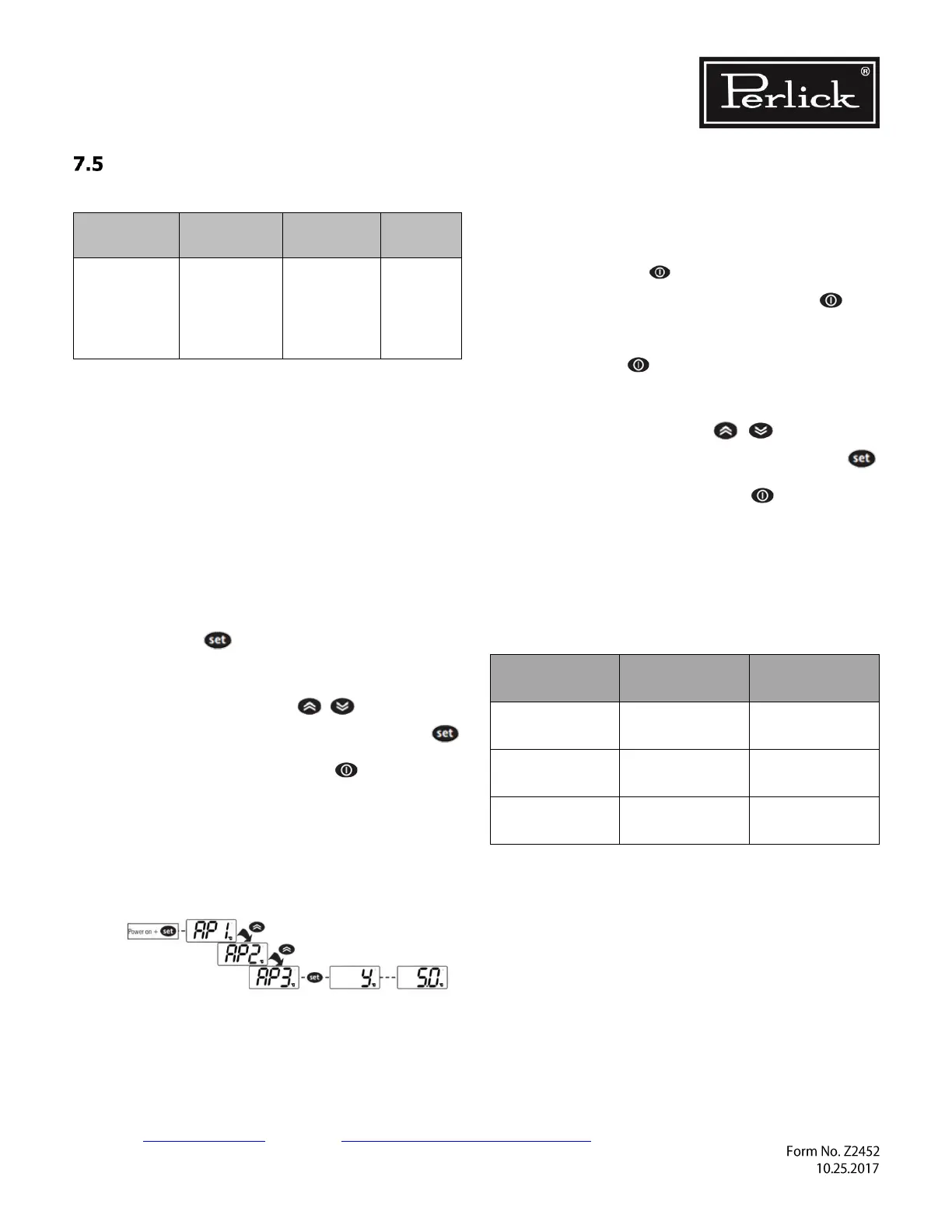
LOADING DEFAULT APPLICATIONS
The procedure used to load one of the default
applications is:
• When the instrument switches on, press and
hold the key: the label AP1 will
appear;
• Scroll though the various applications (AP1-
AP2-AP3) using the keys;
• Select the desired application using the
key (AP3 in the example) or cancel the
procedure by pressing the key or
alternatively wait for the timeout;
• If the operation is successful, the display will
show y, otherwise n will appear;
• After a few seconds the instrument will
return to the main display.
LOADING APPLICATIONS WHEN EXITING
STAND-BY MODE
The procedure for loading one of the preset
applications when exiting stand-by mode is:
• Set the instrument in stand-by mode by
pressing the button for time H02;
• Exit stand-by mode by pressing the
button for time H02;
• Within 10 seconds of exiting stand-by mode,
press the button for time H02: AP1
label will appear;
• Scroll through the various applications (AP1-
AP2-AP3) using the keys;
• Select the desired application using the
key (AP3 in the example) or cancel the
procedure by pressing the key or
alternatively wait for the timeout;
• If the operation is successful, the display will
show y, otherwise n will appear;
• After a few seconds the instrument will
return to the main display.



 To Next Page