65
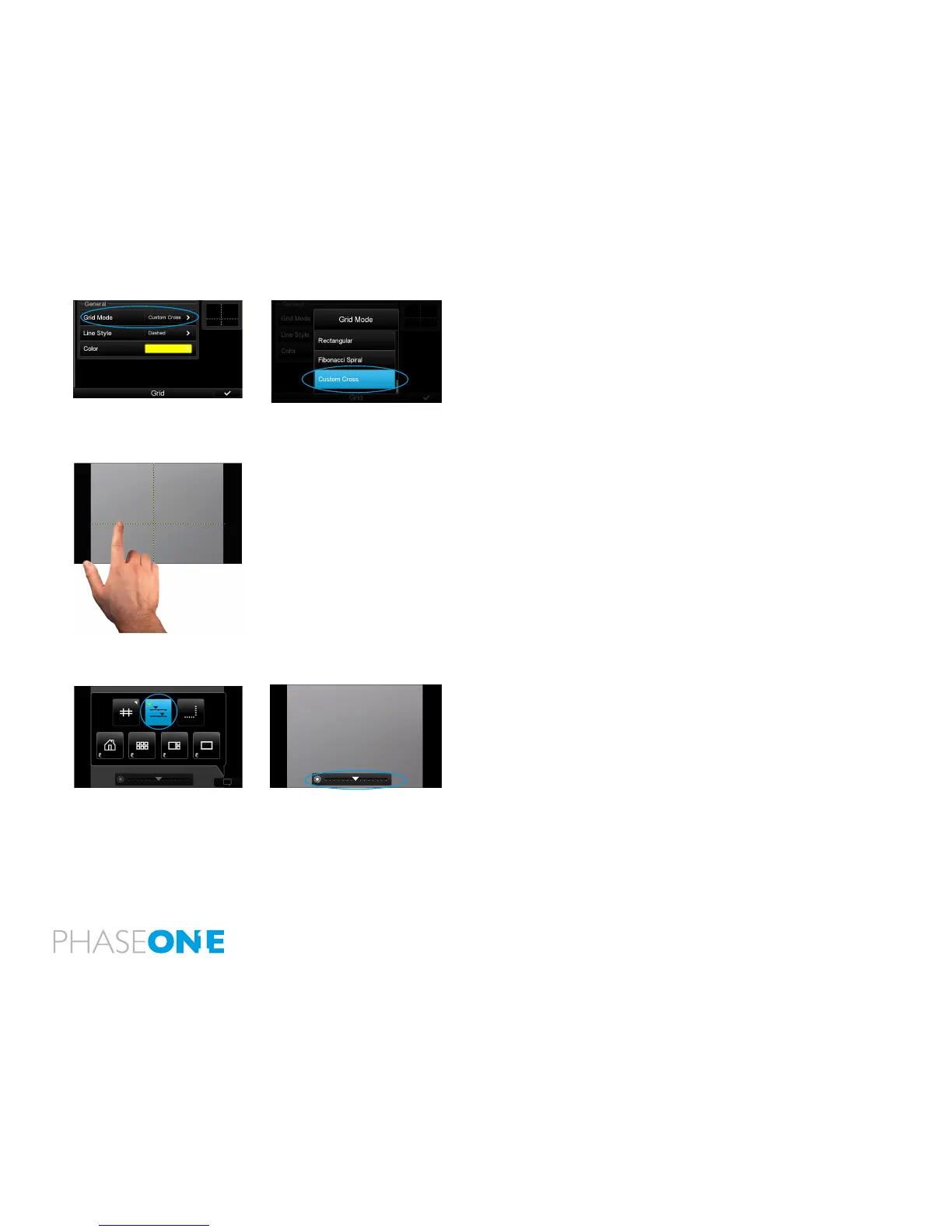
Select the new grid option “Custom Cross”
1. In the Grid Mode dialog scroll down and select “Custom Cross”
Moving Custom Cross lines
When Custom Cross is chosen, the grid lines can be individually
selected and moved around.
1. Press and hold on the grid line you want to move (you will get a
conrmation beep).
2. The grid line will ash, indicating that it can be moved around.
3. Alternatively, both grid lines can be selected and moved together.
Press and hold the cross-point until both grid lines start to ash. Move
the cross-point to the desired position.
4. When you are nished setting the line, tap on another area of the
screen and the line locks itself
5. Or, if left without holding, the line will lock itself after a few seconds
of inactivity.
Brightness levels in Live View
The screen’s brightness is automatically adjusted to the ambient light
levels. Even in low-light conditions, the brightness is modied to a
usable level.
Manual adjustment of the brightness level is also supported.
1. From Inside Live view, click on the contextual menu.
2. Click on the top center button in the contextual pop-up.
3. A Brightness slider will show in the bottom of the Live View.
4. The Brightness can be adjusted by moving the indicator mark to the
right or to the left on the slider.



 To Next Page