6 EN
b
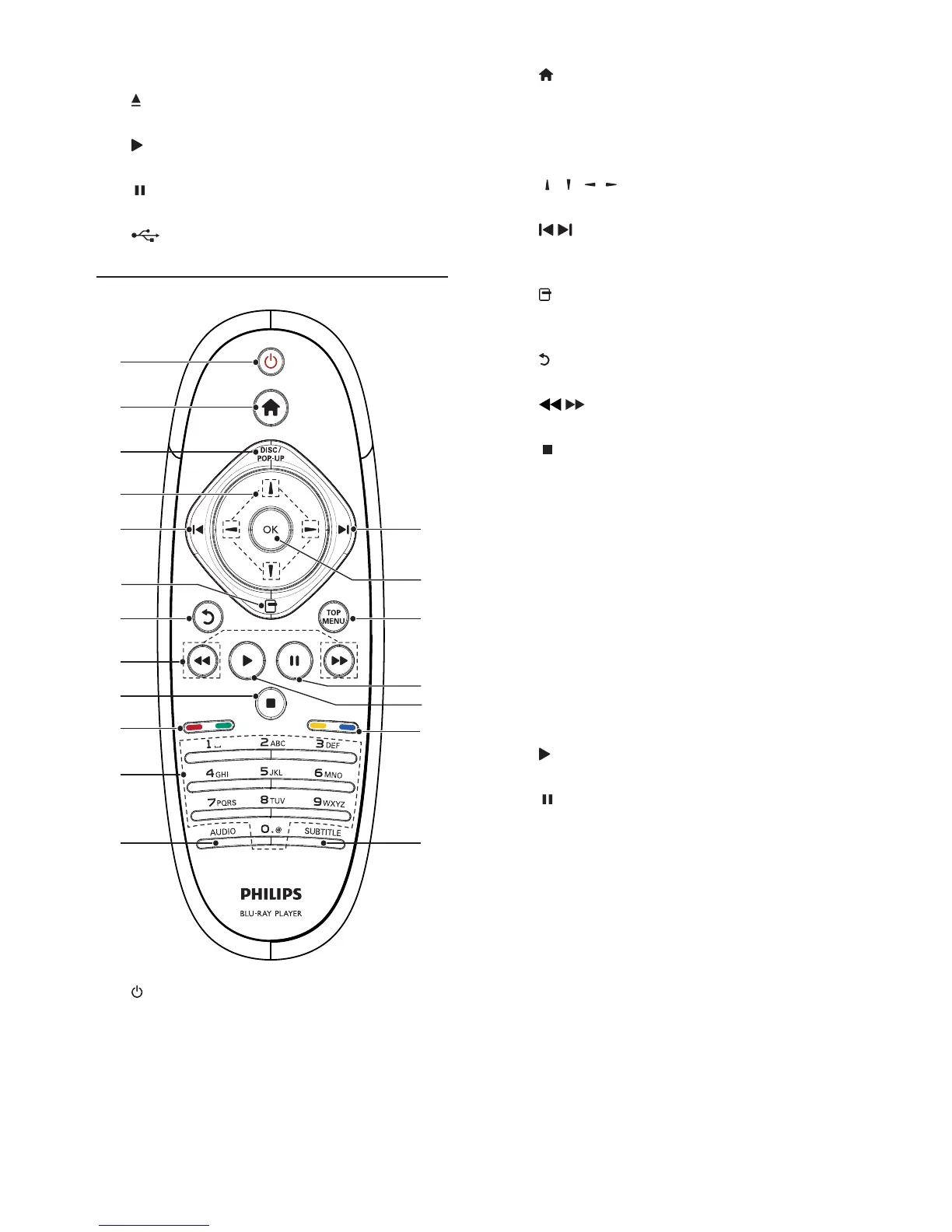
Access the home menu of this player.
c DISC/POP-UP
BD: Access or exit the pop-up menu.
DVD: Access or exit the disc menu.
d
/ / /
Navigate through the menus.
e
/
Skip to the previous or next title, chapter,
or track.
f
Access options for the current activity or
selection.
g
Return to a previous display menu.
h
/
Search backward or forward.
i
Stop play.
Press and hold to eject the disc.
j Color buttons
BD: Select tasks or options.
k Alphanumeric buttons
Select an item to play.
Enter values.
Enter letters via SMS style entry.
l AUDIO
Select an audio language or channel on
a disc.
m SUBTITLE
Select a subtitle language on a disc.
n
Start or resume play.
o
Pause play.
Move the paused picture forward frame
by frame .
p TOP MENU
BD: Display the top menu.
DVD: Display the title menu.
q OK
d Disc slot
e
Eject a disc.
f
Start or resume play.
g
Pause play.
h
jack
Connect a USB device.
Remote control
a
Turn on this player or switch to standby
mode.
When EasyLink is enabled, press and
hold for at least three seconds to turn all
connected HDMI CEC compliant devices
to standby.
a
b
c
d
i
e
f
e
q
p
g
h
o
n
j
k
j
l m


 To Next Page