English
7EN
Tip
If the TV has a DVI connector only, connect via an HDMI/
DVI adaptor. Connect an audio cable for sound output.
If there is a blank TV screen under HDMI connection, on
the remote control press
and then press “731” (numeric
buttons) to recover picture display.
If this player connects to a TV compatible with 1080p or
1080p/24Hz, Philips recommends HDMI category 2 cable,
also known as High Speed HDMI cable, for optimal video
and audio output.
To play the digital video images of a BD-video or DVD-
video via an HDMI connection, it is necessary that both
this player and the display device (or an AV receiver/
HDCP (high-bandwidth digital content protection system).
This connection provides the best picture quality.
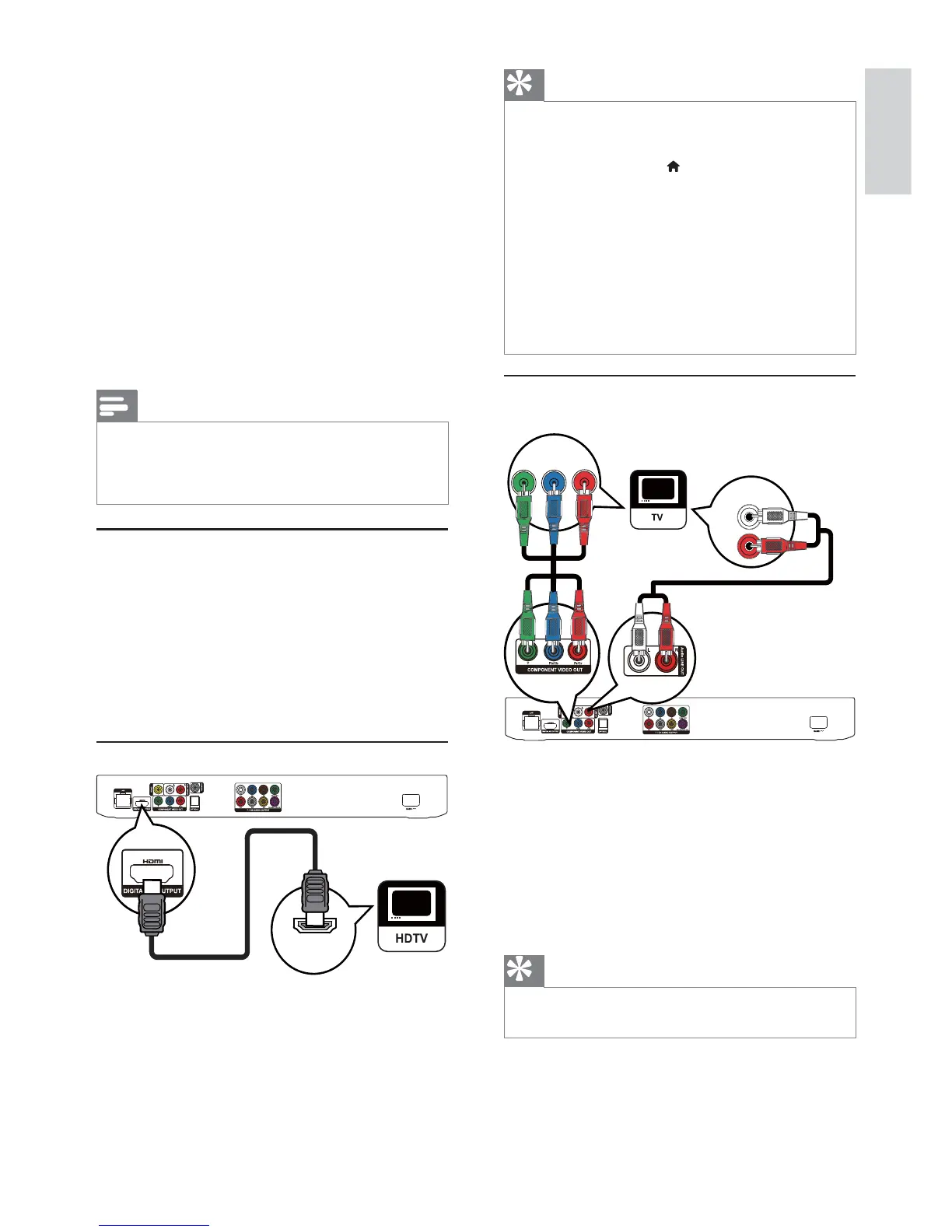
Option 2: Connect to the component
video jacks
1 Connect component video cables (not
supplied) to:
the Y Pb/Cb Pr/Cr jacks on this player.
the COMPONENT VIDEO input jacks
on the TV.
2 Connect audio cables (not supplied) to:
the Audio LINE OUT -L/R jacks on this
player.
the AUDIO input jacks on the TV.
Tip
The component video input jack on the TV might be
labeled as Y Pb Pr or YUV.
PbY
Pr
AUDIO IN
3 Connect
Make the following connections to use this player.
Basic connections:
Video
Audio
Power
Optional connections:
Route audio to other devices
Analog stereo system
USB device
Wired/Wireless network
Note
Refer to the type plate at the back or bottom of the player
Before you make or change any connections, ensure that
all the devices are disconnected from the power outlet.
Connect video/audio cables
Select the best video connection that the TV can
support.
Option 1: Connect to the HDMI jack (for a
HDMI, DVI or HDCP-compliant TV).
Option 2: Connect to the component video
jacks (for a standard TV or Progressive Scan TV).
Option 3: Connect to the composite video
jack (for a standard TV).
Option 1: Connect to the HDMI jack
1 Connect an HDMI cable (not supplied) to:
the HDMI jack on this player.
the HDMI input jack on the TV.
HDMI IN


 To Next Page