>
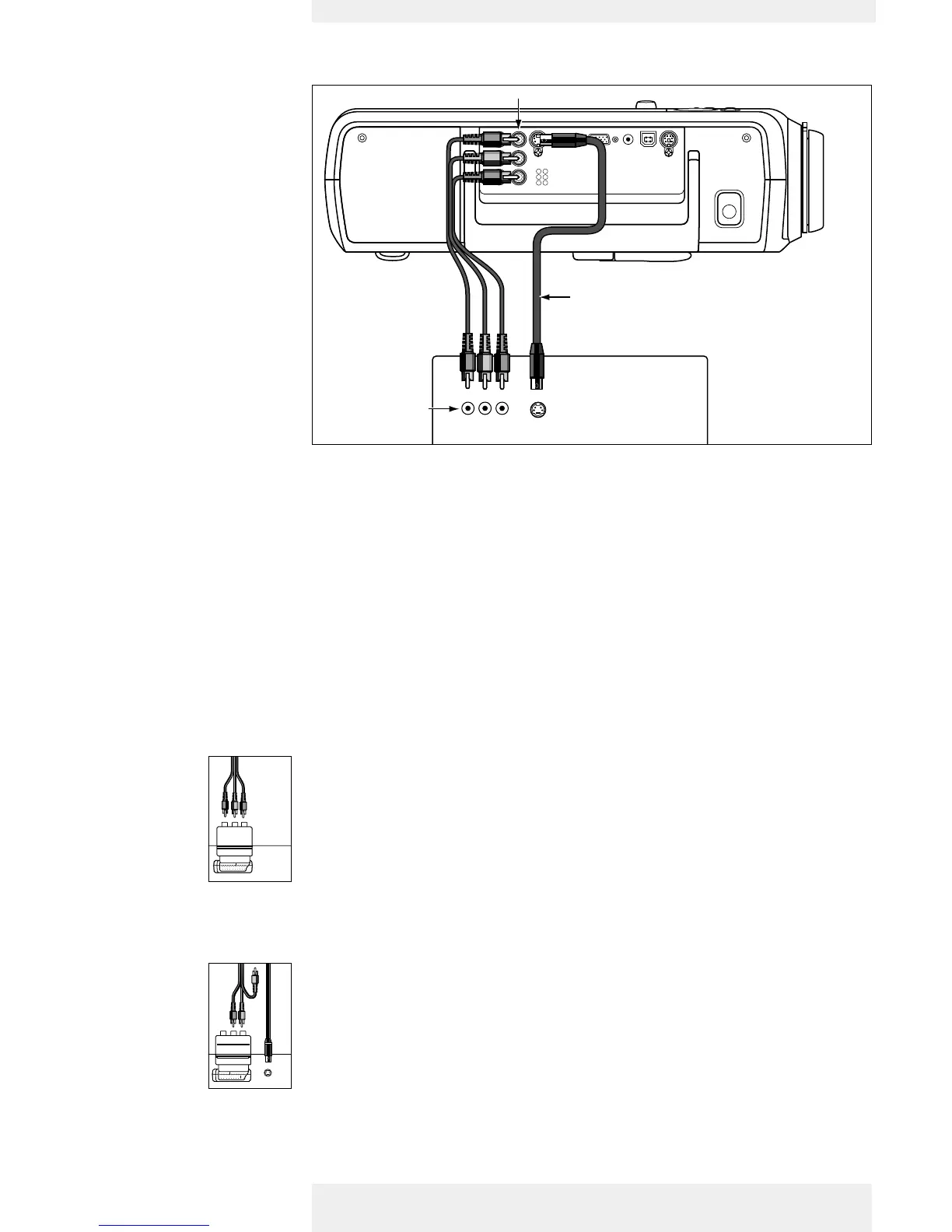
1 Connect the Video (out) socket of a VCR, Laser Disc player, video camera or TV to the
Video (in) socket of the projector.
For this, use the video/audio connection cable (1a) supplied.
2 Connect the Audio out L/R sockets of the VCR, Laser Disc player, video camera or TV to
the Audio (in) L/R sockets of the projector.
For this, use the audio/video connection cable supplied (1b).
1 Connect the S-Video (out) socket of a S-VHS video recorder, Laser Disc player, video
camera or TV to the S-Video (in) socket of the projector.
For this, use optional S-Video connection cable supplied (2).
2 Connect the Audio out L/R sockets of the S-VHS video recorder, Laser Disc player, video
camera or TV to the Audio (in) L/R sockets of the projector.
For this, use audio/video connection cable supplied (1b).
CVBS
1 Connect the Scart/RCA Audio Video adapter supplied to the Scart connector of the VCR,
Laser Disc player, video camera or TV.
2 Plug the video/audio connection cable supplied into both the adapter and the Video and
Audio (in) L/R sockets of the projector.
S-VHS
3 Plug the S-Video connection cable supplied into the VCR and the S-Video socket of the
projector.
CVBS
S-VHS
Scart connection
Scart adapter
(not for USA version)
Scart adapter
(not for USA version)
Philips Home Cinema Projector
English User guide Garbo 12
4. Installation












 To Next Page