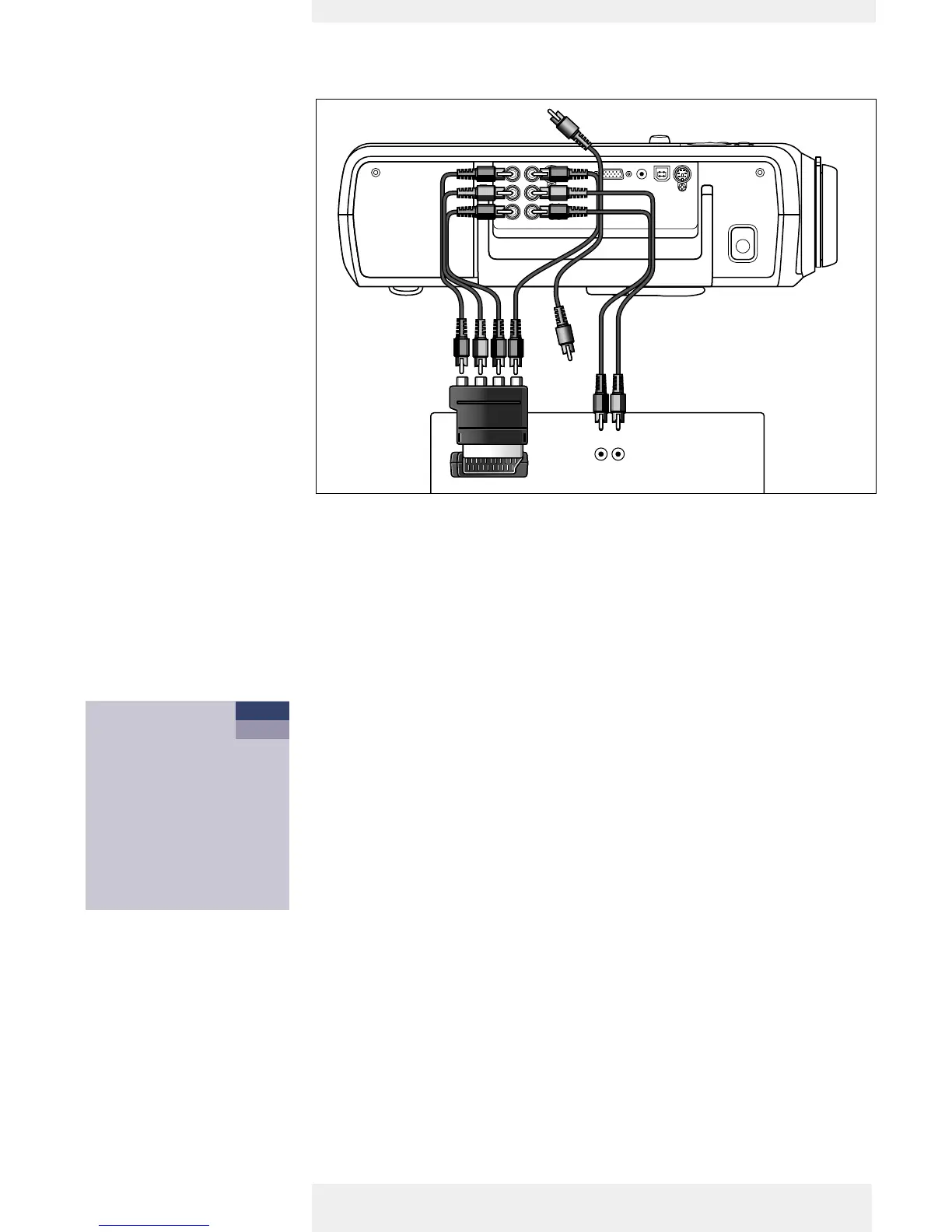
<
RGBS
1 Connect the Scart/RCA Component Video adapter (1) to the Scart connector of your
Component- or HDTV-video equipment
2 Connect the Component in sockets of the projector to the R, G and B outputs of the
adapter.
For this, use the audio/video connection cable supplied (2).
3 Connect the Video input of the projector to the Y output of the adapter.
For this, use an optional audio/video connection cable (3).
4 Select ‘Component’ input by pressing the Source button.
–‘Component’ appears on the screen.
5 If required you can connect the Audio out L/R sockets of the Component- or HDTV-video
equipment to the Audio (in) L/R sockets of the projector.
For this, use an optional audio connection cable (4).
– Audio information from the Component- or HDTV-video equipment will be played via the
projector speaker.
Scart connection
Philips Home Cinema Projector English User guide Garbo 14
4. Installation












 To Next Page