Lern bout the bttery sttus
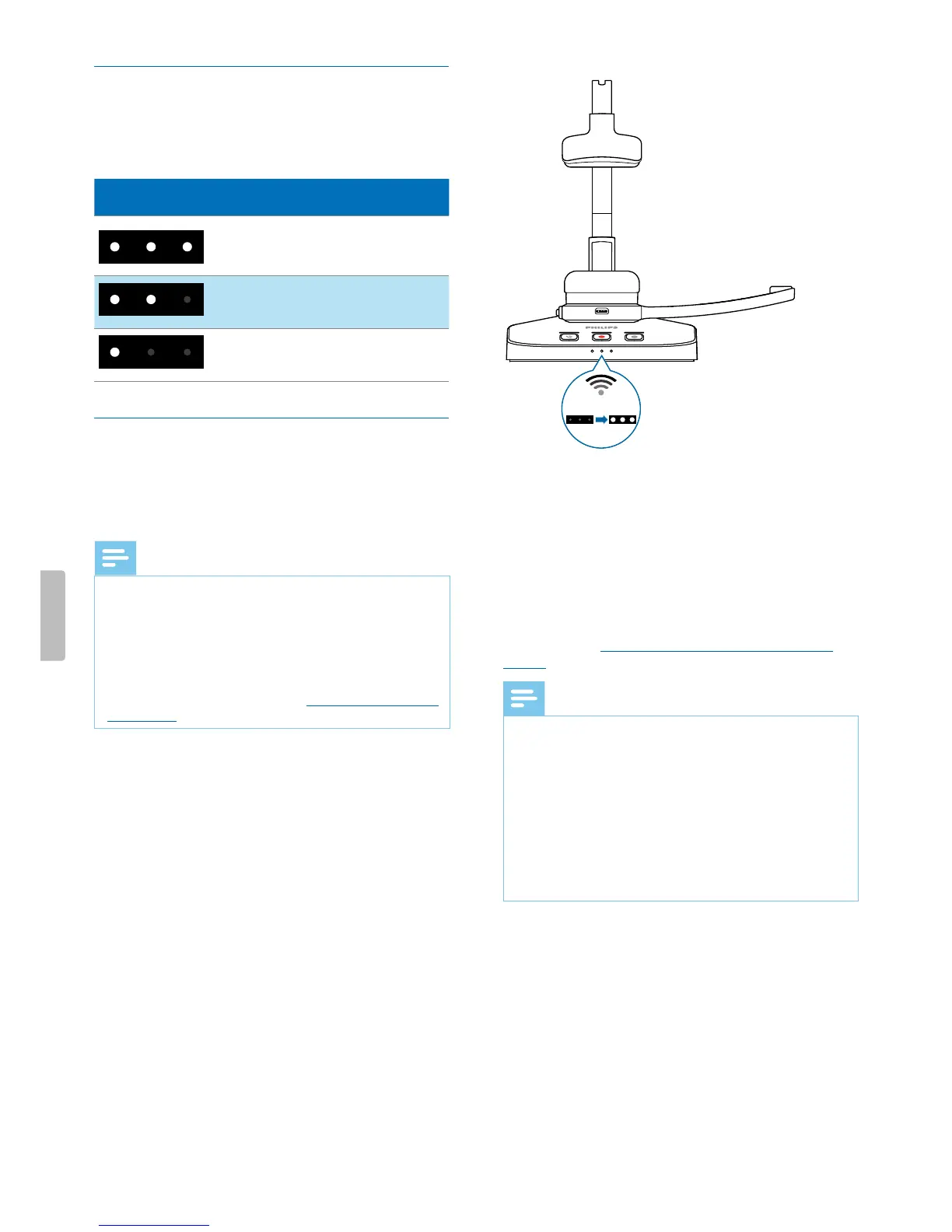
When the SpeechOne is removed from the docking
sttion, the bttery LEDs on the docking sttion indicte
the bttery sttus.
Bttery LED Bttery sttus
more thn 7 hours
recording time left
7 hours or less recording
time left
2.5 hours or less recording
time left
Piring
Once you hve connected your SpeechOne to docking
sttion, you cn dictte wirelessly nd use the dicttion
hedset on dierent worksttions without ny further
piring eort.
Note
• If you use severl docking sttions, mke sure to keep
minimum distnce of 50 cm (18 inches) between
ech docking sttion. If the distnce is less thn 50
cm (18 inches), there might be interferences between
the docking sttions.
• Mke sure tht the distnce between the SpeechOne
nd the docking sttion is not more thn 5 meters (16
feet). For more informtion, see Lern bout wireless
technology.
Pir the SpeechOne nd the docking sttion
• Put the SpeechOne onto the docking sttion for bout
4 seconds.
X The piring process strts.
X When piring is nished, the bttery LEDs on
the docking sttion light up for one second nd
disply the bttery sttus fterwrds.
4 sec
Chnge pired devices
If your desired docking sttion is lredy connected to
dierent SpeechOne, the bttery LEDs on this docking
sttion disply the bttery sttus of the connected
hedset.
To disconnect this existing connection nd pir your own
SpeechOne with the desired docking sttion, proceed
s described in Pir the SpeechOne nd the docking
sttion.
Note
• Plese dierentite between the following two
situtions:
• If the wireless connection between the SpeechOne
nd the docking sttion is lost, ll three button LEDs
on the docking sttion glow ornge nd the sttus
LED on the hedset glows red.
• If there is problem with the USB connection of the
docking sttion (e.g. the USB cble is connected to
the wrong USB port on the docking sttion), ll three
button LEDs on the docking sttion glow ornge nd
the sttus LED on the hedset glows ornge.
11Get started


 To Next Page