Crete recording
Recording nd plybck of dicttions with the
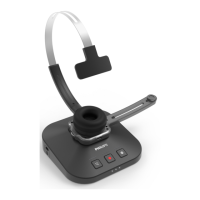
SpeechOne requires dicttion softwre such s Philips
SpeechExec to be instlled on the computer.
For more informtion on recording with the SpeechOne
nd the Philips SpeechExec softwre, downlod the
SpeechExec user mnul t www.philips.com/dicttion.
For more informtion on recording with the remote
control (PSM6500, PSM6800), see Use the remote
control (PSM6500, PSM6800).
Note
• Mke sure tht the distnce between the SpeechOne
nd the docking sttion is not more thn 5 meters (16
feet).
For more informtion, see Going out of rnge.
• Mke sure the docking sttion is connected to your
computer, otherwise recording is not possible.
1
Mke sure the docking sttion is connected to your
computer.
2
To strt recording, press the Record button on the
docking sttion once or press the Hedset button on
the hedset once.
3
To nish recording, press the Record button on the
docking sttion gin or press the Hedset button on
the hedset gin.
Note
• If you receive Skype cll while you re in recording
session nd you ccept the cll, you need to press the
Record button gin fter nishing the cll in order to
continue recording.
Skype clls
Your SpeechOne lso cts s Skype hedset which
you cn use to ccept incoming Skype clls.
When you receive n incoming Skype cll:
X The sttus light strts shing red.
X The LED of the Phone button on the docking
sttion glows green.
To ccept n incoming Skype cll:
• Press the Phone button on the docking sttion once
or
• Press the Hedset button on the hedset once.
X Any ctive recording will be stopped.
X The LEDs of the Phone nd the Do-not-disturb
buttons on the docking sttion, nd the sttus
light glow red.
To end Skype cll:
• Press the Phone button on the docking sttion gin
or
• Press the Hedset button on the hedset gin.
X The LEDs of the Phone nd the Do-not-disturb
buttons on the docking sttion turn o, nd the
sttus light glows green.
To reject Skype cll:
• Press the Phone button on the docking sttion twice
or
• Press the Hedset button on the hedset twice.
Note
• To mute the microphone during Skype cll, move
the microphone boom to n upright position.
• If you receive Skype cll while you re in recording
session nd you ccept the cll, you need to press the
Record button gin fter nishing the cll in order to
continue recording.
15Use your SpeechOne


 To Next Page