8385_en_02 PHOENIX CONTACT 97
A Appendix: service, maintenance, derating, and ambient
conditions
A 1 Error causes and remedies
A 2 Updating the Inline controller firmware
The firmware (integrated software on the Inline controller) can be updated using the Ether-
net interface. Such firmware updates are exclusively used for adding new functions that are
implemented within the scope of continuous product improvement. No firmware update is
required for normal system operation.
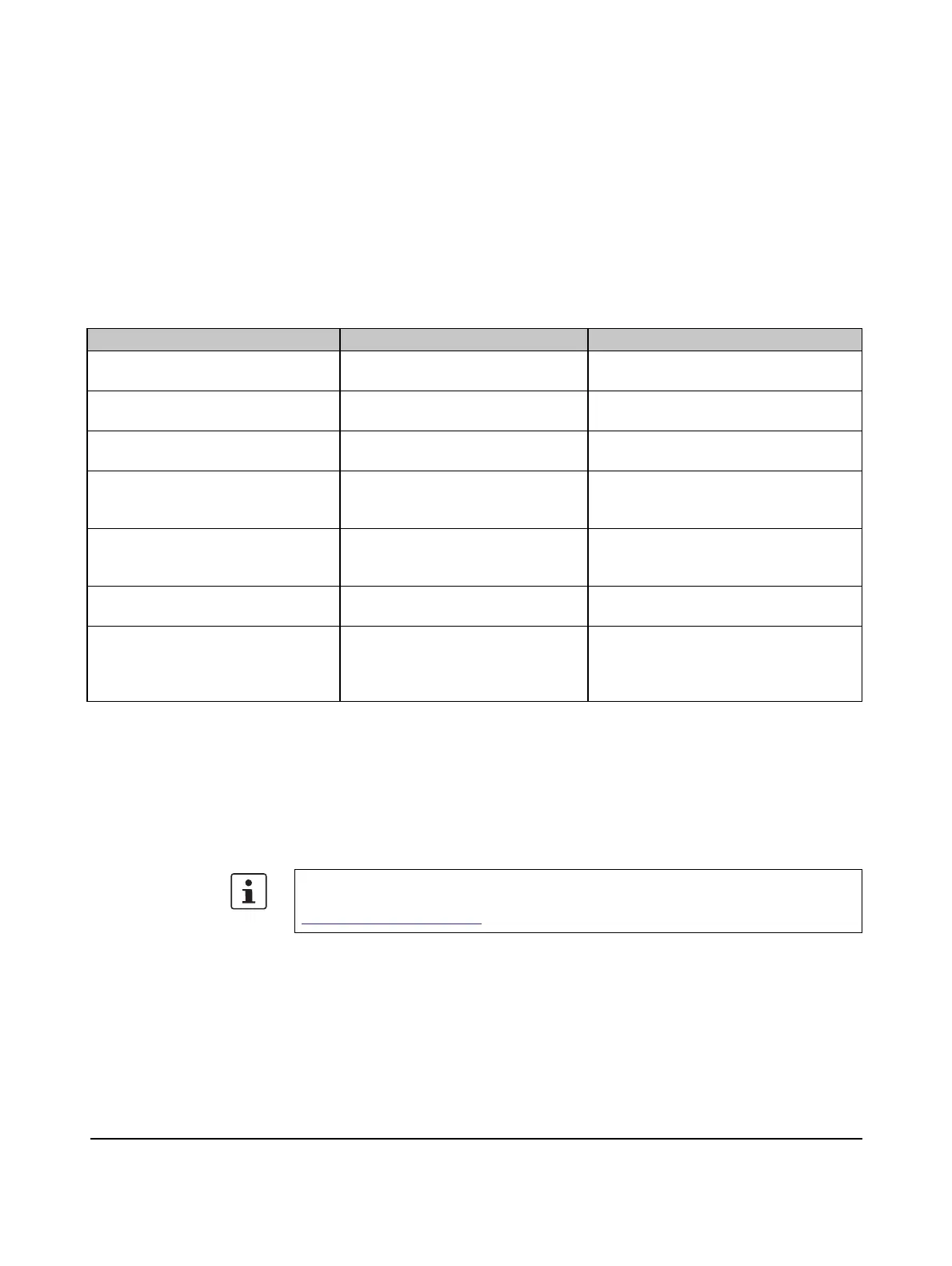
Table A-1 Installation error causes and remedies
Error Cause Remedy
No outputs can be set. The power supply U
S
is not present
(see diagnostics LED).
Connect the power supply.
The devices connected to the Inline
controller cannot be read in.
The power supply U
S
is not present
(see diagnostics LED).
Connect the power supply.
The IEC 61131 program is not run-
ning.
Mode selector switch in STOP posi-
tion.
Set mode selector switch to RUN/PROG
position.
The serial interface is not operating. The connector pin assignment of the
connecting cable or of the connector
adapter used is incorrect.
Use the COM CAB MINI DIN connecting
cable for the Inline controller, with Order
No. 2400127.
The devices on the remote bus can-
not be started up.
The IBS IL 24 RB-T-PAC Inline ter-
minal is not installed directly after the
Inline controller.
Insert the terminal as the first Inline termi-
nal directly next to the Inline controller.
The diagnostics LED of a device is
flashing quickly.
The device has not been assembled
correctly.
Check the connection to the previous
module (bus contacts).
The Inline controller cannot be ad-
dressed via the IP address.
The IP address on the Inline control-
ler has been changed or does not
match the IP settings of the network
devices involved.
Check the IP settings and adapt them to
your application, if necessary (see also
Section “Assigning the IP address for the
controller” on page 45).
To update the firmware, please proceed as described in the “Firmware update ILC
1.../3..., RFC 4...” application note. It can be downloaded at
phoenixcontact.net/products.






 To Next Page