Why is the volume of music too loud on my Phonak ComPilot?
- VvillatimothySep 2, 2025
If the music volume is too loud or quiet, use the volume control of the external device (phone, music player, etc.) to adjust the volume to a comfortable level.

Why is the volume of music too loud on my Phonak ComPilot?
If the music volume is too loud or quiet, use the volume control of the external device (phone, music player, etc.) to adjust the volume to a comfortable level.
Why is my Phonak Hearing Aid's ComPilot operating time reduced?
If the operating time of your ComPilot is reduced, charge it for at least 3 hours the first time you charge it. The battery typically needs several charging cycles to achieve full performance. You can also let a new ComPilot discharge completely three times.
How to fix intermittency during audio transfer via Phonak Hearing Aid ComPilot?
To resolve intermittency during audio transfer, ensure the Bluetooth device is not too far away and is kept in front of you, avoiding placing it in a back pocket. If no device was found, ComPilot will stop searching after 2 minutes, and the intermittency will stop. If you are using a phone connected to other devices such as a PC, disconnect it from those devices.
What to do if my Phonak Hearing Aid ComPilot connection shows unexpected behavior in the car?
If the ComPilot connection to your phone shows unexpected behavior in the car, consider disconnecting the car system from your phone, as the car's Bluetooth system may be connecting to your phone.
What to do if I accepted a call but cannot hear it on my Phonak ComPilot?
If you accept a call through your phone and cannot hear it in your hearing aids, always accept the call by pressing the ComPilot button, don‘t use ComPilot.
What to do if the phone is ringing, the Audio indicator is solid blue but there is no ringing signal through the Phonak Hearing Aids?
If the phone is ringing, the Audio indicator is solid blue but there is no ringing signal through the hearing aids, wear ComPilot correctly around your neck with both neckloop plugs firmly plugged in. Ensure the ring tone is enabled on the phone and hang up the first phone call, then accept the second call.
How to fix Phonak Hearing Aid ComPilot not recognizing a previously paired Bluetooth device?
If your Phonak Hearing Aid ComPilot no longer recognizes a previously paired Bluetooth device: * Switch the ComPilot off and then on again. * Ensure the devices are within 1 meter of each other. * If the ComPilot's memory is full (maximum 8 paired devices), repeat the pairing process for the overwritten device.
Why is my Phonak Hearing Aid ComPilot unresponsive when switching ON?
If your ComPilot is unresponsive, it may be completely discharged; charge it for at least 1 hour. If charging doesn't help, it could be a software problem; unplug any connectors from the ComPilot. You can also try switching the ComPilot OFF and then ON again, or consider resetting it.
What to do if the caller can hear me but I cannot hear the caller on my Phonak ComPilot?
If a caller can hear you, but you cannot hear them, ensure the call is transferred back to ComPilot via the phone menu, as the call may have been transferred to your phone.
What to do if the phone is ringing but there is no ringing signal through Phonak Hearing Aids?
If your phone is ringing, but you're not hearing it through your hearing aids, ensure that Bluetooth is enabled on your phone. If it is, try disabling and then re-enabling Bluetooth on your phone. Also, restart your ComPilot by switching it off and then on again to reactivate the Bluetooth functionality. Make sure ComPilot is selected as the active device in your phone's Bluetooth menu and reduce the distance between your ComPilot and phone.
| Bluetooth | Yes |
|---|---|
| Battery Type | Rechargeable |
| Streaming Time | Up to 8 hours |
| Remote Control | Yes |
| Microphone | Yes |
| Neckloop | Yes |
| Operating Range | Up to 10 meters |
| Audio Input | 3.5mm audio jack |
| Compatibility | Phonak hearing aids |
| Bluetooth Version | Bluetooth 2.1 + EDR |
| Supported Audio Sources | Bluetooth enabled devices, FM |
| Charging Time | Approximately 3 hours |
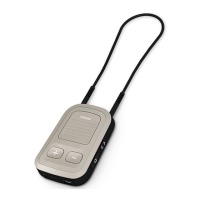
Explains the physical components and indicators of the Phonak ComPilot, including buttons and ports.
Lists the included and optional accessories for the Phonak ComPilot, such as power adapters and microphones.
Instructions for selecting and attaching the correct power adapter for your region.
Steps to charge the ComPilot battery and understand the power indicator lights.
Procedure for powering the ComPilot device on and off using the power switch.
Guide to initiating the Bluetooth pairing process between the ComPilot and other devices.
Correct methods for wearing the ComPilot for optimal functionality and performance.
Procedure to test the audio output and hearing aid connection with the ComPilot.
Instructions for streaming audio using a wired connection to the ComPilot.
Steps for wirelessly streaming audio from Bluetooth-enabled devices to the ComPilot.
Guidance on using the ComPilot for TV audio streaming, recommending specific accessories.
How to adjust the audio volume using the ComPilot's volume control buttons.
Basic information and requirements for using the ComPilot for phone call functionality.
How to handle incoming calls, including ringtones and caller identification features.
Steps to initiate and make phone calls using the ComPilot and connected phone.
Procedure for terminating phone calls using the ComPilot's main button.
Details on advanced call management features like redialing, voice dial, and call holding.
Instructions for connecting and using an optional external microphone with the ComPilot.
How to lock the main button to prevent accidental activation of functions.
Describes different methods for wearing the ComPilot for various uses, including standard and handheld.
How to handle and switch between multiple audio sources connected to the ComPilot.
Procedure for resetting the ComPilot device to its default settings if it becomes unresponsive.
Explanation of the meaning of different indicator light states on the ComPilot for status feedback.
Basic explanation of Bluetooth technology and its role in wireless communication with the ComPilot.
Step-by-step guide for pairing and connecting Bluetooth-enabled devices to the ComPilot.
Details on how the ComPilot announces the names of incoming callers via speech.
Explanation of spoken status messages provided by the ComPilot for alerts and operational feedback.
Specific warnings related to potential hazards and risks associated with the ComPilot device.
Information regarding safe handling, usage, and precautions for the ComPilot product.
Additional important information related to product usage, operating range, and environmental factors.
Details about the local warranty terms obtained at the point of purchase.
Information on the one-year limited international warranty provided by Phonak.
Specifies conditions and limitations that are not covered by the product warranty.