42
IS16
English
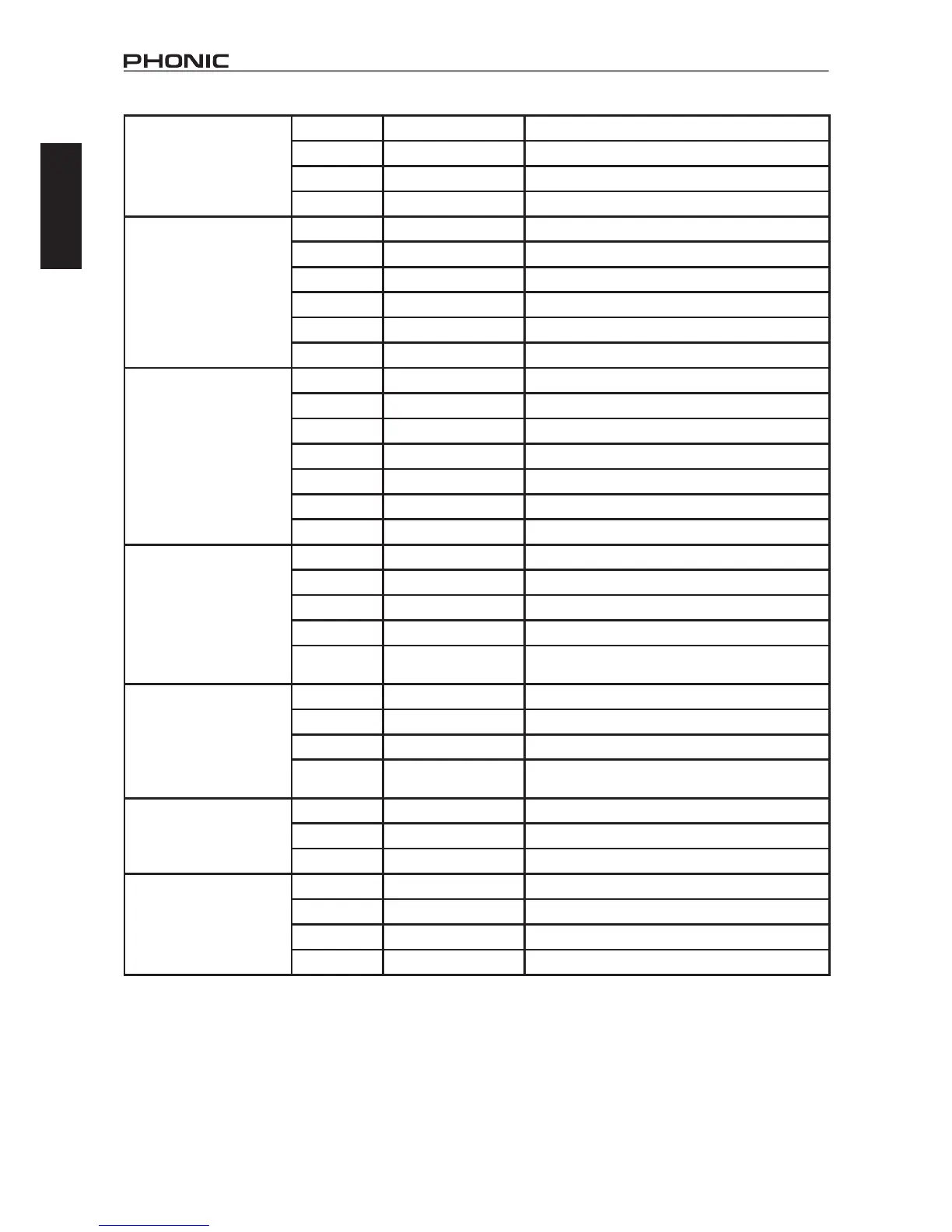
Tap Delay Feedback 0 to 99% Adjuststhefeedbackgainofinputsignal
Tap Button 1 ms to 5 sec Pushtwicetoadjustthetapdelaytime
LPF 20 Hz to 20 kHz Adjuststhelowpasslterfrequencyofthesignal
HPF 20 Hz to 20 kHz Adjustthehighpasslterfrequencyofthesignal
Chorus L.F.O. 0.1 to 20 Hz Lowfrequencyoscillation
Phase 0 to 180∘ Modulationphaseadjustment
Mode Type Sine / Triangle Determines the modulation waveform
Depth 0 to 100% Chorus depth/density
Pre Delay 0 ms to 1 sec Early delay before the chorus effect begins
LPF 20 Hz to 20 kHz Lowpassltercut-offfrequency
Flanger L.F.O. 0.1 to 20 Hz Lowfrequencyoscillation
Phase 0 to 180∘ Modulationphaseadjustment
Wave Sine / Triangle Determines the modulation waveform
Depth 0 to 100% Modulation depth
Pre Delay 0 ms to 1 sec Earlydelaybeforetheangereffectbegins
LPF 20 Hz to 20 kHz Determinestheangerlowpassltercut-offfrequency
FB 0 to 99% Determinesthefeedbackgainoftheangereffect
Phaser L.F.O. 0.1 to 20 Hz Lowfrequencyoscillation
Wave Sine / Triangle Determines the modulation waveform
Depth 0 to 100% AdjuststhedepthofthePhasereffect
Frequency 20 Hz to 20 kHz Determines the modulation frequency of the Phaser
Stage Number 2,4,6,8 Determinesthenumberofall-passlters,orstages,in
the Phaser effect
Vibrato L.F.O. 0.1 to 20 Hz Lowfrequencyoscillation
Wave Sine / Triangle Modulation waveform of the Vibrato effect
Depth 0 to 100% Determines the depth of the Vibrato effect
Frequency 20 Hz to 20 kHz Determines the modulation frequency of the Vibrato ef-
fect
Tremolo L.F.O. 0.1 to 20 Hz Lowfrequencyoscillation
Wave Sine / Triangle Determines the modulation waveform
Depth 0 to 100% AdjuststhedepthoftheTremoloEffect
Auto Pan L.F.O. 0.1 to 20 Hz Lowfrequencyoscillation
Mode Sine / Triangle Determines the modulation waveform
Depth 0 to 100% AdjuststhedepthoftheAutoPaneffect
Way
LR/L R / R L
Determines the direction of the panning effect
Note: Reverb Effects are found on EFFECT 1 only.



 To Next Page