© PSI (Photon Systems Instruments), spol. s r. o.
35
9 USB CONNECTION
All FluorPens come with USB cable that is required for charging of the Li battery and can be also used for data transfer.
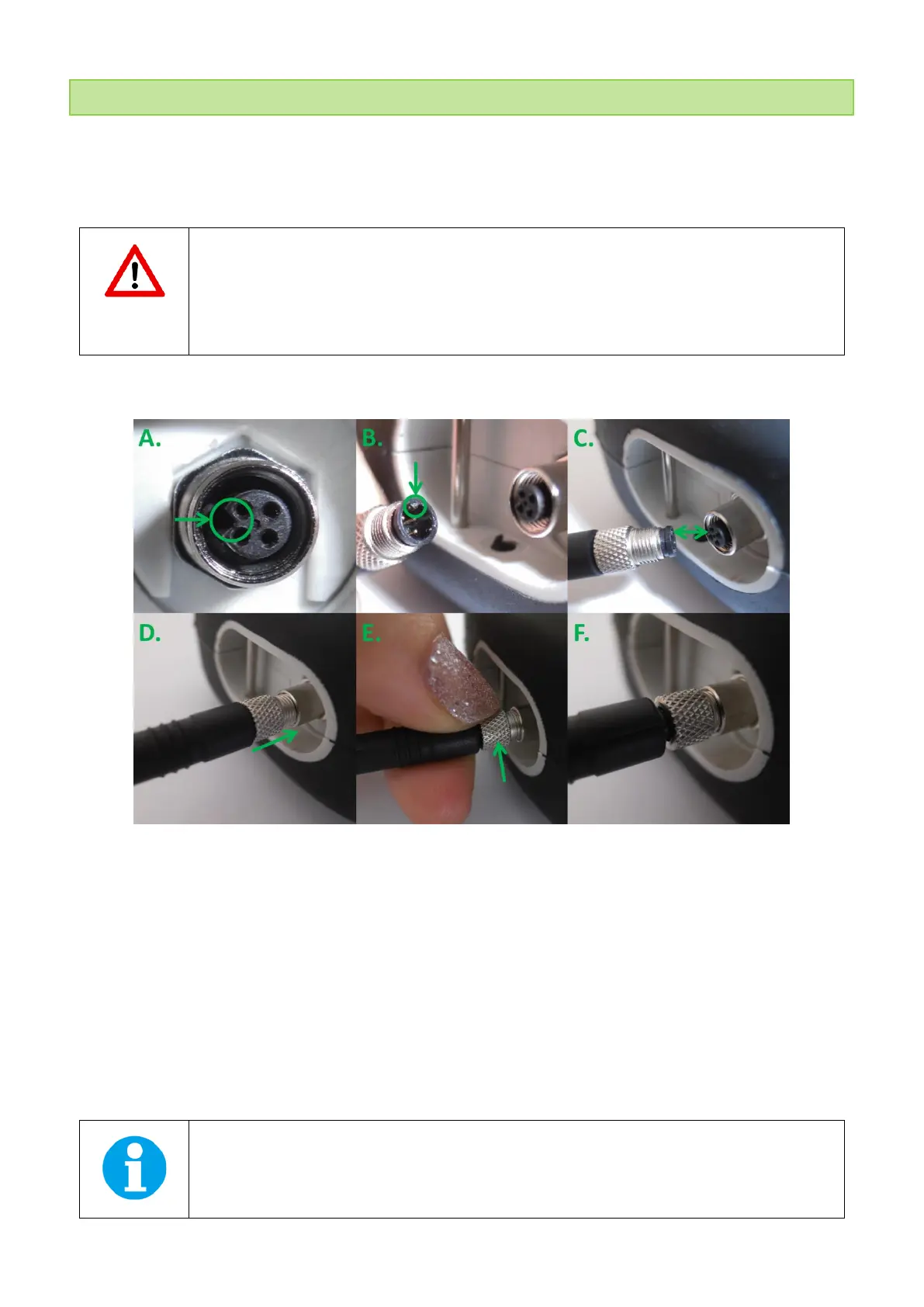
To connect the USB cable with the FluorPen device Follow the picture instructions below. Please note that a lock-in
system is used to secure the USB cable to the FluorPen and extreme caution has to be used when setting up the
connection. Otherwise damage to the cable pins may occur.
When connecting the USB cable take extra caution to prevent damage to cable connector pins.
Ensure that the cable is oriented correctly as shown in the photos below so the circled portion of the
plug and the cable in photo A and B are perfectly lined up prior to pushing the cable into the device
plug. Once this connection is achieved the cable may be secured in position by turning the metal
cover of the cable and locking the cable in position.
To connect FluorPen with your computer please follow steps below in (Fig. 12).
Fig. 12 How to connect FluorPen with USB cable.
A) Connector on FluorPen device. B) Portion of the USB cable with pins. C – E) Position the cable horizontally, plug in the
inlet and screw the securing screw. F) Correct connection of the USB cable and Pen device.
Once the cable is securely attached to the FluorPen device the other end may be Connected to the USB port on a PC. The
FluorPen switches ON automatically after connecting the cable to the PC. For USB connection to be successful the USB
driver and the Fluor Pen software, included on the USB disk, need to be first installed on the PC. Once the USB driver is
installed the Device Manager in Windows will list the USB serial port in the device tree. In case this driver installation is not
successful the driver may be downloaded from PSI websites www.psi.cz. When the driver is installed correctly the
connection between the FluorPen and the PC computer is initiated by selecting in the software on the computer Setup >
Device ID.
For more information about FluorPen software see chapter 11.


 To Next Page