© PSI (Photon Systems Instruments), spol. s r. o.
47
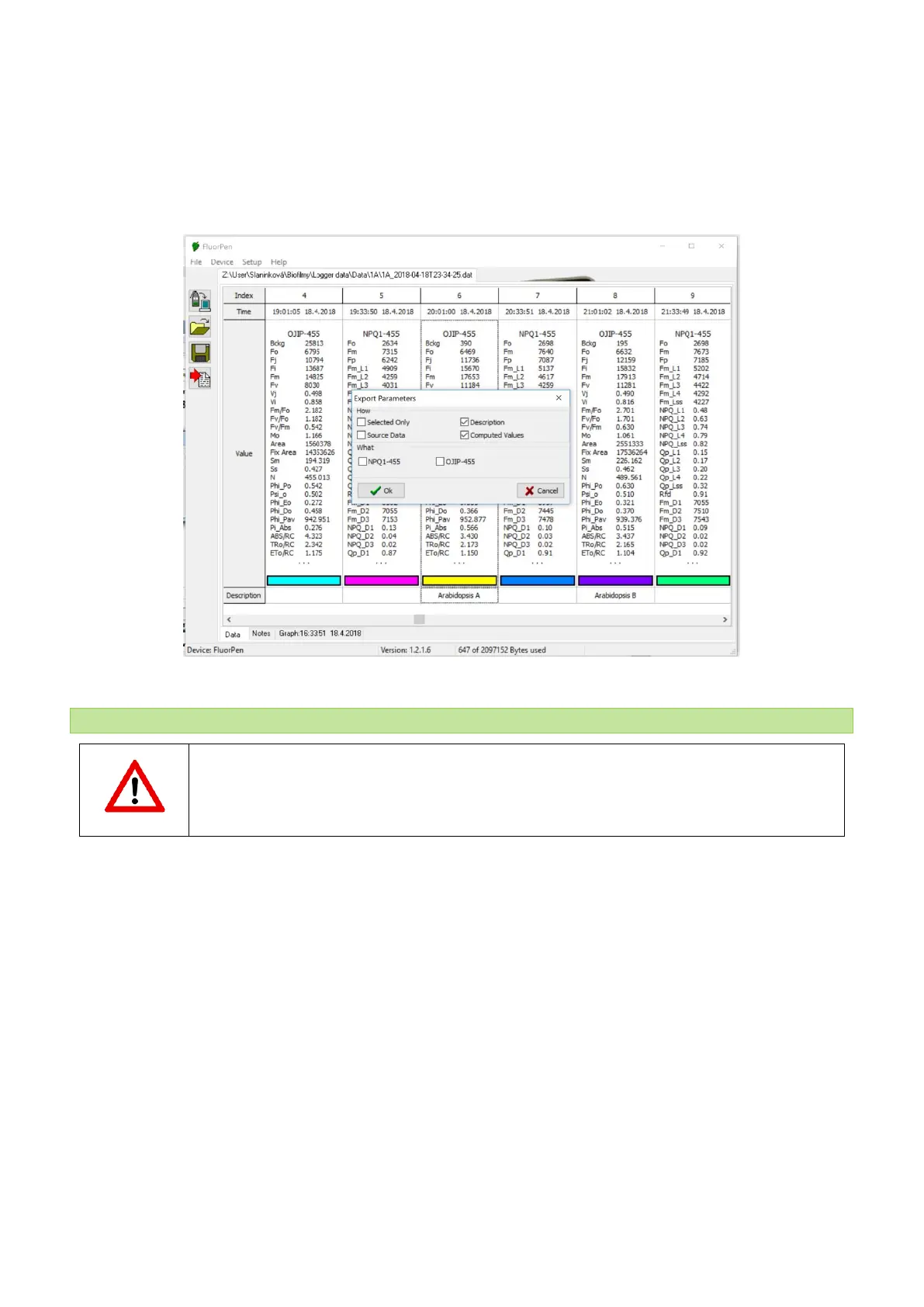
6. To export data from FluorPen software select File > Export or Export icon. Select the type of data to export (Ft,
QY, OJIP…) (Fig. 23).
Selected only – exports only one measurement that is selected by mouse, otherwise it will export everything.
Source data – exports raw data, in case of OJIP: points of the curve.
Description – exports the data description if any.
Computed values – export calculated data, in case of OJIP: F
0
, F
i
, F
j
...
Fig. 23 Export data window.
11.4 FIRMWA R E U PDATE
All data in the FluorPen memory are erased during the firmware update!
Before starting any firmware update, download all your data from the FluorPen memory to the
computer and save!
As changes to the firmware of the device become available these may be applied by doing a firmware update of
the device. This requires a firmware update file (with.bxn extension) which may be obtained from the
manufacturer.
1. Starting Update
• Select: Setup > Update Firmware From File (Fig. 24).


 To Next Page